



Trip computer control keys on models produced since January 1988
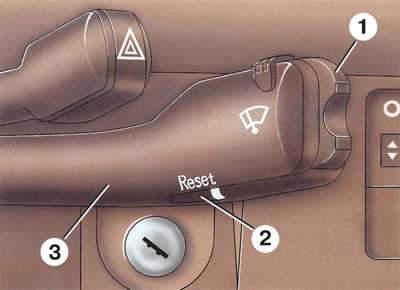
- 1 - function selection key;
- 2 - data reset key;
- 3 - windshield wiper switch lever.
Trip computer display on models produced since January 1988
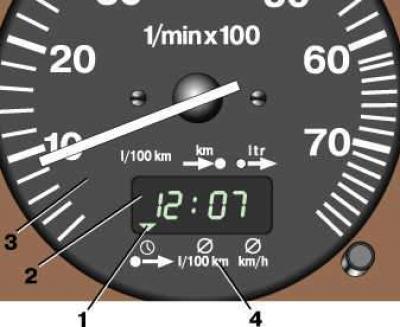
- 1 - function indicator;
- 2 - display;
- 3 - tachometer;
- 4 - function pointer.
 The on-board computer is built into the instrument cluster. It has two control keys, located on models produced before January 1988 in the central part of the instrument panel (see pos. 33 in Fig. Instrument cluster for models produced before January 1988), and on models produced since January 1988 – to the windscreen wiper switch lever (see pos. 28 in Fig. Instrument panel for models produced since January 1988.).
 To switch functions, press the top or bottom of key 1 (see Fig. Trip computer control keys on models produced since January 1988). In this case, indicator 1 (see Fig. Trip computer display on models produced since January 1988) shows the selected function. Each time the key is pressed, the next function in order is activated. When pressing the 2 Reset key (see Fig. Trip computer control keys on models produced since January 1988) more than 2 s the data of the selected function in the computer's "memory" is reset.
Functions of the on-board computer
Fuel consumption (a computer with this function is installed on cars without turbocharging). Shows the current fuel consumption in l/100 km. The computer calculates fuel consumption every 30 m of the way. After the car stops, the last value saved in the "memory" is displayed. The computer starts showing reliable information on fuel consumption after the car has traveled 40 m of the way. When you press the accelerator pedal on a stationary car with the engine running, the computer also shows unreliable information (increased fuel consumption) due to lack of data on the distance traveled.
Boost air pressure (a computer with this function is installed on cars with an MS model engine instead of the fuel consumption function)
 Shows the boost pressure developed by the turbocharger in the range from 0 to 2 bar.
Range on remaining fuel in tank
 Shows the distance in kilometers that the car can travel on the remaining fuel with a constant driving style. This value is calculated based on fuel consumption over the last 30 km of the journey. With an estimated mileage of less than 50 km (fuel reserve in tank) the computer automatically switches to this function from any other. The number on the display starts to flash. After less than 5-8 liters of fuel remain in the tank, the "L" indicator lights up instead of the power reserve value (empty tank). To turn off the warning signal, press the Reset button. If there is a reserve supply of fuel left in the tank, then each time the ignition is turned on, the warning signal will automatically appear.
Amount of fuel consumed
 Shows the amount of fuel consumed since the engine was started in liters. After the ignition is turned off, the last value is saved in the computer's memory. When the ignition is turned on again, after the car has traveled 30 m, the old value is erased from the "memory" and the fuel consumption is calculated again. The value can be reset by pressing the Reset key for 2 seconds.
Time of movement
 Shows the time the car has been in motion since the last data reset. When the ignition is off, the value is saved in the computer's "memory" and during further movement this value is added to the time of movement after stopping. The value can be reset by pressing the Reset button for 2 seconds. After driving for 2 hours (with stops less than 10 minutes) the computer automatically switches to this function from any other. At the same time, the number on the display starts blinking (it is recommended to make a stop for rest). If the vehicle is stopped for less than 10 minutes without the ignition being switched off, the warning signal will switch on again after 2 hours (stopping time is counted as moving time). If the vehicle is stopped for more than 10 minutes with the ignition off, the signal is turned on 2 hours after the start of movement. To turn off the warning signal, press the Reset button.
Average fuel consumption
Shows the average fuel consumption since the last data reset. When the ignition is off, the value is saved in the computer's "memory". The value can be reset by pressing the Reset button for 2 seconds. Before the car has driven the first 30 m, the computer shows zero. After 24 hours, the computer starts a new count.
Average speed of movement
 Shows the average speed since the last data reset. When the ignition is off, the value is saved in the computer's "memory" and when driving further, this value is taken into account as the average speed after stopping. The value can be reset by pressing the Reset button for 2 seconds.
(The original article is available on the website «AudiManual.ru»)