



Trip computer control keys on models produced before January 1988
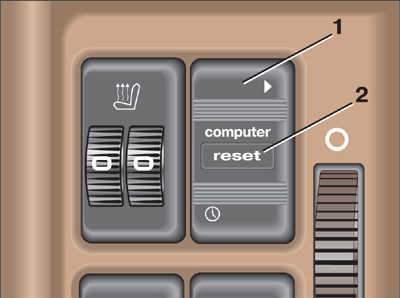
- 1 - function switch key;
- 2 - data reset key.
Trip computer display on models produced before January 1988
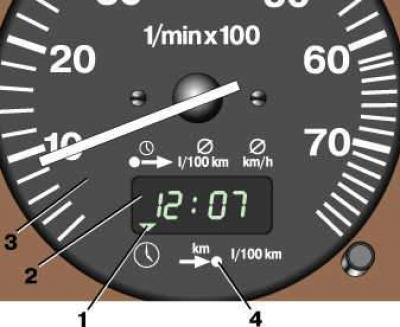
- 1 - function indicator;
- 2 - computer display;
- 3 - tachometer;
- 4 - function pointer.
To switch functions, press the upper part of key 1 (see Fig. Trip computer control keys on models produced before January 1988). In this case, indicator 1 (see Fig. Trip computer display on models produced before January 1988) will show the selected function. Each time you press the key, the next function in order is activated. When you press the lower part of key 1 (see Fig. Trip computer control keys on models produced before January 1988) the electronic clock is switched on. When pressing the 2 Reset key for more than 2 seconds, the data of the selected function in the computer's "memory" is reset.
Computer functions
The computer functions are similar to those on models produced since January 1988, except that the "fuel consumption" function is replaced by the "electronic clock" function.
Electronic clock
Shows the current time. To turn on this function, press the bottom of key 1 (see Fig. Trip computer control keys on models produced before January 1988). When the ignition is turned off, the computer automatically switches to this function from any other, which is restored when the ignition is turned on again. To change the hours, press the lower part of key 1 and hold it until the minutes start flashing. Then press key 2 Reset to change the minutes. Each short press changes the minutes by one minute. If you hold key 2 Reset down, the minutes are changed faster. Press the lower part of key 1 again and hold it until the hours start flashing. Change the hours in the same way as the minutes. After changing the time, press the upper part of key 1.