



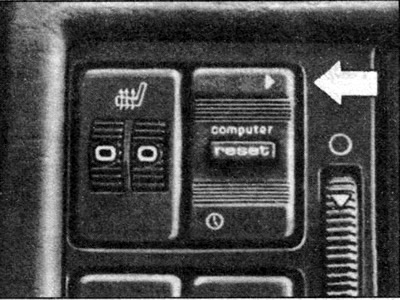
Each time you press the top of the "Computer" key, the display shows information in the following order:
- travel time, max. 23 h 59 min;
- average fuel consumption;
- average speed of movement;
- range with remaining fuel;
- current fuel consumption.
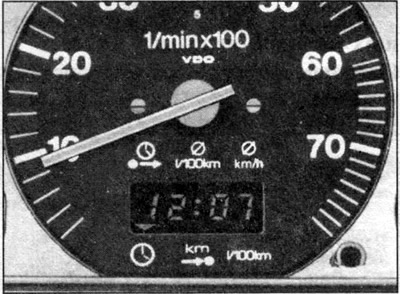
To display the time of day, press the bottom of the key. The information displayed on the display is indicated by a small triangle, the tip of which is directed towards the corresponding symbol at the top or bottom of the display.
Working with the on-board computer
When the ignition is turned off, the current time is displayed on the screen, regardless of the information requested before. When the ignition is turned on, the information that was displayed before the ignition was turned off is displayed again.
To erase the previous information, press the button labeled "Reset" in the middle of the "Computer" key for at least 2 seconds. The warning signals (see below "trip time" and "power reserve") are removed by pressing the "Reset" button. This button is also used to set the time.
Times of Day
To display the current time, press the lower part of the computer control key with the ignition on. The triangle on the screen will show the lower left symbol on the tachometer dial.
To set the time of day, do the following:
- press the lower part of the control key for at least 3 seconds until the minute indication starts flashing;
- release the control key;
- briefly press the "Reset" key to display the next minute, to speed up the passage of minutes, press the key and hold it;
- after setting the minutes accurately, press the lower part of the control key until the hour indicator starts flashing;
- press the "Reset" button briefly to change the time by 1 hour forward and hold it down to advance the time display faster;
- after setting the correct time, press the top of the control key.
Travel time
The trip timer is programmed with the ignition on by pressing the top of the control button until the triangle points to the symbol located in the upper left corner of the screen.
The display shows the travel time since the last reset of the computer memory. When the ignition is switched off, the information about the travel time displayed previously is saved in the computer memory. When the trip continues, the travel time is added to the previous one. The maximum countdown time is 23 h 59 min.
If you need to measure the travel time from this moment, reset the timer to zero by pressing the "Reset" button.
Travel time warning signal
After 2 hours of driving, with any indication on the display, the information "Travel time" is automatically displayed with a flashing light "2.00". To remove the indication of the travel time, press the "Reset" button briefly.
If the trip is interrupted for less than 10 minutes, the warning signal is automatically triggered after 2 hours, i.e. after 4 hours in total. The displayed indication is "4.00", etc.
If the trip is interrupted for more than 10 minutes with the ignition switched off, the warning alarm is automatically reset to zero.
1/100 km
Average fuel consumption
With the ignition on, press the control button several times until the control triangle lights up, pointing at the central symbol above the top edge of the display. The fuel consumption shown on the display corresponds to the average consumption in litres per 100 km since the display was last reset to zero.
After the ignition is turned off, the average consumption value is stored in memory and after the trip is resumed, it continues to read the fuel consumption.
To reset the readings to zero, press the "Reset" button.
km/h
Average speed of movement
As with the previous functions, draw a triangle with its tip against the top-rightmost symbol above the display. The screen displays information about the average speed of the trip in km/h since the last time the speed indication was set to zero.
When the ignition is turned off, the indication goes into the computer memory and after the trip is resumed, it is recalculated taking into account the previous speed.
To clear the memory of previous readings, press the "Reset" button.
km
Power reserve
Proceed as described for the previous functions and position the control triangle opposite the left symbol above the top edge of the display.
The display shows the reserve range, calculated in 10 km increments, with the remaining fuel in the tank, provided that the driving style is maintained. The range is calculated based on fuel consumption over the previous 30 km. Switching to a more economical driving style may increase the range.
Warning signal
If the remaining range is less than 50 km, the display shows the range information instead of any previous information.
The power reserve indicator starts flashing if there is less than 5 liters of fuel left in the fuel tank, the letter "L" lights up - empty tank.
This indication is removed by pressing the computer control key or the "Reset" key.
If the fuel tank is not refilled, the warning signal appears every time the ignition is turned on.
1/100 km
Current fuel consumption
Perform the same operations as for the functions described above and display the control triangle opposite the symbol, at the bottom right edge of the display.
The screen displays information on fuel consumption in liters per 100 km for the last 30-kilometer section of the journey.
When the speed decreases, "zero" is displayed on the screen. When the car stops, the latest data on the current fuel consumption is transferred to the computer memory.
When you press the accelerator pedal with the vehicle stationary and the engine idling, the display may show a very high current fuel consumption.