



Table of contents: Instructions for using the phone ↓ Change language ↓ SOS distress signal and call for help ↓ Landline/Telematics ↓ Fax and data connection socket ↓ Voice control system (SOS) ↓ Navigation system ↓ CD changer ↓ Preparing to connect a mobile phone… ↓ General functions ↓ Installing the adapter ↓ Removal the adapter ↓ Dialogue ↓ Using a speakerphone ↓ Bluetooth technology ↓ Radio stations and office equipment ↓ Radio stations ↓ Office equipment ↓ Mobile radio transmitters ↓
The steering wheel contains controls for basic radio and telephone functions.
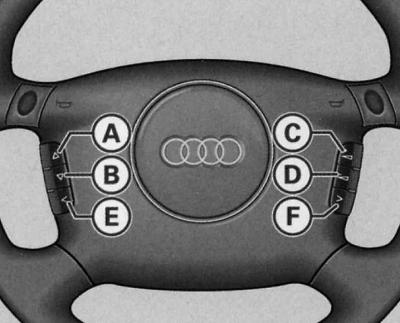
Steering wheel: radio and telephone control keys
To ensure that you are as little distracted as possible from driving while driving, controls for basic radio and telephone functions are installed on the steering wheel panel. This only applies to vehicles with factory-fitted radio and telephone. Of course, it is also possible to control the radio, tape recorder, CD/telephone directly using the corresponding keys for these devices.
The following functions can be activated by pressing the steering wheel buttons.
| Key | Radio | Cassette | Compact disc | Telephone (speakerphone) | Voice control |
| (A) | search radio frequency up  | fast forward  | forward audio track run  | subscriber numbers (register) - search up  | |
| (IN) | search radio frequency down  | fast rewind  | audio track run back  | subscriber numbers (register) - search in descending order  | |
| (WITH) | select station in descending order < / radio/phone switching R/T | ||||
| (D) | increase volume  | ||||
| (E) | decrease volume  | ||||
| (F) | select station in ascending order > /voice control system (sbs) activation key  | voice control system (sbs) power key  | voice control system (sbs) power key  | telephone (receiving, sending a call, ending the current conversation)  | hang up key |
The functions of the keys are determined by the currently enabled radio system mode.
The (C) and (F) keys on models without a landline telephone can be used to select up to twelve stations in sequence. If the station selection keys are not programmed or the radio station is not received, then under certain circumstances only noise will be heard.
The subscriber numbers on models with a landline telephone are scrolled in alphabetical order by subscriber names, ascending A ® Z or descending Z ® A. By pressing the keys (A) or (B) for a longer period of time, the subscriber numbers stored in the memory are scrolled quickly.
A detailed description of the telephone, telematics and voice control system can be found in the relevant operating manuals.
Instructions for using the phone
After turning on the ignition or phone and entering the PIN number, the SIM card memory data is automatically read.
The reading process takes from 15 to 60 seconds, depending on the amount of data stored in your SIM card memory. During this time, the message appears on the FIS display "BITTE WARTEN…" (Wait).
Indication of phone functions
The following phone functions can be displayed on the dashboard display:
| BITTE WARTEN… | sIM card memory data reading process |
| SIM EINSETZEN (install SIM) | there is no SIM card in the phone |
| PIN EINGEBEN | pIN not entered yet |
| KEIN SERVICE | no connection to the telephone network |
| ANRUF (challenge) | Incoming call. The additional display may show the number of the calling subscriber alternately with the "ANRUF" display. |
| NUMBER BESETZT | the dialed number is busy |
| TELEFON AUS | the phone is off |
| ANRUF AUFBAU | establishing a connection |
| KEINE EINTRAGE | there are no messages in the SIM card memory |
| DATEN ACTIV | via infrared or serial interface, call up current information/fax messages. |
Change language
The display of phone functions is carried out automatically in the language stored in the SIM card memory. As a rule, German is the language on the cards of German companies providing network services. Changing the language option is carried out via the menu "Telefoneinstellungen" (phone setup) - "Sprache" (language)
SOS distress signal and call for help
The vehicle is equipped with an additional device for sending a distress signal and calling for help.
Telematics system (telematics is a unified communication and information system), along with the ability to conduct telephone conversations, it has a number of additional security functions.
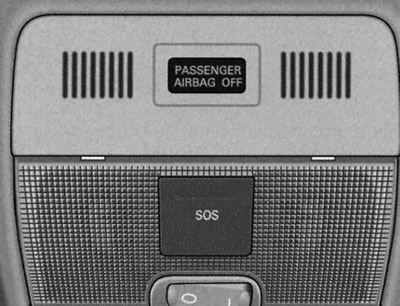
Under the cover there is a device for sending an SOS distress signal and calling for technical assistance.
Sending a distress signal (SOS) by pressing a key
1. Press the lid to open.
2. Press the SOS button.
Call for technical assistance
1. Open the lid by pressing.
2. Press the technical assistance call key (Serviceruf).
When a distress signal (SOS) is sent to the Audi central Technical Assistance control center, information is transmitted regarding the location and identification of your vehicle. In an emergency or dangerous situation, you can send an SOS distress signal by pressing the SOS key. In addition, an SOS signal is sent automatically when the airbag or seat belt tensioner is activated.
Warning: Remember that this signal should only be used in emergency situations. Abuse may result in liability.
Landline/Telematics
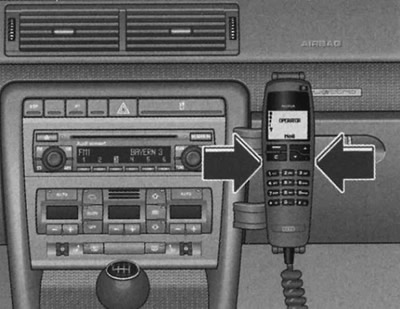
To remove the phone from the holder, press the buttons located on the left and right.
Fax and data connection socket
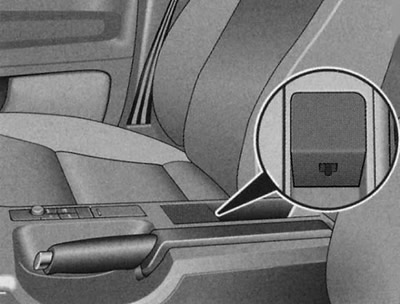
Data transfer interface near the handbrake
The factory installed connector is located in the center console.
It can be used to connect a laptop or fax machine, thus connecting them to the telecommunications module (audi phone).
Voice control system (SOS)
The voice control system is activated by pressing the button (F) located on the multifunction steering wheel. When the device is activated, the driver can use the phone without removing his hands from the steering wheel.
Navigation system
The navigation system is operated using controls located in the central console. Navigation system data is displayed on the instrument panel display.
In Audi navigation plus, the controls for navigation, radio, CD and TV* are located on both sides of the display in the centre console. The navigation system is also shown on the instrument cluster display.
Device for reading the microcircuit card of the electronic book of driver's work accounting* (Audi logbook) is located in the glove compartment, top left. The display of the navigation system plus shows information on the corresponding processing mode.
CD changer
The CD changer is located in the glove compartment.
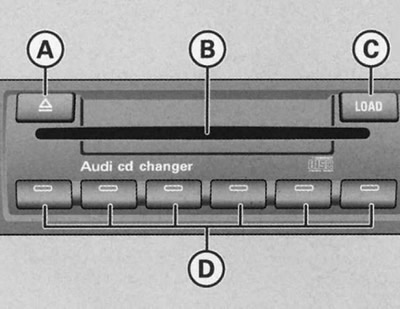
Audi CD changer located in the glove compartment
Loading the CD
1. Press the LOAD key (C) and insert a CD into the slot (B). The CD is automatically loaded into the next free slot in the CD changer. The LED in the corresponding key (D) stops flashing.
Loading all CDs
1. Keep the LOAD key (C) pressed and insert all the CDs into the slot (B) one by one. The LEDs in the keys (D) stop flashing.
Loading a CD to a specific location
1. Press the LOAD key (C). The presence of CDs in the compartments is indicated by the lighting of the LEDs in the corresponding keys (D). The presence of free space is indicated by the blinking of the LEDs.
2. Press the appropriate key (D) and insert the CD into the slot (B).
Insert the CDs into the slot (B) one at a time, straight, with the printed side facing up.
When inserting a CD into the slot (B), never press on the CD. The CD is drawn into the CD changer automatically.
After inserting a CD into the CD changer, wait a short time until the red LEDs on the side of slot (B) light up. When the LEDs light up, the unit is ready to insert another CD into slot (B).
If there is already a CD in the specific slot, it will be ejected. Take the ejected CD and insert a new one in its place.
Ejecting a CD
1. Press the key (A). Now the presence of CDs in the compartments is indicated by the LEDs in the keys (D) lighting up.
2. By pressing the corresponding key (D) the CD is ejected.
Ejecting all CDs
1. Press and hold the (B) key for more than 2 seconds. All CDs in the CD changer are ejected one after the other.
Preparing to connect a mobile phone with a voice control system
It is possible to install and connect commercially available mobile phones in the central console.
This allows you to take full advantage of the speakerphone's benefits and optimal range (thanks to the antenna installed in the car). In addition, the mobile phone battery is charged.
General functions
The voice control system is activated by pressing a button located on the mobile phone adapter or by pressing a button on the multifunction steering wheel.
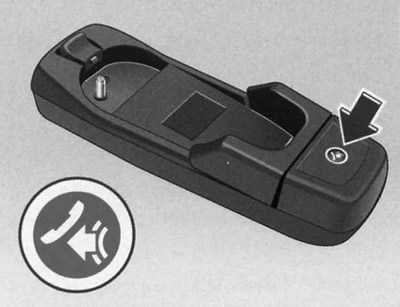
State control key of a car without a multifunctional steering wheel
Key 
The voice control system of the hands-free device is activated depending on the vehicle configuration by pressing a button
 , located on the mobile phone adapter or on the multifunction steering wheel.
This key is used during playback of the internal voice list (for example, phone book addresses) you can additionally select the required number. Incoming phone calls are accepted by pressing the key. The end of the communication session is carried out by pressing this key again.
The system is ready when the "SPEAK" indicator appears on the display of the switched-on radio system or on the instrument panel display of a vehicle with a multi-function steering wheel*. Once switched on, it is possible to enter both voice commands for controlling the functions of the hands-free device and voice commands for using the internal telephone book.
Phone book
The hands-free device allows you to create an internal phone book and use it for calling. The internal phone book is designed for 50 memory cells. This phone book, which can be used regardless of the type of device of the mobile phone used, is an integral part of the hands-free device of your car.
Individual addresses (numbers) of the phone book, entered in the SIM card memory of the mobile phone, can be called up additionally using the mobile phone keys. On vehicles with a multi-function steering wheel*, control is possible using the function keys of the steering wheel. This allows you to use your mobile phone without taking your hands off the steering wheel.
GALA function
The radio system's GALA* function automatically adjusts the volume of voice output/phone conversations according to your driving speed. (For optimal volume control of the speakerphone, the internal earphone volume of the mobile phone used should be set to maximum).
In addition, the volume can be adjusted individually at any time using the corresponding radio tuning button or, on vehicles with a multifunction steering wheel*, using the steering wheel function keys.
After turning off the ignition, the system can be operated with the mobile phone installed in the adapter for approximately 30 minutes.
Additional features*
Only vehicles with a multifunction steering wheel* have additional functions. In addition to convenient operation of the hands-free system via the function keys, the auf keys
 and ab
  it is possible to scroll through the addresses of the phone book of the mobile phone used, entered into the SIM card memory. By briefly pressing and releasing the key
quick selection of the called addresses is possible. Long pressing of the key activates the voice control system of the speakerphone. Via voice command "NAME SPEICHERN" (enter name into memory) after a system request and a final repeat of the input, you can enter the selected address into the internal phone book memory.
If the selected telephone number is entered into the internal telephone book memory of the speakerphone, then this number and the corresponding specified name (designation), with the arrow in front, it will be alternately (with an interval of 3 seconds) displayed on the dashboard display.
Warning: Removing the phone from the adapter during a communication session may result in the connection being interrupted. Removing the phone from the adapter interrupts the connection between the phone and the antenna of the factory-fitted mobile phone. As a result, the quality of reception and transmission is reduced. In addition, the battery of the mobile phone is not charged and high-frequency electromagnetic fields (radiation) from the mobile phone may occur in the car. Therefore, the internal mode function of the hands-free device is not provided.
Installing the adapter
The mobile phone adapter must be installed in the holder installed in the vehicle.
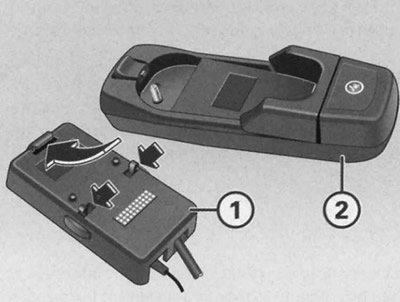
Installing the adapter
Install the adapter (2) with the locking mechanism onto the guide tab of the holder (1) installed in the vehicle.
Fix the mobile phone adapter (2) onto the holder by pressing down the back of the adapter.
Warning: To avoid system malfunction, make sure the adapter is properly secured.
Installing/Removing a Mobile Phone
To use the speakerphone, the mobile phone must be installed in the adapter.
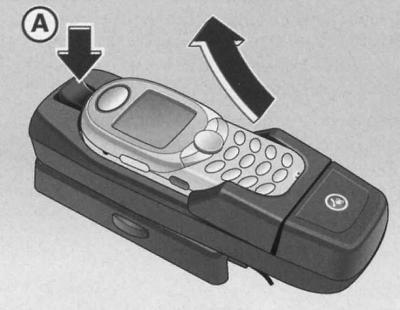
Removing the mobile phone
Installing a mobile phone
1. Place your mobile phone into the adapter.
2. Secure the mobile phone by pressing it into the mounting slot.
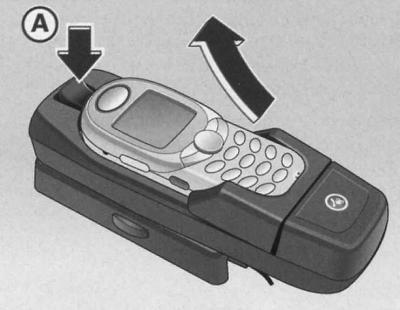
Removal the mobile phone
1. Press the release button (A).
2. Pull out the mobile phone upwards.
Warning: If the mobile phone is not properly secured, it may fall out and be damaged while driving.
Warning: The adapter used depends on the corresponding type of mobile phone and may differ from the one shown in the illustration.
Removal the adapter
1. Remove the phone from the adapter.
2. Release the locking mechanism by simultaneously pressing buttons (a) and (b) of the holder installed in the vehicle.
3. Carefully remove the adapter from the holder.
Dialogue
Necessary information for dialogue when using a speakerphone.
The period of time during which the hands-free system is ready to receive and execute voice commands and to help you with the functions is referred to in this manual as the dialogue. The system responds to commands with appropriate voice messages and, if necessary, assists you in implementing functions. The dialogue function can be switched on/off using the button
 . During the dialogue, the navigation system's voice messages are not voiced.
When a phone call comes in, the conversation is immediately interrupted and the call can be answered by pressing a key
 .
.
Voice assistance function in case of incorrect input
If the voice command is not identified, the system responds (Wie bitte), after which a new voice command can be entered. After the third unsuccessful attempt, the response is "ABBRUCH" and the dialogue is terminated.
To ensure that the system understands you optimally, please keep the following in mind:
Speak at a normal volume. Avoid excessive stress/vocal pauses.
Avoid articulation defects.
Reduce outside noise by closing doors, windows and the sliding roof panel.
Do not point the air diffuser deflectors at the microphone.
At high speeds, it is recommended to speak louder to block out surrounding noise.
Noise in the car when commands are spoken interferes with the operation of the device.
Do not speak while listening to voice messages from the speakerphone.
Only the driver should use the system, as the microphone of the hands-free device is aimed at the driver.
When dialing in noisy environments, use the dialog-driven phone book instead of entering numbers. This will help avoid entering numbers incorrectly.
Using a speakerphone
Voice commands for controlling the speakerphone:
- PIN EINGEBEN/PIN-CODE EINGEBEN: After this command, you can enter the phone's PIN code.
- NUMMER WAHLEN: After this command, you can enter the phone number to connect with the subscriber.
- WAHLWIEDERHOLUNG: After this command, the last dialed number is called again.
The system responds to the entered voice command with an acoustic message and, if necessary, "guides" you through the dialogue.
Voice commands for controlling the internal phone book:
- NAMEN WAHLEN: After this command, it is possible to dial a telephone number entered into the internal phone book memory.
- NAMEN SPEICHERN: After this command, it is possible to enter a name with a telephone number into the internal phone book memory.
- NAMEN LOSCHEN: After this command it is possible to delete a name from the internal phone book.
- TELEFONBUCH ANHOREN: After this command you can listen to the list of the internal phone book.
- TELEFONBUCH LOSCHEN: After this command it is possible to delete all addresses of the internal phone book or one name.
Control commands
A control command causes the system to perform a pre-selected function.
List of possible commands:
- WAHLEN: dialing a phone number.
- SPEICHERN: the name and telephone number are entered into the memory of the internal telephone book/the entered PIN code is entered into the memory.
- ABBRECHEN/ABBRUCH: the dialogue ends.
- WIEDERHOLEN: repeat the entered name/all numbers entered up to this point in the conclusion of the system phrase (und weiter) prompts for the remaining numbers or commands required to be entered.
- KORREKTUR/KORRIGIEREN: deleting the entered name/last entered digits repeating the previously entered digit series. Finally, the system with the phrase (und weiter) prompts for the remaining numbers or commands required to be entered.
- LOSCHEN: delete all entered numbers. Phrase system (DIE NUMMER IST GELOSCHT. DIE NUMMER BITTE) prompts for the remaining numbers or commands required to be entered.
Entering the PIN code or PIN – CODE EINGEBEN
To use the system, you must enter the PIN code.
1. Press the key
 .
.
2. After the sound signal, say the command PIN EINGEBEN or PIN – CODE EINGEBEN.
After entering this command, you can enter the PIN code.
Entering the PIN code is only possible when: the ignition is on and the mobile phone is on.
The PIN code should be entered as a number from zero to nine (0-9). After each sequence of numbers (with a short vocal pause) there is a repetition of identified digits. The system does not identify coherent combinations of digits, for example, 32 (dreiundzwanzing), but only numbers pronounced separately, for example, 2.3 (zwei, drei).
Example of entering PIN code:
| Voice command | Condition | Message | Activity |
| PIN EINGEBEN or PIN-CODE EINGEBEN (enter PIN) | sIM card installed, phone turned on | (Den PIN-Code bitte) (enter PIN code) | dialogue |
| For example, NULL EINS ZWO DREI (zero one two three) | (NUL EINS ZWO DREI) (zero one two three) | dialogue | |
| If no input occurs, the following message is heard after approximately 5 seconds. | dialogue | ||
| No input | (Moliche Kommandos sind: speichern, wiederholen, korrigieren, loschen, oder weitere ziffern) (possible commands: store, repeat, correct, delete, or enter next numbers) | dialogue | |
| SPEICHERN (enter into memory) | (Der PIN-Code ist gespeichert) (pIN code entered into memory) | dialogue | |
The dialogue can be ended at any time by pressing the key
 .
.
Warning: If you enter a PIN code that is longer than eight digits, the system will respond with a message (Der PIN-CODE ist lang) (pIN code too long).
If the PIN code is entered incorrectly, the system responds with a message (Der PIN-CODE ist falsch) (incorrect PIN code).
If the PIN code is entered incorrectly three times in a row, the SIM card is blocked. The SIM card can be unblocked using the personal PUK code (Personal unblock key). The unlock code can only be entered using keys, not voice
Dialing a number (Number Wahlen)
Establishing a connection is done by entering a telephone number into the dialogue.
1. Press the key
 . The readiness of the dialogue system is confirmed by a sound signal.
2. After the beep, say the command Number Wahlen (dial a number).
After entering this command, the system requires you to enter a phone number to connect with the subscriber. The phone number can be entered as a coherently pronounced digital series (full number), in the form of a digital sequence (with a short vocal pause) or by entering the numbers spoken separately. You should enter the numbers from zero to nine (0-9). After each sequence of numbers (with a short vocal pause) there is a repetition of identified digits. The system does not identify coherent combinations of digits, for example, 32 (dreiundzwanzing), but only numbers pronounced separately, for example, 2.3 (zwei, drei).
Instructions for entering a phone number
If you enter a number that consists of more than twenty digits, the system responds with a message (Die number ist zu long) (the number is too long).
Additionally, you can put a plus sign before the 20-digit combination.
Example of entering a phone number
| Voice command | Condition | Message | Activity |
| NUMMER WAHLEN (dial a number) | the phone is on | (Die Nummer bitte) (enter number) | dialogue |
| For example, NULL SIEBEN DREI EINS (zero seven three one) | (Null sieben drei eins) | dialogue | |
| If no input occurs, the following message is heard after approximately 5 seconds. | dialogue | ||
| No input | (Moglihce Kommandos sind: Wahlen, Wiederholen, oder weitere Ziffern) (possible commands: dial, talk, repeat, delete, or enter next digits) | dialogue | |
| DREI NEUN ZWO (three nine two) | (Drei Neun Zwo) (three nine two) | dialogue | |
| WAHLEN (dial a number) | (Dei Nummer wird gewahlt) (the number is being dialed) | dialogue - dialing the phone number 0731392 | |
| End of dialogue | |||
The dialogue can be ended at any time by pressing the key
 .
.
Warning: If you enter a number that is more than twenty digits long, the system will respond with a message (Die number ist zu long) (the number is too long).
Additionally, you can put a plus sign before the 20-digit combination
Recall (WAHLWIEDERHOLUNG)
1. Press the key
 .
.
2. After the beep, say the command WAHLWIEDERHOLUNG (re-call).
After entering this command by voice, the last telephone number dialed through the speakerphone is redialed.
Example of entering the voice command WAHLWIEDERHOLUNG:
- Voice command: WAHLWIEDERHOLUNG (re-call)
- Condition: the phone is turned on
- Message: (Die Nummer wird gewahlt) (the number is being dialed)
- Activity: dialogue
- End of dialogue
The dialogue can be ended at any time by pressing the key

Entering a name into the phone book memory
You can enter names with corresponding telephone numbers into the internal phone book memory.
1. Press the key
 . The system's readiness is confirmed by a sound signal.
2. After the sound signal, say the command NAMEN SPEICHERN (enter name into memory).
After entering this command, the system requires you to enter a name and phone number to enter into the memory of the internal phone book with voice control. No more than 50 addresses can be entered and used in the memory of this phone book. You should enter numbers from zero to nine (0-9). The phone number can be entered as a coherent numeric string (full number), in the form of a digital sequence (with a short vocal pause) or by entering the numbers spoken separately. After each sequence of numbers (with a short vocal pause) there is a repetition of identified digits. The system does not identify coherent combinations of digits, for example, 32 (dreiundzwanzig), but only numbers pronounced separately, for example, 2, 3 (zwei, drei).
Address (name and phone number) is entered into the phone book memory via the SPEICHERN control command (enter into memory).
The address entered into memory, displayed alternately at intervals of approximately 3 seconds, appears on the display with an arrow in front of the name and the corresponding telephone number.
The dialogue can be ended at any time by pressing the key

| Voice command | Condition | Message | Activity |
| NAMEN SPEICHER (enter name into memory) | availability of memory in the phone book | (den namen bitte) (enter name) | dialogue |
| FIRMA XYZ (firm XYZ) | (bitte wiederholen sie den namen) (repeat name) | dialogue | |
| FIRMA XYZ (firm XYZ) | (die nummer bitte) (enter number) | dialogue | |
| NULL EINS ZWO DREI (zero one two three) | (null eins zwo drei) (zero one two three) | dialogue | |
| VIER FUNF SECHS | (vier funf sechs) (four five six) | dialogue | |
| If no input occurs, the following message is heard after approximately 5 seconds. | dialogue | ||
| No input | (mogliche kommandos sind: speichern, korrigieren losche, oder weitere ziffern) (possible commands: store, repeat, correct, delete, or enter next numbers) | dialogue | |
| SPEICHERN (enter into memory) | (der namen ist gepeichechert) (name entered into memory) | dialogue - name firm XYZ with number 0123456 entered into memory | |
| End of dialogue | |||
Warning: If you enter a number that is more than twenty digits long, the system will respond with a message (Die number ist zu long) (the number is too long).
Additionally, before the 20-digit combination, you can say the word PLUS (+).
After entering the control command Loschen (delete) or Korrektur (correction) it is possible to delete or correct the corresponding blocks of numbers.
After entering the control command Wiederholen (repeat), all digits entered to date in the dialogue system are repeated.
In case of similar sounding names, additional data should be entered into memory (for example, an additional name).
The dialogue can be ended at any time by pressing the key
 .
.
The phone book is system dependent. Addresses (name and phone number) sIM cards are not entered into the memory of the mobile phone.
Choosing a name (Name Wahlen)
1. Press the key
 .
.
2. After the beep, say the command Name Wahlen (choosing a name).
After entering this command, you can select the address entered into memory from the internal phone book.
The system best recognizes addresses entered directly by the user.
Example of address selection from the internal phone book
| Voice command | Condition | Message | Activity |
| NEMEN WAHLEN (choose a name) | the phone is on; presence of addresses in the phone book | (den namen bitte) (enter name) | dialogue |
| FIRMA XYZ (firm XYZ) | (firma XYZ) | dialogue | |
| If no input occurs, the following message is heard after approximately 5 seconds. | dialogue | ||
| No input | (Mogliche kommandos sind: wahlen, weiderholen, korrigieren) (possible commands: select, repeat, fix) | dialogue | |
| WAHLEN (dial a number) | (Die nummer wird gewahlt) (the number is being dialed) | dialogue - dialing the phone number of company XYZ according to the address | |
| End of dialogue | |||
The dialogue can be ended at any time by pressing the key
 .
.
Listening to the phone book list (Telefonbuchanhoren)
The dialogue system allows you to listen to the list of addresses in the internal telephone book with voice control.
1. Press the key
 . The readiness of the dialogue system is confirmed by a sound signal.
2. After the beep, say the command Telefonbuch anhoren (listening to the phone book list).
After entering this command, the system reads out the list of the internal phone book. By pressing the key when the system pronounces the name you are looking for, the corresponding phone number is selected. After reading out the list, you can turn on this function again and select one of the addresses entered into the memory by voice input.
Example of the command Telefonbuch anhoren
| Voice command | Condition | Message | Activity |
| TELEFONBUCH ANHOREN (listen to the phone book) | presence of addresses in the phone book | dialogue voiceover phone book | |
| End of dialogue |
Example of address selection
| Voice command | Condition | Message | Activity |
| TELEFONBUCH ANHOREN (listen to the phone book) | presence of addresses in the phone book; while voicing the searched address, the key was pressed | (Dei Nummer wird gewahlt) (the number is being dialed) | dialogue - repetition of the sought name; dialing a subscriber number) |
| End of dialogue |
Deleting a name (Namen loschen)
You can delete addresses from the internal phone book.
1. Press the key
 . The readiness of the dialogue system is confirmed by a sound signal.
2. After the beep, say the command Namen loschen (delete name).
After entering this command, it is possible to delete the address of the internal phone book entered into memory.
Example of deleting an internal phone book address
| Voice command | Condition | Message | Activity |
| NAMEN LOSCHEN (delete name) | presence of addresses in the phone book | (Den Namen bitte) (enter name) | dialogue |
| FIRMA XYZ (firm XYZ) | (Mochtensie firma xyz loschen) (you want to delete the address of company XYZ) | dialogue | |
| If no input occurs, the following message is heard after approximately 5 seconds. | dialogue | ||
| No input | (Mogliche Kommandos sind: ja nein wiederholen, korrigieren) (voz - possible commands yes, no, repeat, correct) | dialogue | |
| End of dialogue | |||
The dialogue can be ended at any time by pressing the key
 .
.
Warning: If the user does not understand the name spoken by the dialog system, he can use the Wiederholen command to force the system to play the name again.
If the user answers nien (no), the system answers "Abbruch" and the dialog ends.
Deleting phone book addresses (TELEFONBUCH LOSCHEN)
You can delete all or individual addresses from your phone book.
1. Press the key
 .
.
2. After the beep, say the command TELEFONBUCH LOSCHEN (delete phone book).
After entering this command, it is possible to delete all or individual addresses entered into the internal phone book memory.
Example of deleting all addresses from the internal phone book
| Voice command | Condition | Message | Activity |
| TELEFONBUCH LOSCHEN (delete name) | presence of addresses in the phone book | (wollen sie das gesamte telefonbuch loschen) (do you want to delete your entire phone book?) | dialogue |
| If no input occurs, the following message is heard after approximately 5 seconds. | dialogue | ||
| No input | (mogliche kommandos sind: ja, nein) (possible commands: yes, no) | dialogue | |
| Yes (yes) | (sind sie sicher) (are you sure?) | dialogue | |
| If no input occurs, the following message is heard after approximately 5 seconds. | dialogue | ||
| No input | (mogliche kommandos sind: ja, nein) (possible commands: yes, no) | dialogue | |
| Yes (yes) | (das telefonbuch ist geloscht) (phone book) | dialog delete all addresses | |
| End of dialogue | |||
Example of deleting individual addresses from the internal phone book
| Voice command | Condition | Message | Activity |
| TELEFONBUCH LOSCHEN (delete name) | presence of addresses in the phone book | (wollen sie das telefonbuch loschen) (do you want to delete your phone book?) | dialogue |
| If no input occurs, the following message is heard after approximately 5 seconds. | dialogue | ||
| No input | (Mogliche kommanos sind: ja, nien, wiederholen) (possible commands: yes, no, repeat) | dialogue | |
| NO (no) | dialogue - phone book voiceovers | ||
| No input | pressed key  at the address to be deleted at the address to be deleted | (Wollen sie (namen) loschen) (do you want to delete the name) | dialogue |
| If no input occurs, the following message is heard after approximately 5 seconds. | dialogue | ||
| No input | (Mogliche kommandos sind: ja nein) (possible commands: yes, no) | dialogue | |
| Yes (yes) | (der name ist goloscht) (name removed) | the address dialog is deleted and all remaining addresses are voiced | |
| The addresses have been announced | End of dialogue | ||
Warning: While the internal phone book addresses are being read out, you can press the key
General instructions for the internal phone book
When entering, you should take into account the following tips and instructions.
For a voice-controlled phone book, you should choose names with as much sound difference as possible.
If the system does not recognize the address of the phone book (for example, voice input of an address by another user), it is possible to scroll through the phone book list with voice control via a command "telefonbuch anhoren". By pressing the key
 (at the moment of voicing the name you are looking for, you can select the corresponding address.
The system identifies the numbers from zero to nine (0-9). If you say zwo instead of "zwei", the system will identify the numbers more easily.
In case of a voice message from the system (Funktion zur zeit nicht moglich) (the function cannot be executed at this time) check the functionality of the speakerphone as follows:
- is your mobile phone turned on?
- is the PIN code entered?
International telephone calls
This section describes how to enter international and long-distance codes.
Help with entering phone numbers in other countries:
To access the international network, you can say the word PLUS (+) at the beginning of the number combination.
After entering the word PLUS (+), you must say the corresponding country code. The country code follows a common format, such as 49 for Germany or 44 for the UK.
After the country code, do not dial the number zero (0) before the area code.
Example of calling a UK subscriber number
| Voice command | Condition | Message | Activity |
|
NUMMEN WAHLEN (dial a number) |
the phone is on
|
(die nummer bitte) (enter number) |
dialogue dialogue dialogue |
|
PLUS VIER VIER (plus four is four) |
(Plus vier vier) (plus four is four) |
||
|
SIEBEN DREI EINS (seven three one) |
(seiben drei eins) (seven three one) |
||
|
DREI NEUN ZWO (three nine two) |
(drei neun zwo) (three nine two) |
||
|
WAHLEN (dial a number) |
(die nummer wird gewahlt) (the number is being dialed) |
||
|
|
|
End of dialogue |
Bluetooth technology
Bluetooth technology is used to connect mobile and stationary devices using standardized radio communication.
Warning: Using the Bluetooth function of a mobile phone on an airplane is not allowed!
Warning: Installing a mobile phone in the adapter improves the quality of communication and reduces radiation in the cabin. In addition, the battery of the mobile phone is recharged.
Radio stations and office equipment
Stationary radio stations and office equipment
Radio stations
Permission is required for the factory installation of radio transmitters in a vehicle. The Audi Group generally permits the installation of radio transmitters under the following conditions:
Technically correct installation of the antenna, outdoor installation of the antenna (using shielded cable and antenna matching without reflection) and the effective power of the transmitter at the base of the antenna is no more than 10 W.
Office equipment
Installation of household and office equipment is permitted provided that they do not affect the driver's direct control over the vehicle and are marked "CE". Additional installed devices, the use of which may affect the driver's control over the vehicle, must be approved for use in the vehicle and marked "e".
Warning: Subsequent installation of electrical or electronic devices requires a permit for use in this model of vehicle and, under certain circumstances, may invalidate the right to operate them.
Be sure to follow the operating instructions for mobile phones and radio stations.
Mobile radio transmitters
Using commercially available mobile phones or radios under the following conditions may result in malfunction of the vehicle's electronics:
- lack of external antenna,
- incorrectly installed outdoor antenna,
- radiation power more than 10 watts.
Therefore, it is prohibited to use mobile radio telephones or walkie-talkies in the vehicle without or with an incorrectly installed external antenna.
In addition, only an external antenna provides the optimal range of the devices.
Warning: Always follow the operating instructions for mobile phones and radios.
The original publication in its entirety is posted on the website: AudiManual.ru