



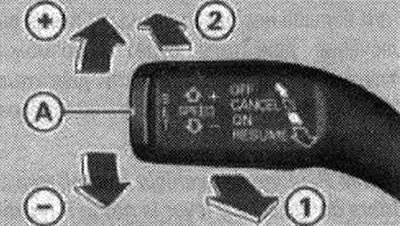
Speed control system handle and button
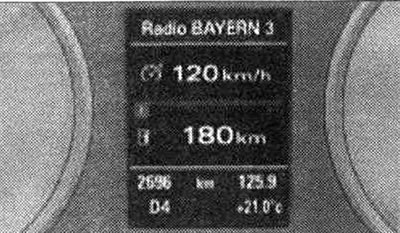
Display:selected speed
The speed control system allows you to maintain a set speed, starting from 30 km/h. To turn on the device, pull the handle to position "1". Move at the current speed that you want to maintain. To program the speed, press the "A" button. The display will show the programmed speed and a green control lamp

The image may change depending on the display status. Additionally, the control lamp on the instrument panel lights up. Adjusting the engine power or actively applying the brakes allows you to maintain a constant speed.
Note: Vehicles with manual transmission: the set speed can only be reached if the gear engaged allows it (the maximum permissible engine shaft speed is not exceeded and the engine shaft rotates uniformly). Therefore, it is necessary to engage a higher or lower gear in a timely manner. When the braking force is applied automatically, the brake signal lights come on.
To increase or decrease the speed value, press the handle in the "+" or "-" direction. To program the current speed, release the handle. When you briefly press the handle, the speed changes by 1 km/h. When you hold the handle down, the speed changes in steps of 10 km/h. The speed can be increased at any time by pressing the accelerator pedal, for example, for overtaking. After releasing the pedal, the system adjusts the speed back to the previously programmed value. However, if the programmed speed is exceeded by more than 10 km/h for more than 5 minutes, the speed control system is temporarily switched off. The green indicator light on the display changes to white, the programmed speed is saved.
KP "S tronic"
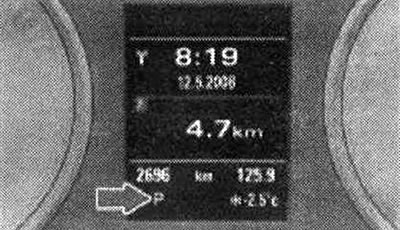
Display: gear shift lever positions
The current position of the gearshift lever and the selected gear are displayed on the instrument cluster display.
"P" - parking lock
In this position of the gearshift lever, the drive wheels are locked mechanically. The parking lock may only be engaged when the vehicle is stationary. To set the gearshift lever to position "P" and to move it from this position, simultaneously press the lock button (on the control lever) and the brake pedal.
"R" - reverse gear
Reverse gear may only be engaged when the vehicle is stationary and the engine is idling. To engage gear "R", press the lock button and simultaneously press the brake pedal. When the ignition is on and the gearshift lever is in the "R" position, the reversing lights are on.
"N" - neutral position (idle position)
This position of the lever is the idle position.
"D" - the main position for forward movement
In this position of the lever, switching to higher and lower forward gears is carried out automatically, depending on the engine load or the speed of movement. To move the shift lever from the "N" position to "D", it is necessary to press the brake pedal at a speed below 5 km/h or when the car is stationary.
"S" - sport position
Set the gearshift lever to the "S" position when driving in sport mode. Later upshifts allow the engine's power reserves to be fully utilized. To move the gearshift lever from the "N" position to the "S" position, press the brake pedal at a speed below 5 km/h or when the vehicle is stationary.
Attention. Never set the gearshift lever to the "R" or "P" position while driving - risk of accident! In all positions of the gearshift lever (except "P") with the engine running, it is necessary to hold the car with the brake pedal, since even in idle mode, the transmission of force from the engine to the wheels is not completely suspended - the car "crawls". When setting a gear on a stationary car, be careful not to press the gas pedal through inattention. Otherwise, the car will immediately start moving, possibly even with the handbrake fully applied - risk of accident! Before opening the hood and starting work with the engine running, move the gearshift lever to the "P" position and apply the parking brake - risk of accident! In a car with "Audi drive select" the sporty characteristics of the gearshift can be adjusted in DYNAMIC mode. The gear "S" appears on the instrument panel display instead of "D". The gearshift lever position "S" is missing. If the gearshift lever is inadvertently moved to the "N" position while driving, the accelerator must be released and the engine must idle before returning to "D". If the power supply fails, it is not possible to move the gearshift lever to the "P" position. In this case, the gearshift lever can be released mechanically.
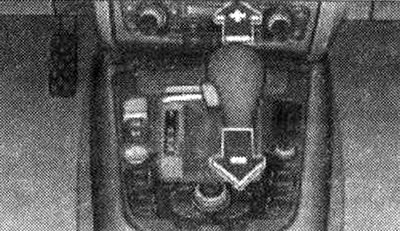
Center console: manual shift position ("tiptronic")
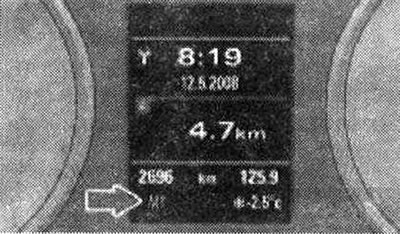
Display: manual shift position ("tiptronic")
Activating the manual gear shift program (tiptronic) gives the driver the option of manual gear shifting.
Switching to manual mode
Move the gearshift lever from position "D" to the right. As soon as the gearbox shifts, the selected gear appears on the display.
Shifting into higher gears
Move the gearshift lever (in the "tiptronic" position) forward to "+".
Downshifting
Move the gearshift lever (in the "tiptronic" position) back to "-". You can switch to manual mode both while driving and while stationary. When accelerating, the automatic transmission will switch to the next higher gear shortly before reaching maximum engine speed. When selecting a gear that is lower than the actual one, the automatic will switch only after it is no longer possible to exceed the permissible engine speed. When the "Kick-down" device is activated, the transmission switches to the next lower gear depending on the speed and engine speed.
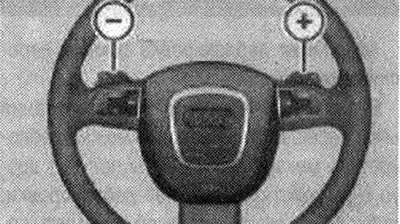
Steering wheel: gear shift
The paddle shifters on the steering wheel also allow the driver to change gear manually. To change down, press the left paddle "-". To change up, press the right paddle "+". The paddle shifters on the steering wheel are activated when the gearshift lever is in position "D", "S" or in the manual shift program ("tiptronic"). As soon as the gearshift lever is moved from position "D" to position "S" and vice versa, the paddle shifters on the steering wheel are deactivated again. Of course, manual gearshifting is also possible using the gearshift lever on the center console.
Note: If the gearshift lever is in the "O/S" position and the gearshift paddles on the steering wheel are not operated for a certain period of time or the vehicle is moving at a speed of less than 10 km/h, the transmission switches to automatic mode.
The "Kick-down" device allows for maximum acceleration. When the gas pedal is pressed sharply, exceeding the resistance point, the automatic system switches to a lower gear depending on the revolutions and speed. Switching to the next higher gear occurs immediately after reaching the maximum engine shaft speed corresponding to the given gear.
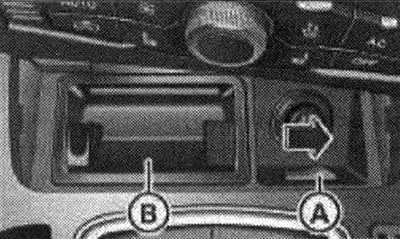
Removal the ashtray insert
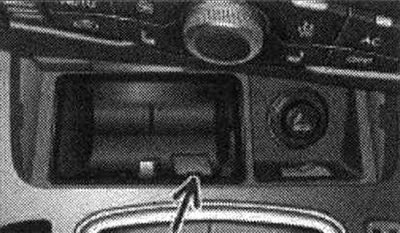
Emergency release of the gear shift lever
In the event of a power failure, the gearshift lever can be released mechanically. To gain access to the emergency release device, remove the ashtray insert "B" using the release handle "A". Loosen and remove the small cover from the ashtray mounting socket. Press the bolt with a screwdriver or similar object and hold it down. Finally, press the lock button and move the gearshift lever to position "N". The gearshift lever can only be moved from position "P" if the key is in the ignition switch and the ignition is on. If in the event of a power failure (for example, the battery is discharged) if the vehicle needs to be pushed or towed, the gearshift lever must be set to the "N" position using the emergency release device.