



Table of contents: Using the radio system ↓ Using the radio system and telephone ↓ Instructions for using the phone ↓ Phone and telematics of cars with… ↓ Telephone ↓ Using the phone from the rear seats ↓
Using the radio system
The steering wheel contains controls for basic radio system functions.
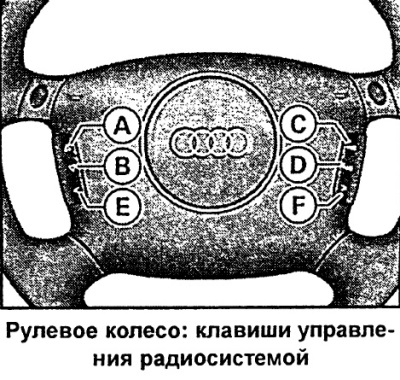
The steering wheel panel of vehicles with a factory-fitted radio system contains controls for basic functions. This allows the driver to be distracted as little as possible from driving while driving. Of course, the radio, tape recorder/CD player and the corresponding radio system buttons can also be controlled directly. A detailed description can be found in the operating instructions for the radio system.
By pressing the steering wheel buttons the following modes are activated:
Key A:
- Radio: Search radio frequency in ascending order
- Cassette: Fast forward
- Compact Disc: Skip audio track forward
Key B:
- Radio: Search radio frequency in descending order
- Cassette: Fast Rewind
- Compact disc: audio track run backwards
Key C: Volume up
D key: volume down
Key E: Station selection keys (pre-installation) in descending order
F key: Station selection keys (pre-installation) ascending
The functions of the keys are determined by the mode of the radio system that is currently active. The keys E and F can be used to select up to twelve stations in sequence. If the station selection keys are not programmed or the radio station is not received, then under certain circumstances only noise will be heard.
Using the radio system and telephone
The steering wheel contains controls for basic radio and telephone functions.
The steering wheel panel of vehicles with factory-fitted radio and telephone features controls for basic functions. This allows the driver to be distracted as little as possible from driving while driving. Of course, it is also possible to operate the radio, tape/CD player or telephone directly using the corresponding buttons of these instruments.
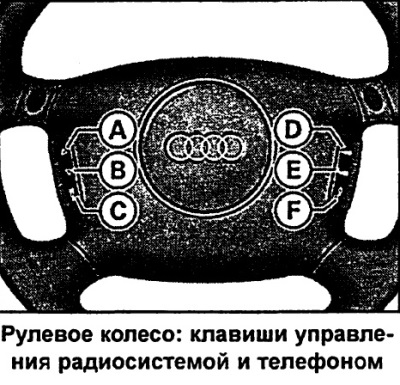
By pressing the steering wheel buttons the following modes are activated:
Key A:
- Radio: Search radio frequency in ascending order
- Cassette: Fast forward
- Compact Disc: Skip audio track forward
- Telephone (speakerphone): subscriber numbers (register) - search in ascending order
Key B:
- Radio: Search radio frequency in descending order
- Cassette: Fast Rewind
- Compact disc: audio track run backwards
- Telephone (speakerphone): subscriber numbers (register) - search in descending order
Key D: Volume up
Key E: Volume down
F key:
- Radio: Voice Broadcast System (SBS) On/Off Key
- Cassette: Speech Broadcast System (SBS) On/Off Key
- CD: Voice Based System (SBS) On/Off Key
- Telephone (speakerphone): telephone (conducting negotiations, ending the current conversation)
- Voice control: End call key
The functions of the keys are determined by the radio system mode that is currently enabled.
The subscriber numbers are scrolled in alphabetical order by subscriber names, ascending A→Z or descending Z→A. Longer pressing of the A or B keys results in a quick scroll of the subscriber numbers stored in memory.
Instructions for using the phone
After turning on the ignition or the phone and entering the PIN number, the SIM card memory data is automatically read.
The reading process takes from 15 to 60 seconds, depending on the amount of data stored in the memory of your SIM card. During this time, the message appears on the FIS display "BITTE WARTEN..." (please wait).
Telephone function indication
The following telephone functions can be displayed on the instrument cluster display:
- BITTE WARTEN — Process of reading SIM card memory data
- SIM EINSETZEN (install SIM) — There is no SIM card in the phone
- PIN NOT ENTERED — PIN number not entered yet
- KEIN SERVICE (lack of communication) - There is no connection to the telephone network
- ANRUF (call) — Incoming call. The caller's number may be additionally displayed alternately with the "ANRUF" indication.
- NUMERBESETZT — The dialed number is busy
- TELEFON AUS — The phone is off
- ANRUF AUFBAU (set) - Establishing a connection
- KEINEINTRAGE (no messages) — There are no messages in the SIM card memory
- DATENRUF AKTIV (data call function) — Via infrared or serial interface, retrieval of current information/fax messages.
Changing the language option The display of phone functions is automatically carried out in the language stored in the SIM card memory. As a rule, German is the language on the cards of German companies providing network services. Changing the language option is carried out through the menu "Telefoneinstellungen" (phone setup) — "Sprache" (language).
Phone and telematics of cars with Audi telematics
SOS distress signal and call for help
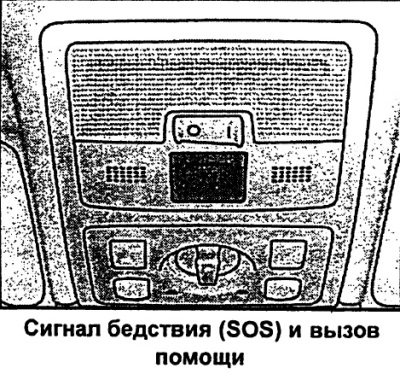
Telematics system (telematics is a unified system of telecommunications and informatics), along with the ability to conduct telephone conversations, it has a number of additional safety functions. Under the cover is a device for sending an SOS distress signal and calling for technical assistance.
Sending a distress signal (SOS) by pressing a key
- To open, press the lid.
- Press the SOS button.
Call for technical assistance
- Open the lid by pressing.
- Press the technical assistance call button (Serviceruf).
When a distress signal (SOS) is sent to the Audi central Technical Assistance center, important information regarding the location and identification of your vehicle will be transmitted. In an emergency or dangerous situation, you can send an SOS distress signal by pressing the SOS key. In addition, an SOS signal will be sent automatically when the airbag or seat belt tensioners are activated.
Telephone
The phone is located in the center console or armrest.
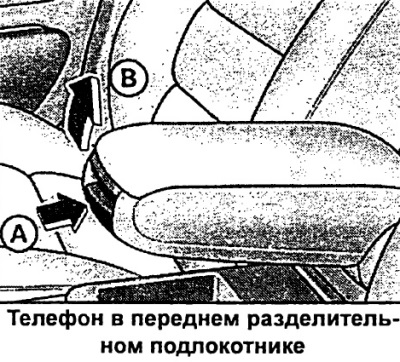
Installing the armrest
- It is possible to set the armrest in various fixed positions. Press the A button and move the armrest completely down.
- Raise the armrest upward, successively passing through fixed positions, until you reach the desired one.
Opening the armrest cover
- The armrest cover is opened by handle B.
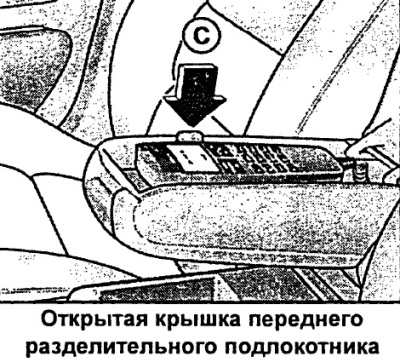
Removal the phone
- Release the phone from the holder by pressing the C key.
For reasons of comfort, as well as to allow rear seat passengers to use the phone, the armrest can be installed in one of several fixed positions.
For instructions on how to use your Audi telephone, please refer to the corresponding operating instructions.
Using the phone from the rear seats
The car phone can be used by passengers in the front and rear seats.

Making phone calls from the rear seats
- Move the armrest up to a vertical position.
Setting the armrest to its original position
- Press button A and move the armrest forward as far as it will go.