



Table of contents: Car with FIS and tire air monitoring… ↓ Tire pressure drop ↓ Pressure drop alarm ↓ Entering air pressure data into… ↓ The programming process ↓ Malfunctions ↓
Car with FIS and tire air monitoring system
The tire pressure monitoring system signals a drop in air pressure.
The tire pressure monitoring system monitors the set air pressure of the four working wheels while driving and, if the pressure drops, warns the driver by lighting up symbols and displaying a corresponding indicator on the FIS display. The system operates using sensors mounted on the wheels. Radio signals from these sensors are transmitted to the tire pressure monitoring system.
The condition for monitoring the air pressure is its preliminary correction in accordance with the vehicle load and subsequent input into the system memory (set pressure).
Note: The system helps the driver monitor the air pressure in the tires, which, however, does not relieve the driver of responsibility for the air pressure.
Tire pressure drop
The red symbol indicates a large drop in air pressure.
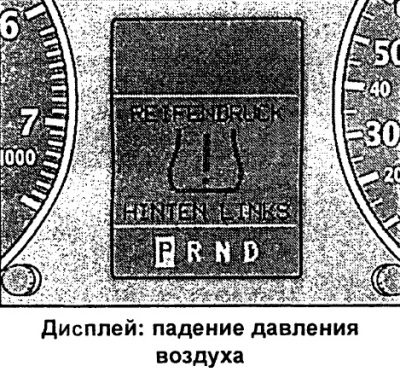
If the air pressure drops by more than 0.4 bar, a red tyre symbol lights up on the FIS display along with the designation of the corresponding wheel.
For example, additional text REIFENDRUCK HINTEN LINKS (air pressure rear left) means a drop in air pressure in the rear left wheel.
In this case, stop immediately and take appropriate measures.
Pressure drop alarm
The yellow symbol indicates a drop in air pressure.
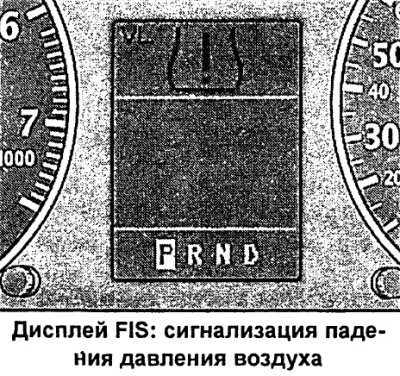
If the air pressure drops by more than 0.2 bar, a yellow tyre symbol lights up on the FIS display along with the designation of the corresponding wheel.
Additional letter abbreviations:
- VL - front left wheel
- VR - front right wheel
- HL - rear left wheel
- HR - rear right wheel
The illustration shows an example of a drop in air pressure in the left front wheel.
When the yellow symbol lights up, check and adjust the air pressure as soon as possible.
Entering air pressure data into memory
A condition for the normal operation of the tire pressure monitoring system is that the set pressure is re-entered into the memory each time a wheel is changed.
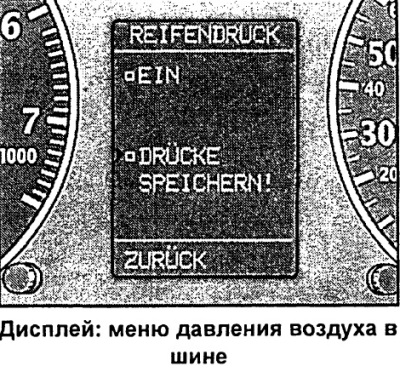
For the tire pressure monitoring system to function, the following is required:
Air pressure adjustment
- Check the air pressure of all wheels of the car (including spare tire).
- If necessary, adjust the pressure according to the standards specified on the plate attached to the inside of the filler cap.
Entering air pressure data into memory
- Turn on the ignition.
- Press the Menu key. The start menu appears.
- Turn the rotary/push button to set the command selection arrow to EINSTELLEN (setup).
- Confirm selection by pressing the rotary/push button. The submenu EINSTELLEN (setting) appears.
- Turn the rotary/push button to set the command selection arrow to REIFENDRUCK (air pressure).
- Confirm selection by pressing the rotary/push button. The REIFENDRUCK submenu appears (air pressure).
- Set the command selection arrow to DRUCKE SPEICHERN (enter air pressure data into memory).
- Confirm the selection by pressing the rotary/push button. A check mark appears. The system confirms the correctness of the memory entry with the message DIE AKTUELLEN LUFTDRUCKE WURDEN GESPEICHERT (current air pressure data entered into memory)
- Set the command selection arrow to ZURUCK (back).
- To exit the REIFENDRUCK menu (air pressure) press the rotary/push button.
After the above-described input of air pressure data into the memory (DRUCKE SPEICHERN) the automatic system programming process begins.
Each time after changing the air pressure, as well as replacing a wheel, a new entry into the memory is required via the DRUCKE SPEICHERN command (enter pressure data into memory). Only after this does the system know the set pressure and, if necessary, it can signal its drop.
The programming process
After entering the set pressure data into the memory, the programming process begins.
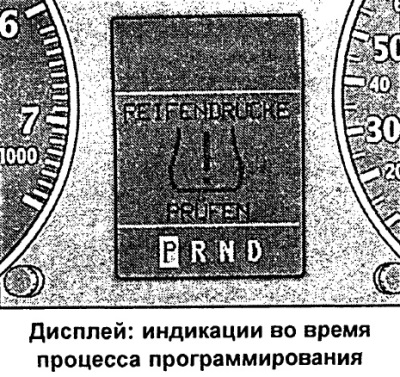
The programming process begins after entering the air pressure data into the memory. It occurs automatically and, as a rule, unnoticeably for your attention. The duration is several minutes.
The system measures and stores actual air pressure data and checks the likelihood of a wheel replacement.
At the programming stage, the system's functionality is limited. This means that signal indication is only possible when the air pressure drops by more than 0.4 bar in one or more wheels (also in the spare tire). In this case, a red signal symbol appears with the text REIFENDRUCKE PRUFEN (check tire pressure).
Malfunctions
In case of malfunctions, the corresponding indication is displayed.
No access to the system
If there is no access to the system, a crossed-out bus symbol appears on the FIS display. Possible reasons for this symbol to appear are:
- The appearance of this symbol at the end of the programming process may mean that the system does not recognize the wheels mounted on the vehicle. The reason may be that one or more wheels without a sensor are installed.
- Failure of the sensor or other components.
- The system identifies more than 5 wheels of the vehicle, for example when transporting several spare wheels in the vehicle.
- After replacing a wheel, the air pressure data was not entered into the memory (function REIFENDRUCKE SPEICHERN).
- When using anti-skid chains, due to the chains' shielding properties, the system may malfunction. The system switches off.
If possible, eliminate the fault and finally call the REIFENDRUCKE SPEICHERN function again. Contact an Audi dealer if you are unable to eliminate the fault.
Functional impairment
A temporary system failure may be caused by strong electromagnetic fields. When in the area of such fields, a message about a functional failure appears: a lightning bolt symbol appears next to the crossed-out bus symbol.
Large difference in air pressure of wheels of one axle
If, during the programming stage, the system detects a difference in air pressure between the wheels of one axle of more than 0.4 bar, then in this case a message appears on the FIS display indicating the corresponding wheels, for example, VL and VR (front left and front right).
Note: When changing tires, do not remove or change sensors and valves. Only replace the valve core. Replace the valve and wheel electronics only if necessary.
Turning the system off and on
The driver has the ability to turn off the system.
The tire pressure monitoring system can be switched off as follows:
- Call the REIFENDRUCK menu (air pressure).
- Set the command selector arrow to EIN.
- If there is a check mark there, press the rotary/push button. A square ("no") appears.
- Set the command selection arrow to ZURUCK (back).
- To exit the REIFENDRUCK menu (air pressure) press the rotary/push button.
When the tire pressure monitoring system is switched off, as a reminder to the driver, a yellow tire symbol with the text AUS (off) appears briefly on the FIS display each time the ignition is switched on.
The text is based on materials from the website: audimanual.ru