



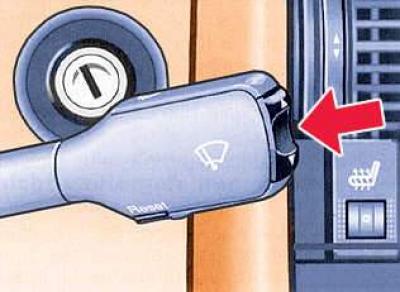
The function switch (arrow) and the reset key ("Reset") are mounted in the wiper control handle.
If the ignition is on, then by repeatedly pressing the lower side of the function switch, they are displayed sequentially. By pressing the upper side of the switch, the functions are displayed in the reverse order.
By pressing and holding the reset button for at least 2 seconds, you can reset the absolute and average fuel consumption, driving time and average speed values accumulated in the memory to zero. By briefly pressing the key, you can interrupt the computer signal indication warning about exceeding the standard time of continuous driving and the need for refueling.
When the ignition is turned on, the last function at the moment the ignition was turned off is displayed. When the battery terminals are disconnected, all accumulated values are erased.
Display
The on-board computer provides 6 types of information:
- current fuel consumption or boost pressure of the Audi S6 Avant (169 kW);
- fuel range;
- absolute fuel consumption;
- continuous driving time (max. indication 23:59);
- average fuel consumption;
- average speed of movement.
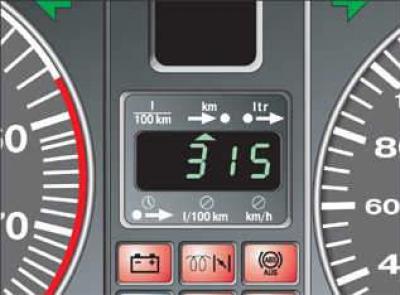
Fuel consumption, range and speed indicators are displayed in metric units, and in certain export versions in the English system of units (l/100 km – mpg, km/h – mph, km – mi).
You can tell which function is active by the triangle pointing to the corresponding symbol at the top or bottom of the display. The illustration shows the fuel range indication as an example.
L/100 km — current fuel consumption
The display shows the current fuel consumption values, measured in l/100 km.
Consumption is calculated for each 30-meter section of the route. When the car is stopped, the last calculated value is displayed. If the current fuel consumption display is called up after the engine is started, the average fuel consumption is displayed for the first 30–40 meters of the route. If you manipulate the accelerator pedal while the engine is running, without moving off, the fuel consumption readings may be very high. Using this display, you can select the driving mode that corresponds to the optimal fuel consumption.
bar — boost pressure
The display shows the absolute pressure in the engine intake manifold. The display range is from 0 to 2.5 bar.
After turning on the ignition with the engine not running, the indication corresponds to the actual atmospheric pressure (barometric) pressure, which means about 1.0 bar at sea level. After starting the engine, the readings decrease due to the vacuum in the intake manifold. When driving, the indication changes within the range from 1 to 2 bar, depending on, among other things, the position of the accelerator pedal. If, under the influence of the turbocharger, the pressure in the intake manifold increases so much that it exceeds atmospheric pressure, then in this case they say "boost pressure".
At full load, the boost pressure depends on engine speed, boost air temperature, atmospheric pressure (altitude) and fuel quality. The engine electronics continuously adjust the boost pressure to the engine operating mode. Therefore, significant fluctuations in boost pressure readings are possible while driving.
In case of exceeding the maximum permissible boost pressure at fully open throttle valve (due to system malfunctions), for safety reasons, the Motoronic control unit will switch off the valve injectors and thus stop the fuel supply until the boost pressure drops to normal.
In this case, avoiding exceeding the permissible boost pressure by carefully pressing the accelerator pedal, you can go to the Audi plant to determine the cause of the abnormal increase in pressure.
 — fuel range
The fuel range is determined by discrete values, counted in 10 km increments. This indication shows how many kilometers the car can still travel on the actual remaining fuel in a given driving mode. The fuel consumption over the last 30 km of the route is taken as the basis for calculating the fuel range. With more economical subsequent movement, the range increases.
Reminder to refuel
When the power reserve is less than 50 km, an automatic switchover to the indication of this parameter occurs. The indication starts to flash. When the remaining fuel in the tank reaches 5–8 liters, the letter "L" appears on the display instead of the power reserve value, meaning that the tank is empty.
The signal indicator can be switched off by briefly pressing the upper or lower side of the function switch, or by pressing the "Reset" button. Until the car is refueled, the signal indicator will appear each time the ignition is turned on.
 — absolute fuel consumption
The display shows the amount of fuel consumed after starting the engine. The consumption value is erased from the memory after the ignition is turned on again and after 30 m of movement. In addition, this value can be erased by pressing the "Reset" button.
 — travel time
The display shows the travel time since the last memory reset. When the ignition is on, the travel time value is saved in the memory. As you continue driving, the subsequent time count is added to it.
The maximum travel time displayed is 23 hours and 59 minutes.
If you want to start counting travel time from a certain point, clear the memory by pressing the "Reset" button.
A reminder to take a break from movement
Two hours after the start of the journey, regardless of the programmed function, an automatic switchover to the travel time indication occurs. A flashing indication of the type "2:0" reminds the driver of the need to take a break from driving. This indication can be switched off by briefly pressing the upper or lower side of the function switch or the "Reset" button. If the ignition remains on or if the break is less than 10 minutes, then every subsequent two hours the reminder of the need to stop for a rest will be repeated, with a travel time indication of the type "4:0", "6:0" etc.
If the break lasts more than 10 minutes with the ignition off, the travel time countdown data is reset.
 — average fuel consumption
The display shows the average fuel consumption since the last memory reset. Do not confuse it with the instantaneous consumption at the time of reading the readings.
When the ignition is switched off, the average fuel consumption value is stored in memory. When driving further, the subsequent consumption data is taken into account.
To erase the memory, press the "Reset" button. When driving the first 30 m after reset, the display shows zero.
 — average speed of movement
The display shows the average speed since the last memory reset. When the ignition is off, this value is saved in the memory. When continuing to move, the subsequent mileage is taken into account.
To reset the memory data, press the "Reset" button.