



Table of contents: Removal ↓ Installation ↓ Especially for CD changer ↓ Especially for navigation device… ↓
Depending on the model, the AUDI A4 can be equipped with various audio systems. The serial radio is equipped with a radio with a retractable holder, allowing for quick removal and installation of the radio. However, this requires a special extraction tool, sold in a set with the radio.
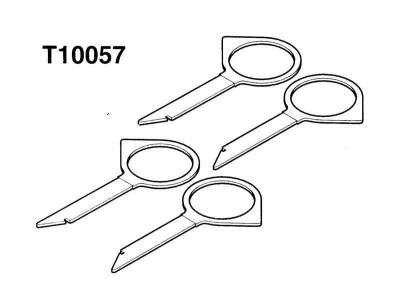
To remove the factory fitted radio, navigation unit or CD changer, 2 or 4 T10057 AUDI keys are required.
The serial radio receiver has a code to protect against hacking. The code prevents unauthorized switching on of the device if its power supply has been interrupted. The power supply can be interrupted, for example, when disconnecting from the battery, when removing the radio receiver or if the fuse has blown.
AUDI radio systems are coded from the dashboard. Therefore, when disconnecting and then connecting the power supply or when removing and installing the same radio, no code entry is required.
Caution: If the radio installed later is coded, you must find out the code before disconnecting the radio. Otherwise, the radio can only be switched on by the manufacturer. The code number is given in the radio's operating manual. Do not store it in the car.
Removal
1. Disconnect the negative (-) battery cable.
Warning: Follow the instructions in Section Replacing the battery.
2. Insert 2 T10057 AUDI unlocking keys into the unlocking slot until they lock. There is text on the top side of the key "Top L" "Top R". Insert the key so that the text points upwards. The key with the inscription "Top L" should be on the left, the key with the inscription "Top R" on the right.
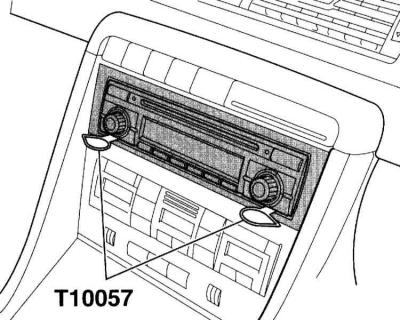
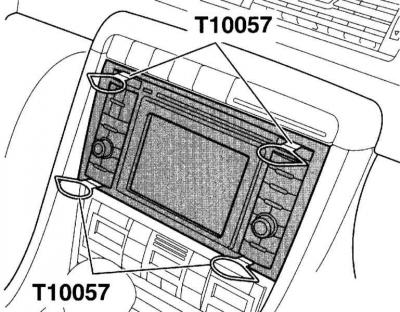
3. Remove the radio/navigation unit from the center console using the release lugs of the release keys.
4. Press the locking bars on the device and pull the release keys out of the slots.
5. Disconnect the power supply, speaker and antenna connectors from the back of the device.
Installation
1. Connect the connectors on the back of the radio/navigation unit.
2. Insert the radio/navigation unit into the center console until the retaining springs engage.
Especially for CD changer
1. Disconnect the negative (-) battery cable.
Warning: Follow the instructions in Section Replacing the battery.
2. Open the glove compartment.
3. Insert the T10057 key into the unlocking slot until it locks into place and pull out the CD changer using the key lugs.
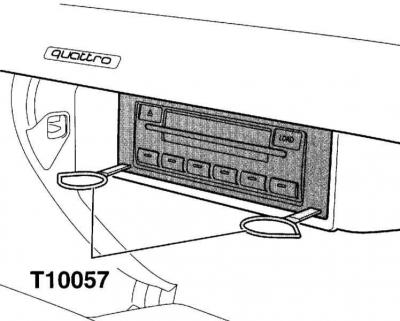
4. Further installation is carried out in the reverse order of removal.
Especially for navigation device with CD-drive
1. Disconnect the negative (-) battery cable.
Warning: Follow the directions Replacing the battery.
2. Open the cover for the left box in the trunk.
3. Insert the T10057 release key into the release slot until it locks into place and pull the navigation unit (2) out of the mounting frame (1) using the key lugs.
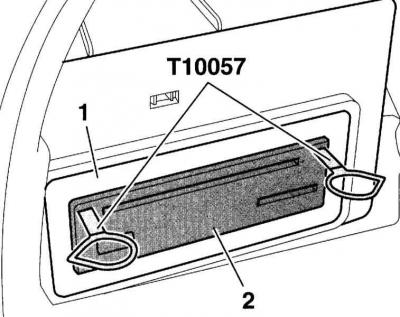
4. Further installation is carried out in the reverse order of removal.