



Table of contents: Front seat position memory ↓ Driver's seat memory ↓ Programming the radio key ↓ Front passenger seat memory ↓
Front seat position memory
Driver's seat memory
The memory keys can be used to program and recall three positions for the driver's seat, steering column and outside mirrors.
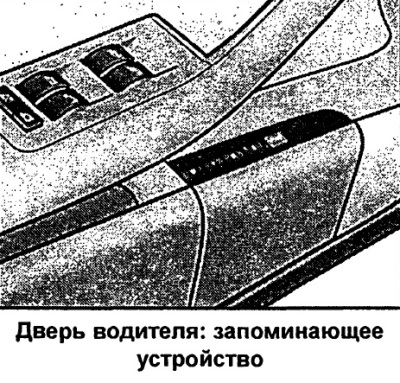
Storage keys
Memory keys 1, 2 and 3 can be used to program and recall up to three positions for the driver's seat, steering column and outside mirrors.
STOP key
The seat position memory is switched off by pressing the STOP button. The Off sign next to the STOP button lights up (visible only when the light is on).
All entered positions are saved in the memory. The position of the seat, steering column and outside mirrors can only be adjusted in the usual way - using the electric drive. It is recommended to switch off the memory device by pressing the STOP button if the driver uses the car occasionally and therefore does not need to program the seat position for him.
Note: Programmed positions can also be played back using the radio remote control.
Programming of positions
When programming and playing all functions, the STOP key must be pressed (depressed).
- Adjust the position of the driver's seat.
- Adjust the position of the steering column.
- Adjust the position of both outside mirrors.
- Press and hold the "Memory" key. Additionally, press one of the memory device keys for at least 1 second.
- Release the keys. This position is now entered into memory and corresponds to the number of the key selected during input.
Each time you reprogram the same key, the previous data is reset. When programming, it is recommended to start with key 1, leaving one of the remaining keys for other drivers.
When locking the car with a radio key (remote radio control) the last position of the seat and mirrors is entered into the memory. This position of the seat and mirrors is automatically reproduced by the remote control when the car is subsequently unlocked. The position of the outside mirrors is reproduced immediately after unlocking, and the position of the driver's seat after opening the driver's door. However, this does not reset the data of the memory device for the previously undertaken distribution to keys 1-3. At any time, it is possible to reproduce the entered positions using the corresponding keys.
Reproduction of provisions
The programmed positions can be reproduced both by the memory keys and by the radio remote control (radio key).
Playback with storage keys
- With the driver's door open, press the corresponding memory device button once.
- With the driver's door closed, press and hold the appropriate memory button until the seat, steering column and outside mirrors reach the programmed position.
Playback by remote control
- Unlock the car using the remote control and within the next 10 minutes open the driver's door.
If after unlocking the car with the remote control the driver's door remains closed for 10 minutes, the seat position is reproduced using the memory device keys.
Attention: In an emergency, the playback process can be interrupted by pressing the STOP key or by pressing any of the keys on the storage device.
Programming the radio key
Car with driver's seat memory
To reproduce the entered positions by the remote radio control, it is necessary to program the radio key to the memory device key.
Programming a radio key to a memory device key
- Use the corresponding key of the memory device, which this key must correspond to, to reproduce the programmed positions.
- Press and hold this key and within 10 seconds additionally press the radio key unlock button.
- After about 2 seconds, release the key.
Cancelling programming of a radio key to a memory device key
- Press and hold the "Memory" button and within 10 seconds additionally press the radio key unlock button.
- After about 2 seconds, release the "Memory" key.
When reprogramming, the previous data is automatically reset.
It is recommended to program so that key 1 corresponds to one and key 2 to the other factory radio key. If necessary, another radio key can be purchased through an Audi contract partner and programmed to key 3.
Front passenger seat memory
The memory keys can be used to program and recall three different positions for the front passenger seat.
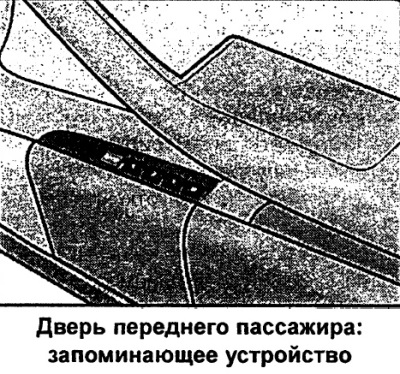
Storage keys
Memory keys 1, 2 and 3 can be used to program and recall up to three front passenger seat positions.
STOP key
The seat position memory is switched off by pressing the STOP button. The Off sign next to the STOP button lights up (visible only when the light is on).
All entered positions are saved in memory. The seat position can only be adjusted in the usual way - using an electric drive.
Programming of positions
Vehicle with front passenger seat memory
When programming and playing back positions, the STOP key must be pressed (depressed).
- Adjust the position of the front passenger.
- Press and hold the "Memory" key. Additionally, press one of the memory device keys for at least 1 second.
- Release the keys. This position is now entered into memory and corresponds to the number of the key selected during input.
Each time the same key is programmed, the previous data is reset. When programming, it is recommended to start with key 1, leaving one of the remaining keys for the other front passengers.
Reproduction of provisions
The programmed positions can be recalled using the memory keys.
- With the front passenger door open, press the corresponding memory device button once.
- With the front passenger door closed, press and hold the appropriate memory button until the seat reaches the programmed position.
The stored position of the front passenger seat cannot be reproduced by the radio remote control.
Attention: In an emergency, the playback process can be interrupted by pressing the STOP key or by pressing any of the keys on the storage device.
(The original article is located on the online resource AUDIMANUAL.ru)