



Table of contents: One-time storage device (on-board… ↓ Shared storage device (on-board… ↓ An effective program ↓ Setting zero values ↓ Turning the gear shift indicator… ↓ View service information ↓ Resetting the maintenance interval… ↓
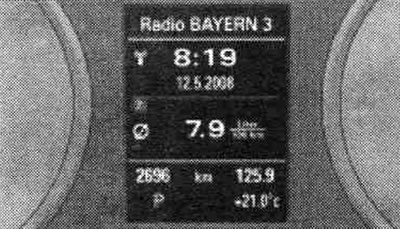
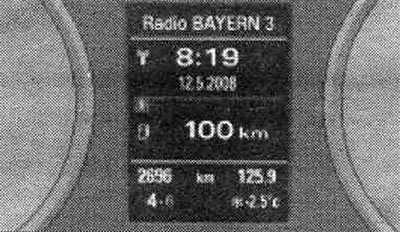
Trip computer: average fuel consumption.
The on-board computer analyzes and can sequentially display the following information on the instrument panel display.
Fuel range: The display shows the fuel range in kilometers. This indicator shows how many kilometers the car can still travel with the actual remaining fuel in the current driving mode. The fuel range is calculated in 10 km increments.
Average fuel consumption: The display shows the average fuel consumption in l/100 km, determined since the last memory reset. Thanks to this indication, you can select a driving mode with optimal fuel consumption.
Current fuel consumption: The display shows your current fuel consumption in l/100 km. This indicator helps you select the driving mode that optimizes fuel consumption. Consumption is calculated for each 30-meter section of the route. When the vehicle is stationary, the indicator switches to liters per hour.
Average speed: The display shows the average speed in km/h calculated since the last time the memory data was cleared.
Driving time: The display shows the driving time counted down since the last time the memory data was cleared.
Number of kilometers traveled: The display shows the number of kilometers traveled since the last time the memory data was cleared.
Additional consumers: The effective program specifies additional consumers that currently affect fuel consumption. The largest consumer comes first. In addition, the scale displays the current total consumption of all additional. consumers in liters per hour.
Note: When the battery terminals are disconnected, all stored values are deleted from the memory device. Depending on the configuration, the quantity and type of additional. the consumers displayed in an effective program vary.
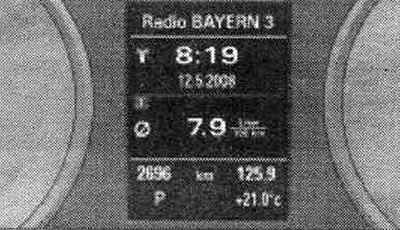
On-board computer: storage device 1.
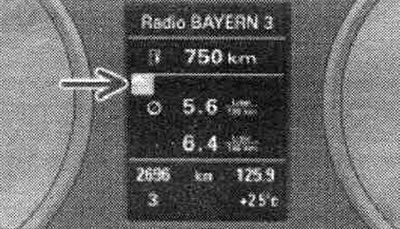
On-board computer: effective program.
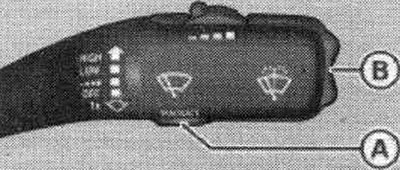
Windscreen wiper control handle: controls for the on-board computer.
The on-board computer is equipped with two automatically operating storage devices and an effective program. By pressing the RESET "B" button you can switch the functions of the on-board computer 1, 2 and the effective program. Which storage device is currently enabled can be determined by the number or symbol displayed on the display. The appearance of number 1 on the display means that the data of the one-time storage device is indicated (on-board computer 1). The appearance of number 2 on the display means that the general storage device data is indicated (on-board computer 2). Dispenser pistol symbol - (shown by the arrow) - indicates an effective program.
One-time storage device (on-board computer 1)
A one-time memory device stores information about movement from the moment the ignition is turned on until the moment it is turned off. When driving is resumed within 2 hours after the ignition is switched off, new values are added to the already stored driving information. If the interruption in movement lasts more than 2 hours, then after the resumption of movement, the data in the storage device is automatically reset.
Shared storage device (on-board computer 2)
Unlike a one-time storage device, a shared storage device cannot automatically delete data. This allows you to set the time period over which information or traffic data is analyzed.
An effective program
An effective program can help you save fuel. The program analyzes fuel consumption data and displays additional information. consumers and recommended transmissions. Fuel-efficient driving tips provide information on efficient driving habits. Information about the distance traveled and fuel consumption is sent to the effective program from the on-board computer 1. When data is deleted in the on-board computer 1, the values in the effective program are also reset.
The on-board computer is controlled by two switches mounted in the windshield wiper control handle. To display the on-board computer's memory devices, press the RESET "A" button several times until the required memory device appears on the display. To sequentially display vehicle driving data in the memory device, press the "B" function switch on the top or bottom. The trip computer can only be used when the ignition is on. When the ignition is turned on, the display shows the function selected before the ignition was turned off. In addition to the on-board computer data (on-board computer 1, 2 and effective program) the display also shows information on other systems. To switch the display of this information, briefly press and release the RESET "B" button.
Setting zero values
To delete one current parameter of the on-board computer, select the required function and hold down the RESET "B" button for at least one second. The RESET button can be used to reset the following values individually to zero: average fuel consumption; average speed; time of movement; number of kilometers traveled. In the effective program, all currently displayed values are cleared. All values in the single-use and shared memory can be erased simultaneously via the radio or MMI.
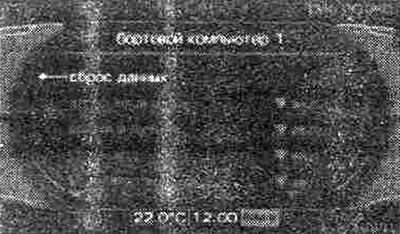
MMI display: on-board computer.
Basic settings for the on-board computer are made in the radio or MMI.
Select: the CAR function key, instrument cluster, trip computer 1, or trip computer 2. In the data reset menu, it is possible to reset all values of the one-time and general memory device at once. In addition, you can determine what information about the vehicle's movement should be displayed on the screen. If any of the driving information is disabled, this information will not be displayed on the display. However, the information continues to be analyzed by the on-board computer and can be displayed at any time. Using a one-time storage device, the vehicle movement information in the effective program is also reset.
Display: gear shift indication.

Display: Turn on/off the recommended gear display.
Applies to vehicles with manual transmission and gear shift indicator. By relying on the gear shift indicator while driving, you can save fuel. The gear shift indicator can be turned on or off in the radio or MM1.
Turning the gear shift indicator on/off
Select: CAR function key > instrument cluster > recommended shift To understand the instructions given on the gear shift indicator, start driving in a normal manner. When the current gear in driving mode no longer provides optimal fuel consumption, a recommendation to shift to the desired gear appears. The display shows the currently engaged and recommended gear. Upshift: If upshifting is recommended, the corresponding indicator appears to the right of the gear engaged indicator. Downshift: If downshifting is recommended, the corresponding indication appears to the left of the gear engaged indication. You may also need to skip certain gears (3 > 5). If there is no prompt, continue driving in the current gear. When you press the clutch pedal, the indicator on the instrument panel goes out.
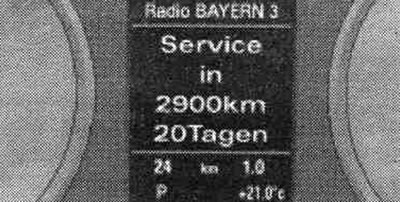
Display: example of indication of maintenance intervals.

Display: indication of maintenance intervals.
The maintenance interval indicator shows that the vehicle needs to undergo maintenance. The type of upcoming maintenance (preventative inspection or oil change) you can find this information on the radio display or MMI in the "Car" menu. The display shows two levels of messages.
1. Service Reminder: when a certain number of kilometers remain until the upcoming service, every time the ignition is switched on, the SERVICE IN — KM — DAYS indication appears on the instrument panel display (service in — km — days). The kilometer and day data are independent of each other. If the scheduled maintenance date has arrived, the display will show the message "Service due!" (Technical inspection required!), despite the fact that the required mileage has not yet been covered. And vice versa - if the time for maintenance, calculated by kilometers, has come, then the message Service duel appears on the display again (Technical inspection required!), despite the fact that the period shown in days has not yet expired. The remaining range and time are briefly displayed on the display each time the ignition is turned on.
2. Maintenance required: if it is time for maintenance, the message Service due! appears on the display immediately after turning on the ignition (Technical inspection required!). After a while, the standard display indication turns on. Additionally, a sound signal is heard.
View service information
(number of kilometers and days until the next maintenance)
In the "Sag" menu, you can find out the number of kilometers and days remaining until the next oil change and maintenance. To do this, select the function key CAR > periodic. maintenance. In new vehicles, the display may not show all the information during the first 500 km.
Resetting the maintenance interval indicator
After the maintenance, Audi resets the display. The driver can only reset the oil change indicator. To do this, select the function key CAR > Service interval (maintenance frequency) > Reset oil change interval (oil change reset). Once the oil change indicator has been reset, the next oil change will be required in 15,000 km or one year (regular maintenance).
Caution! When the vehicle's battery is disconnected, the maintenance interval indicator parameters cannot be calculated, and the maintenance reminder will not be displayed. Please note that maintaining regular maintenance is crucial to ensuring the longevity and safety of your vehicle. This is especially true for the engine. Even with low mileage, the maximum interval between maintenance should not be exceeded. Do not reset the display between oil changes, otherwise the display will be incorrect. When the battery terminals are disconnected, the maintenance interval indication remains unchanged. If maintenance was not performed at a service station, the oil change indicator can only be reset to the "permanent maintenance interval" of 15,000 km. To retain eligibility for the "LongLife" reduced-frequency maintenance, the oil change indicator must be reset by a specialized service center.