



Table of contents: Power window switch ↓ Child safety door lock ↓
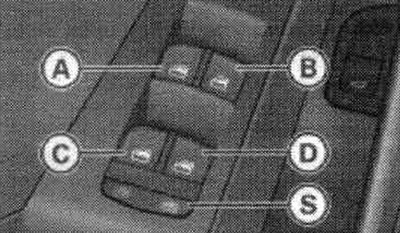
Detail of the driver's side door: controls.
The driver can control all windows. All window switches have 2 positions.
Lowering the windows: Press the switch to the first position and hold it pressed until the window is lowered to the desired height. To automatically lower the window, briefly press the switch to position 2.
Raising the windows: Pull the switch to the first position and hold it in this position until the window rises to the desired height. To automatically raise the glass, briefly pull the switch to position 2.
Power window switch
A. Driver's door.
B. Front passenger door.
C. Rear left door.
D. Rear right door.
S. Safety button.
Child safety door lock
When the safety button "S" is pressed, the LED inside it lights up. The rear door window switches are disabled.
Note: After the ignition is turned off, the power windows remain operational for approximately 10 minutes. The power windows are disabled only when the driver's or passenger's door is open.
The windows and sliding/tilting sunroof can be conveniently opened and closed using the remote control. Which windows open depends on the settings in the radio or MMI.
Comfortable opening
Press the opening button on the radio key until the windows open to the current position and the sliding/lifting sunroof rises.
Comfortable closing
Press and hold the lock button on the radio key until the windows and sunroof are closed.
Convenient closing with a "chip key"
Touch the lock sensor located in the door handle until the windows and the sliding/lifting sunroof are closed.
The driver can select which windows should be lowered via the radio or MMI.

Display: "Comfort opening" menu.
Select: function key CAR > windows > comfortable opening. To be able to conveniently open the front and rear door windows, as well as the sliding/lifting sunroof, the "Front Doors", "Rear Doors" and "Sliding Sunroof" functions must be activated.