



Table of contents: Governing bodies ↓ Driver's door controls ↓ Lockout switch ↓ Controls in the front passenger door… ↓ Centralized opening and closing of… ↓ Functional disorders ↓
Governing bodies
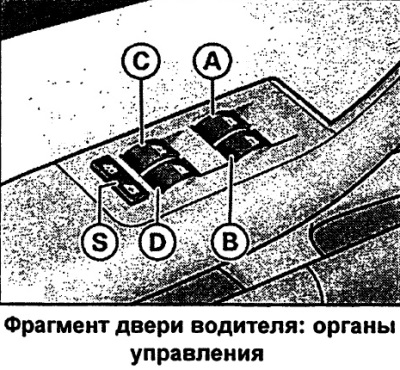
Front window switches
A - Driver's door window switch
B — Front passenger door window switch
Rear window switches
C — rear left door window lift switch
D — Rear right door window lift switch
S — interlock switch
Attention
- Always remove the ignition key from the car when leaving it even for a short time, especially when leaving children in the car. Children can start the engine or turn on electrical equipment (for example, electric windows). Risk of injury! The windows are only switched off after the driver's or front passenger's door is opened.
- Inattention or lack of control when using window lifts can lead to serious injuries!
- No one should remain in a car locked from the outside, since in an emergency it will be impossible to open the windows from the inside.
Note: In addition to the switches in the driver's door, each of the other doors has an independent switch for the corresponding window lifter.
Driver's door controls
The driver can operate all electric windows of the car.
There are two positions of the window switches:
Lowering the windows
- Press the switch and hold it until the glass reaches the desired position.
- To automatically lower the glass, press the switch briefly. By pressing the switch briefly again, you can stop the glass lowering process in any position.
Raising the glass
- Pull the switch and hold it until the glass reaches the desired position.
- To automatically raise the glass, briefly pull the switch. By briefly pulling the switch again, the lifting process can be stopped in any position.
Lockout switch
The locking switch S can be used to de-energise the rear door windows. On the rear door side, the windows only operate when the switch is recessed.
When the rear door windows are off, the symbol in the locking switch lights up (the button is not recessed).
Note: The windows operate for about 10 minutes after the ignition is turned off. However, they are immediately switched off when one of the front doors is opened.
Controls in the front passenger door and rear doors
These doors only contain the switch for the corresponding window lifter.
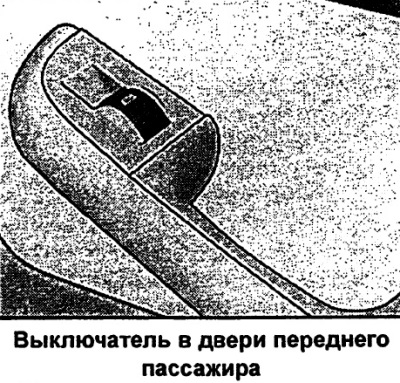
There are two positions of the window switches:
Lowering the windows
- Press the switch and hold it until the glass reaches the desired position.
- To lower the glass automatically, press the switch briefly. By pressing the switch briefly again, you can stop the glass lowering process in any position.
Raising the glass
- Pull the switch and hold it until the glass reaches the desired position.
- To automatically raise the glass, briefly pull the switch. By briefly pulling the switch again, the lifting process can be stopped in any position.
Note: The windows operate for about 10 minutes after the ignition is turned off. However, they are immediately switched off when one of the front doors is opened.
Centralized opening and closing of windows
When you unlock or lock your vehicle, you can also open or close the windows.
Lowering the windows with a key
- Turn and hold the key inserted into the driver's door lock in the unlock position - all windows open.
Lowering the windows with a remote radio control system
- Press and hold the unlock button until the windows reach the desired position.
Raising the windows with a key
- Keep the key inserted into the driver's door lock in the locked position until all windows are closed.
Raising the windows with a remote radio control system
- Press and hold the lock button until all windows are closed.
The process of lowering or raising the windows can be interrupted by releasing the key or the locking button of the remote radio control of the locks.
Caution: For safety reasons, only raise and lower the windows using the radio remote control at a distance of approximately 2 m from the vehicle. When the button is released, the closing process is immediately stopped.
Functional disorders
Disabling automatic window raising and lowering
The automatic window raising and lowering function is disabled after disconnecting and then reconnecting the battery. To restore the automatic function, the following is required:
- By continuously pressing the window lift switch, bring the glass to the extreme upper position.
- Release the switch and press it again, holding the switch for about one second with the window closed. The automation is now back in working mode.
The article is a reprint of material from: AudiManual.ru