



Overview of keys
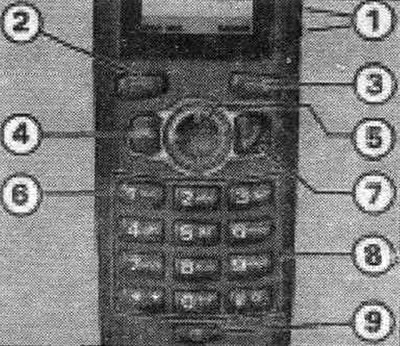
A handset with telephone keys.
1. Volume control key
The volume control key is located on the right side of the handset. Increase/decrease the volume by pressing this key.
2/3. Control keys
To activate the functions displayed in the lower corners of the display, press, for example, the left control key "2" to select Address Book or the right control key "3" to select Menu. Pressing the Menu control key opens the main menu. The displayed main menu is highlighted with a white background. To open the next submenu or activate/deactivate the selection box, press the OK control key. To move up one level in the menu hierarchy, press the Back control key.
4. Finish key
To end a conversation, reject a call, or exit the menu, press the End button.
5. Navigation key
To switch between menus, press the navigation key in the corresponding direction. An arrow next to a menu icon indicates that you can use the navigation key to scroll through the menu and open subsequent submenus.
6. Mailbox
To dial a saved mailbox number, press and hold the 1 key. If the mailbox number has not yet been saved, enter the corresponding number.
7. Call key
To initiate a call or accept an incoming call, press the Call key. Additionally, a list of recently dialed numbers can be displayed in the initial display.
8. Keyboard
The number keys are used to enter numbers, letters, and special characters. + and keys # are used in different functions for different purposes. To enable the keyboard lock function in manual mode, press the + key and within a short time — the Lock control key (lock). To cancel the keyboard lock, press the Unlock control key (unlock) on the telephone handset and within a short time — the + key.
9. On/Off key
Turning the telephone handset on and/or off.
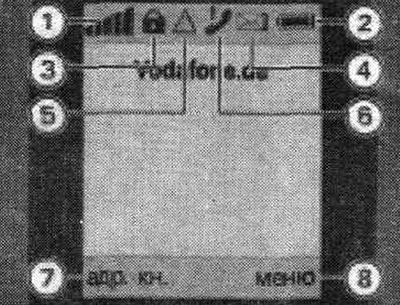
1. GSM radio network signal strength. 2. Battery charge level. 3. Keypad lock symbol. 4. Received SMS symbol. A crossed-out symbol indicates that the SMS memory is full. 5. Roaming symbol. 6. Missed call symbol. 7. Function of the left control key. 8. Function of the right control key.
[This article was copied from an online resource audimanual.ru]