



Table of contents: Rear view camera components (until… ↓ Rear view camera components (with… ↓ Rear view camera control unit… ↓ Removal and installation the rear… ↓ Removal and installation the rear… ↓ Removal and installation the rear… ↓
Rear camera. the type helps the driver when reversing by clearly displaying the used front indicator module and control module. informs the traffic situation behind the vehicle using the "J685" system. The system is activated when the rear brake light is engaged. transmission. The system can also be activated manually using the "E266" parking assistant button in the center console (optional). Rear camera. the type consists of the following components: rear camera. type "R189", used rear camera. type "J772", used front panel control, display and information output "J523", steering wheel with steering angle sensor "G85". Other control units can be installed as an additional option. Installation of additional. license plate in a car with a rear camera. type is not allowed, otherwise it may cause problems in the operation of the system. Troubleshooting. carried out in the Guided Troubleshooting mode.
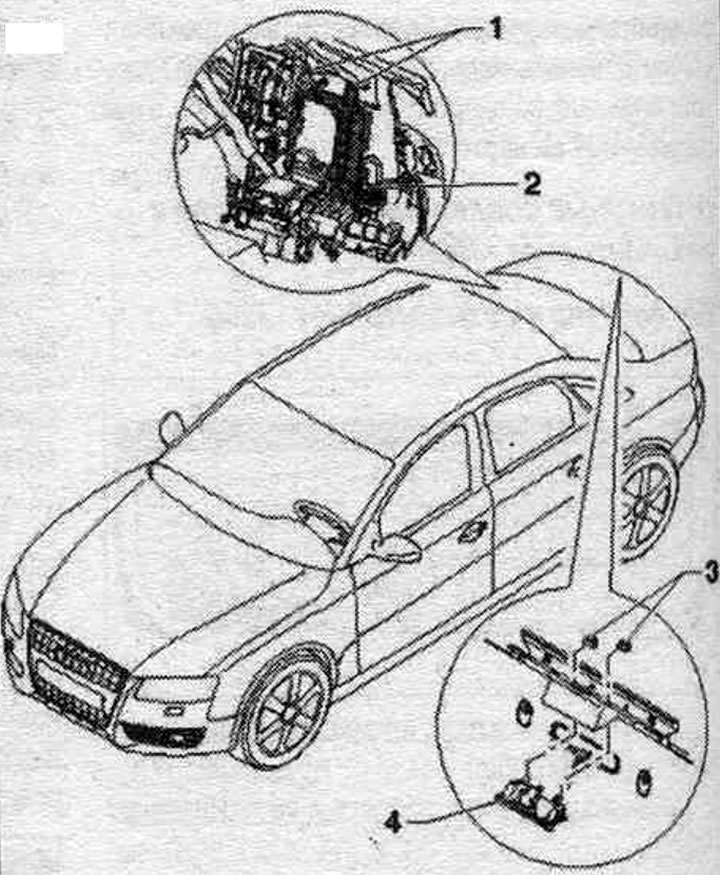
1. Bolt: 2 Nm.
2. Used rear cameras. type "J772".
3. Nut: 6 Nm.
4. Rear camera. type "R189".
Rear view camera components (until calendar week 44/08)
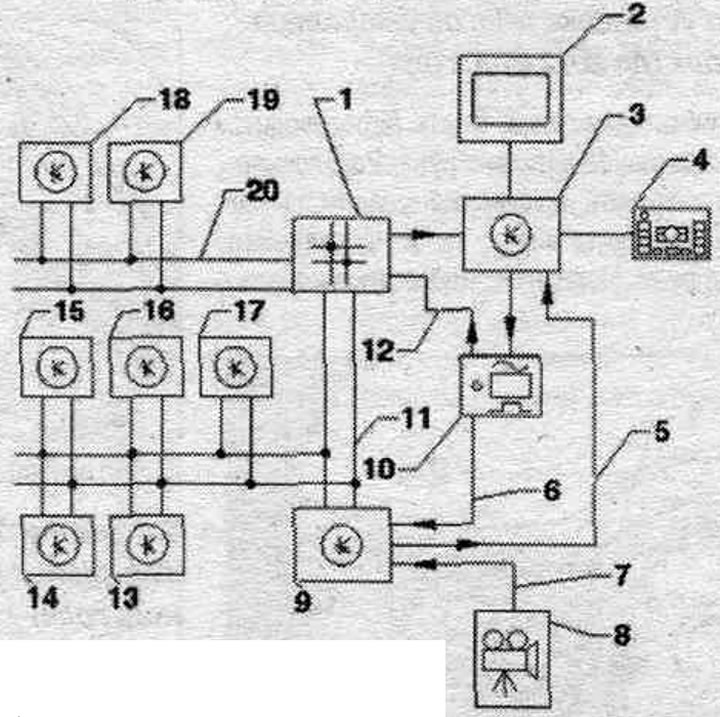
1. Data bus diagnostic interface "J533" behind the front compartment on the left.
2. Indicator of used control body. and indication, front "J685" in the center of the lane. panels.
3. Used control body. and indication, front behind front. panel.
4. Control module. multimedia system "E380" in the center, console.
5. FBAS wire to the control unit. trans. display panel, control and information output.
6. FBAS cable from TV tuner "R78".
7. FBAS cable from rear camera. type "R189".
8. Rear camera. type "R189" in the trunk lid.
9. Used rear cameras. type "J772" behind the right side trim of the trunk.
10. TV tuner "R78" behind the left trunk trim.
11. CAN bus (comfort).
12. MOST bus.
13. Used parking assistant "J446" behind the right side trim of the trunk.
14. Used on-board network "J519" behind the front lining. panels on the driver's side.
15. Central used comfort system "J393" behind the right side trim of the trunk.
16. Used trailer recognition "J345" behind the right side trim of the trunk.
17. Used Climatronie "J255" on lane. panels.
18. Used ABS "J104" in the engine compartment.
19. Steering angle sensor "G85" on the steering column in the used steering column "J527".
20. CAN bus (drive).
Rear view camera components (with the calendar of the week 45/08)
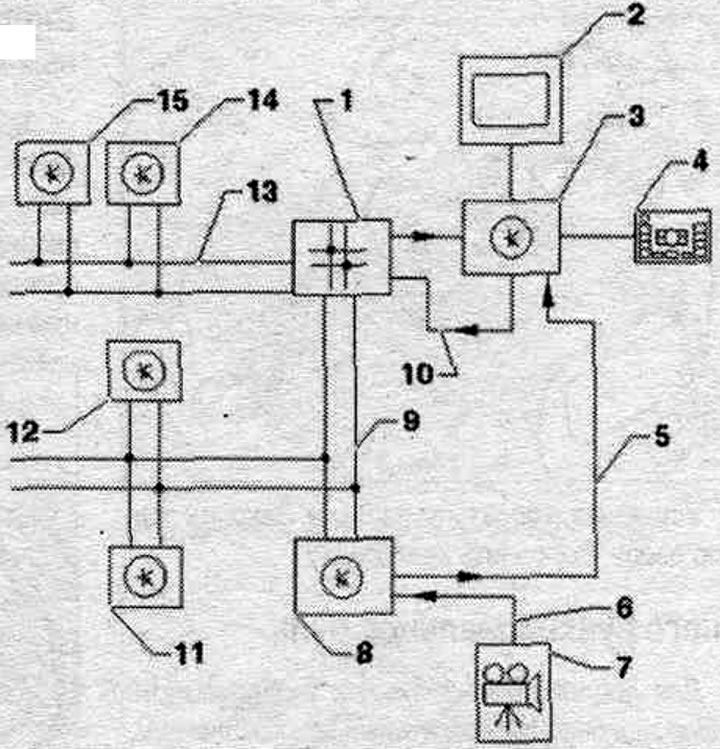
1. Data bus diagnostic interface "J533" behind the front compartment on the left.
2. Indicator of used control body. and indication, front "J685" in the center of the lane. panels.
3. Used information, electronics 1 "J794" on the front panel.
4. Control module. multimedia system "E380" in the center, console.
5. FBAS cable from a used rear camera. type "J772".
6. FBAS cable from rear camera. type "R189".
7. Rear camera. type "R189" in the trunk lid.
8. Used rear cameras. type "J772" behind the right side trim of the trunk.
9. CAN bus (comfort).
10. MOST bus.
11. Used parking assistant "J446" behind the right side trim of the trunk.
12. Used trailer recognition "J345" behind the right side trim of the trunk.
13. CAN bus (drive).
14. Used ABS "J104" in the engine compartment.
15. Steering angle sensor "G85" on the steering column in the steering control unit. columns "J527".
Rear view camera control unit connectors "J772"
Rear view camera control unit "J772"
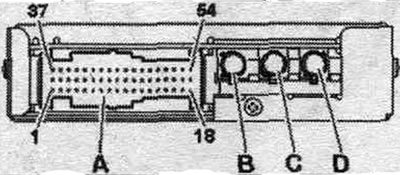
A. Multi-pin connector, 54-pin (T54b).
B. FBAS input from TV tuner "R78" (to the calends of week 44/08).
Q. The FBAS input is not used (from the calends of week 45/08).
C. FBAS output to the control unit. per. control panel, indication and information output/control unit. electronic information, system 1 "J794".
D. FBAS input from rear camera. type "R189".
A. Multi-pin connector, 54-pin (T54b)
39. CAN bus Low (comfort).
40. CAN bus High (comfort).
43. Terminal 30.
44. Terminal 31.
47. Contact 31 to rear camera. type "R189".
48. Rear camera power supply. type -R 189-.
Removal and installation the rear view camera control unit "J772"
Used rear cameras. the "J772" type is located behind the right side trim panel of the trunk. When replacing a used one, select "Guided Fault Search" mode. replace the corresponding used part. Use the Tester for this. Turn off the ignition. Remove the right side trim of the trunk. Used system rear cameras. type "J772" "3" is inserted into holder "2". To remove, first remove the center, used comfort system "J303" "1", and then bracket "2". Unscrew the bolts "arrows" and nut "5". Remove bracket "2" from the box to disconnect connectors "3" and "4". Unclip the used rear camera system. type "J772" from bracket "2" and remove it in an upward direction. Unlock and disconnect the used rear camera connector. type "J772".
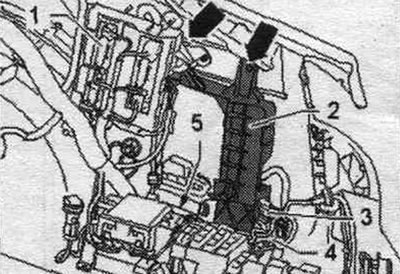
Installation in reverse order. Perform calibration.
Removal and installation the rear view camera "R189" (Sedan)
Rear camera. type "R189" is installed in the trunk handle. Turn off the ignition. Rear camera. type "R189" has a flexible cable. The connections to the vehicle's cable harness are located at the rear. lid. Remove the rear trim. doors. Unscrew nuts "2". Rear camera. type - R189- is rigidly connected to handle "3". Remove handle "3" with the rear camera. type "R189" from the trunk.
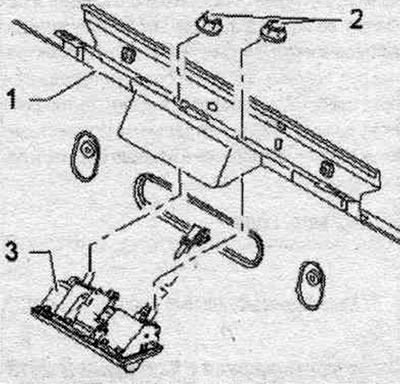
Unlock and disconnect plug connectors "1" and "2" from the trunk. Remove the handle from the trunk.
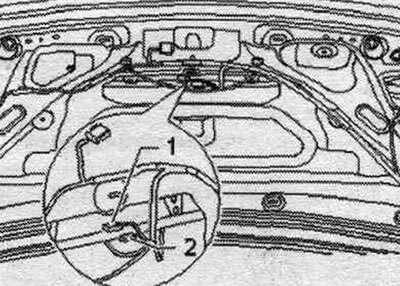
Installation in reverse order. Close the back door. Perform calibration.
Removal and installation the rear view camera "R189" (Avant)
Rear camera. type "R189" is installed in the trunk handle. Turn off the ignition. Rear camera. type "R189" has a flexible cable. The connections to the vehicle's cable harness are located at the rear. lid. Remove the rear trim. doors. Unlock and disconnect plug connectors "1", "2" and "3" from handle "4". Rear camera. type "R189" is rigidly connected to handle "4". Unscrew nuts "2". Remove handle "3" with the rear camera. type "R189" from trunk "1".
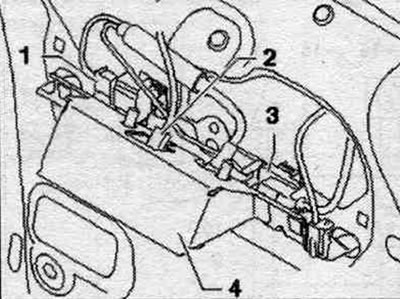
Installation in reverse order. Close the back door. Perform calibration.
[The article is a reprint of material from «audimanual»]