
Repair Chevrolet Repair Toyota Repair Honda Repair AvtoVAZ Repair Mercedes-Benz Repair BMW Repair Opel
Home  |  Contacts  |  Sitemap  |    
English Русский
Български
Беларускі
Український
Српски
Hrvatski
Română
Polski
Slovenský
Magyar
AudiManual.ru


  • AUDI 80
  • AUDI 100
  • AUDI A3
  • AUDI A4
  • AUDI A6
  • AUDI A8
  • AUDI Q
  • OTHER
  • ARTICLES
B8 (2007-2015) B7 (2004-2008) B6 (2000-2006) B6 (2000-2006, petrol) B5 (1994-2001) B5 (1994-2001, petrol)

Internet Access Control Unit «J666» (since 2013 model year) (Audi A4 B8)

  • Home
  • Audi A4
  • B8 (2007-2015)
  • Electrical equipment
  • Audio system
  • Internet Access Control Unit «J666» (since 2013 model year)
            0
Table of contents: Plug connections of the Internet… ↓ Removal and installation the… ↓ Removal and installation of the… ↓
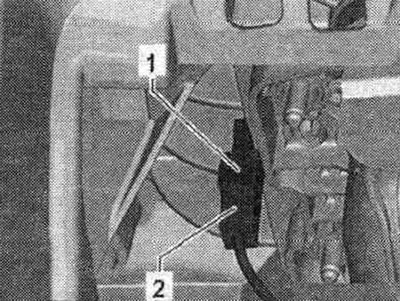
Used Internet access "J666" "1" is located in the lane. box "2". Used Internet access "J666" supplements the connector for connecting external audio sources "R199" with the following functions: recording web radio stations and podcasts via WLAN and playing them in the car; listen to live web radio stations using a broadband USB modem; creating WLAN Hotspot modules (using a broadband USB modem). The used J666 Internet access point has a built-in SD card reader. The SD card is used for online configuration. Used Internet access "J666" is installed together with the output for external audio sources "R199" (interface). An "R266" Internet access antenna is glued behind the front drawer (wLAN antenna) on the air duct. A broadband USB modem connects to the "R199" external audio output (interface) using adapter wires. Troubleshooting. carried out through used information, electronics 1 "J794" (memory faulty.). Configuration with SD card: audi.com/mp3. The configuration is saved on the SD card.

Plug connections of the Internet access control unit "J666"


Internet Access Control Unit "J666"
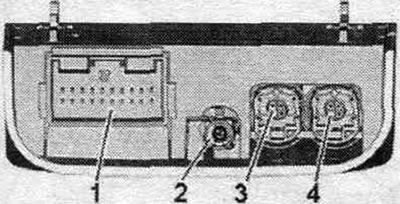


1. Multi-pin plug connection, 20-pin (T20g).

1. Multi-pin plug connection, 20-pin (T20g).
2. Output of the antenna for accessing the Internet network "R266".
3. Multi-contact 4-pole connector (T4o) to the control unit. inform, electronics 1 "J794".
4 Multi-pin connector, 4-pin (T4n) to the terminal for external audio sources "R199" (interface).


1. Multi-pin plug connector, 20-pin (T20g)
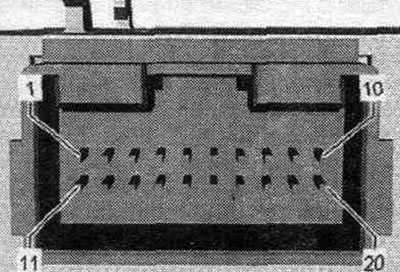


1. USB (+5 V) from used information electronics 1 «J794».

1. USB (+5 V) from used information electronics 1 "J794".
2. USB (ground) from used information electronics 1 "J794".
3. USB (+5 V) to the output for external audio sources "R199" (interface).
6. Terminal 30.
7. Terminal 31.
16. Detect to the output for external audio sources "R199" (interface).
18. Detect used communications electronics 1 "J794".
19. CAN bus High (combi).
20. CAN bus Low (combi).


3. Multi-pin connector, 4-pin (T4o)


All contacts are connected to used communications electronics 1 "J794".
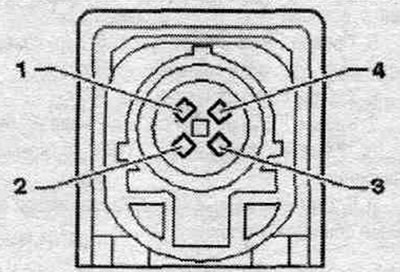
1. D (+).

1. D (+).
2. iPod identification.
3. D (-).
4. Mass.


4. Multi-pin connector, 4-pin (T4n)


All contacts are connected to the output for external audio sources "R199" (interface).


1. D (+).

2. iPod identification.

3. D (-).

4. Mass.

Removal and installation the Internet access control unit "J666"


Used Internet access "J666" "1" is located in the lane. box "2". Turn off the ignition. Open lane. drawer. Remove the chip card. Move the used Internet access "J666" "1" "in the direction of the arrow" back until it becomes possible to remove it from the trim "2". Unlock and disconnect the plug connectors "3" from the used chip card reader "J676" "1".
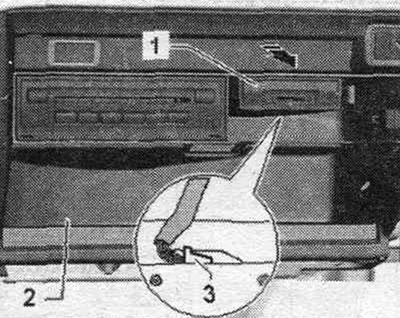
Used Internet access «J666» «1» is located in the lane. box «2». Turn off the ignition. Open lane.…


Installation in reverse order. Remove the protective film from the internal battery. When replacing a used J666 Internet access device, the customer must reconfigure the device.

Removal and installation of the Internet access antenna "R266"


Internet access antenna "R266" (wLAN antenna) located behind the lane. box on the air duct. Remove the front compartment. The "R266" internet access antenna is glued to the air duct. Disconnect the plug "2" of the Internet access antenna "R266" "1". Disconnect the Internet access antenna "R266" "1" from the adhesive surface using a screwdriver.

Thoroughly clean the bonding surface on the air duct with isopropanol. Remove the protective film from the adhesive surface of the R266 Internet access antenna. Press the R266 Internet access antenna "1" to the adhesive surface on the air duct (approx. 10 seconds). Installation in reverse order.


Thoroughly clean the bonding surface on the air duct with isopropanol. Remove the protective film…
The article was checked by auto expert Timur Bazhenov
This article is available at russian, bulgarian, belarusian, ukrainian, serbian, croatian, romanian, polish, slovak, hungarian

Share information:
Previous articles
Audi A4 B8: Audio system
Next articles

Output for external audio sources «R199»
CD changer «R41»
Navigation system — general information and installation diagrams
Telephone system — general information and installation diagrams
TV equipment — components and installation diagrams
Rear view camera — components and installation diagrams
Multifunctional steering wheel — components and installation…
Voice control system and multimedia interface components


Similar articles on other Audi car models:
Electrical diagram of the fuel pump, fuel injection system,… Audi 80 B4 (1991-1996)
Multipoint injection control unit, ignition system, injection… Audi 100 C4 (1990-1994, petrol)
Air conditioner diagnostics based on codes on the display of its… Audi A3 Type 8L (1996-2003)
Electrical diagram of the control unit Motronic, valve… Audi A6 C5 (1997-2004)
E87 Air Conditioning Control Unit Audi A8 D2 (1994-2002)
Access control system unit, switch and antenna, fuses Audi Q7 Typ 4L (2005-2015, diesel)
Engine Control Unit — Check Audi A2 (1999-2005)
Link to this page in different formats


Visitor comments

No comments yet


How much will 46 + 30 =


A4(B8, 2007-2015) 
  • General information
  • Operating instructions
  • Power unit
  • Petrol engines 1.8 l
  • Petrol engines 1.8/2.0 l
  • Petrol engines 3.0 l
  • Petrol engines 3.2 l
  • Fuel system (petrol)
  • Diesel engines 2.0 l (CA*)
  • Diesel engines 2.0 l (CJCB)
  • Diesel engines 2.7/3.0 l
  • Diesel engines 3.0 l
  • Fuel system (diesel)
  • Transmission
  • Manual gearbox 0B1
  • Manual gearbox 0B2
  • Manual gearbox 0B3
  • Manual gearbox 0B4
  • Automatic transmission 0B5
  • Automatic transmission 0B6
  • Automatic transmission 0AW
  • All-wheel drive system
  • Chassis
  • Front suspension
  • Rear suspension
  • Brake system
  • Steering system
  • Body
  • Exterior
  • Interior
  • Seats
  • Doors, locks and windows
  • Security system
  • Heating and air conditioning
  • Electrical equipment
  • Audio system
  • Power devices
  • Equipment and devices
  • Lighting and lamps
  • Electrical circuits
 
A4(B7, 2004-2008) 
  • General information
  • Introduction to manual
  • Troubleshooting
  • Operating instructions
  • Maintenance
  • Power unit
  • Petrol engines 2.0 (ALT)
  • Petrol engines 2.0 (TFSI)
  • Petrol engines 1.8 (MPI)
  • Diesel engines
  • Cooling system
  • Air conditioner
  • Fuel and exhaust system
  • Ignition system
  • Starting and charging
  • Transmission
  • Clutch
  • Manual gearbox
  • Automatic gearbox
  • Drive shafts
  • Chassis
  • Brake system
  • Front suspension
  • Rear suspension
  • Steering
  • Body
  • Exterior
  • Interior
  • Electrical equipment
  • Equipment and devices
  • Lighting and signaling
  • Windscreen wipers and washers
  • Electrical diagrams
  • Electrical diagrams (since 2007)
 
A4(B6, 2000-2006) 
  • General information
  • Vehicle Description
  • User manual
  • Maintenance
  • Power unit
  • Gasoline engine
  • Diesel engine
  • Lubrication system
  • Cooling system
  • Supply system
  • Injection system
  • Exhaust system
  • Ignition and control
  • Transmission
  • Gear box
  • Clutch and drive shafts
  • Chassis
  • Brake system
  • Car suspension
  • Steering
  • Body
  • Heating and ventilation
  • Exterior (external elements)
  • Interior (internal elements)
  • Electrical equipment
  • Power devices
  • Lighting and appliances
  • Electrical circuits
 
A4(B6, 2000-2006, petrol) 
  • General information
  • Introduction to the guide
  • Car care
  • Power unit
  • Engine repair
  • Lubrication system
  • Cooling system
  • Injection and control system
  • Ignition system
  • Power and exhaust system
  • Transmission
  • Clutch and drive shafts
  • Car gearbox
  • Chassis
  • Suspension and wheels
  • Steering
  • Brake system
  • Body
  • Interior
  • Exterior
  • Electrical equipment
  • Equipment and devices
  • Lighting and signaling
  • Power devices
  • Electrical circuits
 
A4(B5, 1994-2001) 
  • General information
  • Introduction to the guide
  • Car care
  • Maintenance (gasoline)
  • Maintenance (diesel)
  • Power unit
  • Gasoline engines
  • Diesel engines
  • Engine overhaul
  • Cooling system
  • Fuel injection (gasoline)
  • Fuel system (diesel)
  • Exhaust system
  • Ignition system
  • Transmission
  • Clutch
  • Mechanical gearbox
  • Automatic gearbox
  • Drive shafts
  • Chassis
  • Brake system
  • Car suspension
  • Steering
  • Body
  • Exterior
  • Interior
  • Doors, locks and windows
  • Heating and ventilation
  • Electrical equipment
  • Power devices
  • Equipment and devices
  • Electrical circuits
 
A4(B5, 1994-2001, petrol) 
  • General information
  • Vehicle description
  • Maintenance
  • Power unit
  • Engine repair
  • Turbocharging
  • Exhaust system
  • Cooling system
  • Ignition system
  • Fuel system
  • Motronic injection system
  • MPI and MPFI injection system
  • Transmission
  • Clutch
  • Gearbox and shafts
  • Chassis
  • Steering
  • Car suspension
  • Brake system
  • Wheels and tires
  • Body
  • Heating and ventilation
  • Body parts
  • Electrical equipment
  • Fuses and relays
  • Power devices
  • Lighting and lamps
  • Tools and devices
  • Electrical circuits
 
AudiManual.ru © 2017-2026 · Mobile version · Feedback · Sitemap: EN BG BY UA RS HR RO PL SK HU · Site search · News and articles
80 B2 · 80 B3 petrol · 80 B3 · 80 B4 · 100 C3 diesel · 100 C3 petrol · 100 C3 · 100 C4 petrol · 100 C4 · A3 Type 8L · A4 B5 petrol · A4 B5 · A4 B6 petrol · A4 B6 · A4 B7 · A4 B8 · A6 C4 · A6 C5 · A6 C5 Allroad · A8 D2 · Q5 Type 8R · Q7 Typ 4L · Audi A2 ·
This site uses cookies 🍪. Click the button to accept this fact.