



The audio system is controlled by keys located on its panel (15 in illustration 14.1). The navigation system is controlled by a panel on the console between the seats (see illustration 16.25). The purpose of most control keys is intuitively clear from the markings on them. The navigation system disc reader is located in the left side niche of the luggage compartment (see illustration 14.21).
In addition, using the keys located on the steering wheel spokes, you can control basic functions of the audio system:
- switching between radio stations or disc tracks;
- select sound source;
- volume control;
- launch voice control (if available).
Some configurations include a landline telephone (see illustration 20.1) or mobile phone adapter (see illustration 20.2), installed in place of a landline telephone. Additionally, there may be an "SOS" emergency call button located in the overhead console (see Section 14). You can control your phone using the voice control system without being distracted from driving.
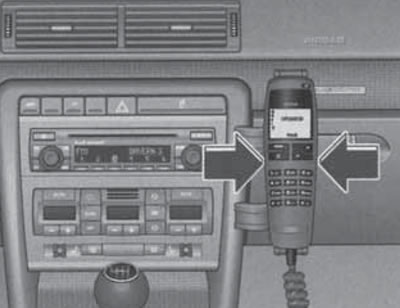
20.1. Landline telephone (the handset release keys are indicated)
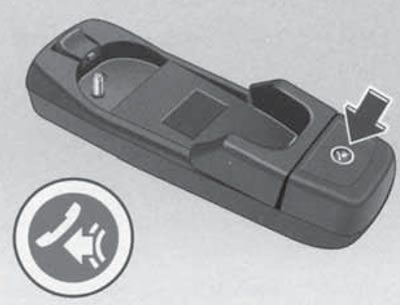
20.2. Mobile Phone Adapter with Voice Control Key
The mobile phone adapter allows you to use the car's standard telephone antenna and recharge the battery of the phone installed in the adapter.
CD changer
If the audio system has a CD changer, it is located in the main storage compartment (see illustration 20.3).
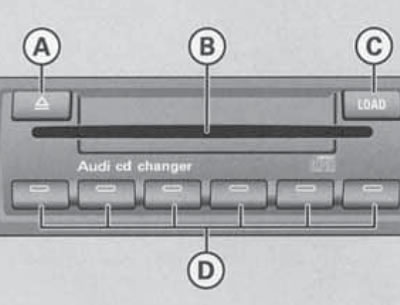
20.3. CD changer
To load a disc, press the "LOAD" key (C) and place the disc in the slot (B) with the label facing up, without pressing on the disc - it will automatically be placed in the next free cell. Free cells can be identified by the flashing indicators in the corresponding numeric keys (D). When the disc is loaded, the flashing in the corresponding key will stop. To load a disc into a specific cell after pressing the "LOAD" key, press the corresponding key with a flashing (empty cell) or burning (occupied cell) indicator. If an occupied cell is selected, the disc in it will be ejected into the receiving slot.
To load multiple discs, hold down the "LOAD" key for a few seconds, then insert the discs one by one into the input slot. After loading each disc, wait a while until the red indicator lights up in the input slot, indicating that the next disc is ready to be loaded.
To eject a disc, press the (A) key and then the corresponding numeric key (D) with the indicator light on. To eject all discs, hold down the (A) key for more than two seconds.
The original publication in its entirety is posted on the website AudiManual.ru