



Function switch (in the illustration it is shown by an arrow) and the reset button is mounted in the windshield wiper control handle.
If the ignition is on, pressing the lower side of the function switch several times will display the functions sequentially on the display. Pressing the upper side of the switch will display the functions in reverse order.
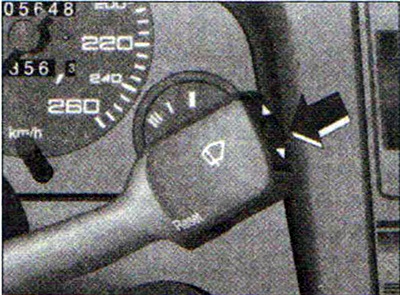
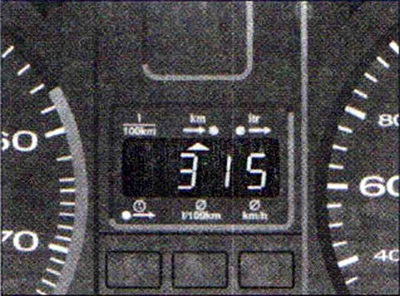
By holding the reset button down for at least two seconds, the recorded values of absolute and average fuel consumption, travel time and average speed are erased, returning to the beginning of the countdown, i.e. to zero. Signal computer indication (warning about exceeding the standard time of continuous driving and about the fuel reserve in the tank) can be interrupted by briefly pressing the button.
When the ignition is turned on, the display shows the function that was displayed before the engine was turned off.
When the battery terminals are disconnected, all values stored in the memory are deleted.
Display
The on-board computer displays six types of information:
- fuel consumption at the moment
- power reserve
- amount of fuel consumed
- travel time to reach destination
- average fuel consumption
- average speed of movement
Current fuel consumption
The display shows the current fuel consumption values, measured in liters per 100 km.
Consumption is calculated based on the mileage of a 30-meter section of the road. When the car is stopped, the last calculated value is displayed.
If the function for determining the current fuel consumption is set immediately after starting the engine, then only the average fuel consumption value is shown on the display for the first 30 m of movement. If the accelerator pedal is manipulated with the vehicle stationary and the engine running, the consumption readings may be very high.
Using the data displayed on the computer screen when this function is activated, the driver can select the optimal driving mode based on the appropriate fuel consumption value.
Power reserve
The range is determined in 10 km increments. The figure displayed on the screen shows how many kilometers the car can travel on the actual remaining fuel, if the driving mode is the same.
The basis for calculating the power reserve is the fuel consumption over the last 30 km of the journey. With subsequent movement in a more economical mode, the power reserve increases.
Reminder to refuel
If the power reserve becomes less than 50 km, then regardless of the current function, a switchover to the indication of this parameter occurs. The power reserve indications begin to flash. When the remaining fuel in the tank reaches 5-8 liters, then instead of the power reserve value, the letter L appears on the display, meaning that the tank is empty.
The warning signal can be switched off by briefly pressing the top or bottom of the function switch or by pressing the reset button.
If the car is not refueled, the reminder indicator will appear again each time the ignition is turned on.
Amount of fuel consumed
The display shows the amount of fuel consumed since the engine was started. The consumption value is cleared after the ignition is turned on again and the subsequent 30 m run. In addition, it can be deleted by pressing the reset button.
Travel time
The display shows the travel time, counting from the moment of the last memory erasure. When the ignition is turned off, the travel time value is saved. When the trip continues, the next time segment is added to it.
The limit of travel time readings is 23 hours 59 minutes.
If you want to start counting the travel time from a certain point, the entry in the memory is deleted by pressing the reset button.
A reminder to stop and rest
Two hours after the start of the journey, regardless of the current function, the display automatically switches to the time spent behind the wheel. The flashing 2:00 indicator reminds the driver to stop and rest.
This reminder indication can be switched off by briefly pressing the upper or lower side of the function switch or by pressing the reset button. If the ignition remains on or if the break is less than 10 minutes, then every next two hours the reminder to stop for a rest will be repeated, with the travel time indication 4:00, 6:00, etc.
If the rest lasts more than 10 minutes and the ignition is turned off, the travel time result is deleted from the memory.
Average fuel consumption
The display shows the average fuel consumption. The starting point is the last time such data was deleted from the memory. The average fuel consumption should not be confused with the current consumption.
When the ignition is switched off, the average consumption value is saved in memory. When the trip continues, the subsequent consumption is taken into account when calculating average values.
To erase the memory, press the reset button. When driving the first 30 m after resetting, the display shows zero.
Average speed of movement
The display shows the average speed of the route traveled since the last data deletion from the memory. When the ignition is turned off, this value is saved. When the trip continues, the subsequent mileage is taken into account when calculating the average speed.