



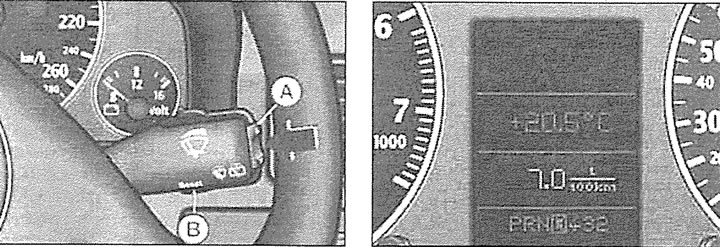
If the ignition is on, pressing the lower side of the function switch A several times will display the functions sequentially on the display.
By pressing the upper side of the switch, the functions on the display are called up in the reverse order.
By holding the reset button B (Reset) pressed for at least two seconds, the recorded values of absolute and average fuel consumption, travel time and average speed are erased from memory, returning to the beginning of the countdown, i.e. to zero.
Signal computer indication (warning of exceeding the set speed limit) can be interrupted by briefly pressing the button.
Pressing and holding the button in this position for at least one second will reset the recorded values for average fuel consumption, time to destination and average speed.
When the ignition is switched on, the display shows the function that was activated before the ignition was switched off. When the battery is disconnected, the accumulated data from the on-board computer is deleted.
The on-board computer displays five types of information:
- fuel consumption at the moment;
- power reserve;
- continuous driving time (maximum reading 23:59);
- average fuel consumption;
- average speed of movement.
- fuel consumption at the moment.
The display shows the current fuel consumption values, measured in liters per 100 km. Consumption is calculated based on the mileage of a 30-meter section of the road. When the car is stopped, the last calculated value is displayed. If the function for determining the current fuel consumption is set immediately after starting the engine, then for the first 30-40 m of movement, only the average fuel consumption value is shown on the display.
Using the data displayed on the computer screen when this function is activated, the driver can select the optimal driving mode based on the appropriate fuel consumption value.
km - power reserve
The range is determined in 10 km increments. The figure displayed on the screen shows how many kilometers the car can travel on the actual remaining fuel, if the driving mode is the same.
The basis for calculating the power reserve is the fuel consumption over the last 30 km of the journey. With subsequent movement in a more economical mode, the power reserve increases.
h - travel time
The display shows the travel time, counting from the moment of the last memory erasure. When the ignition is switched off, the travel time value is saved. When the trip continues, the next time segment is added to it. The limit of travel time indications is 23 h 59 min. If you want to start counting the travel time from a certain moment, the entry in the memory is deleted by pressing the reset button (Reset).
A reminder to stop and rest
Two hours after the start of the journey, regardless of the current function, the system automatically switches to the display of the time spent behind the wheel. The flashing 2:00 indicator reminds the driver of the need to stop and rest. This reminder indicator can be switched off by briefly pressing the upper or lower side of the function switch or the reset button. If the ignition remains on, or if the break is less than 10 minutes, then every subsequent two hours the reminder of the need to stop for a rest will be repeated, with the indication of the route 4:00, 6:00, etc.
If the rest lasts more than 10 minutes and the ignition is turned off, the travel time result is deleted from the memory.
 Average fuel consumption
The display shows the average fuel consumption. The starting point is the last time such data was deleted from the memory. The average fuel consumption should not be confused with the current consumption. When the ignition is switched off, the average consumption value is saved in the memory. When the trip continues, the subsequent consumption is taken into account when calculating the average values.
To delete the data, press the reset button. After passing the first 30 m after reset, the display shows a zero value.
 Average speed of movement
The display shows the average speed of the route traveled since the last data deletion from the memory. When the ignition is turned off, this value is saved. When the trip continues, the subsequent mileage is taken into account when calculating the average speed.
To erase the memory, press the reset button. Radio frequency display
If the vehicle is equipped with an on-board computer and there are no 2nd priority level faults and the radio is turned on, after the self-diagnostic system has performed a check and confirmed the serviceability of the systems with the letters OK, the display shows the radio frequency or the name of the radio station to which the radio is currently tuned.