



Table of contents: Switches on the front of the center… ↓ Ground clearance adjustment (4-level… ↓ Automatic ground clearance control ↓ Manual ground clearance adjustment ↓
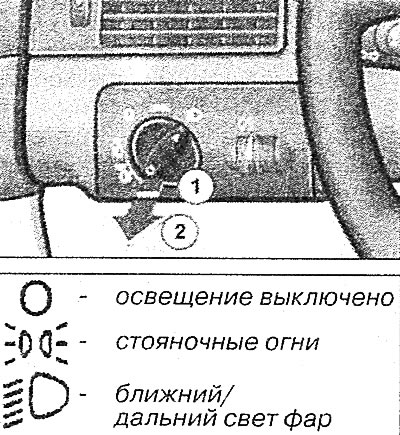
Light switch
The light switch is located on the instrument panel on the driver's side and is designed to turn on the exterior lighting.
Fog lights 
To turn on the front fog lights, move the light switch to the parking light or low/high beam position and set the switch to the fixed position 1.
Fog lights 
To turn on the rear fog lights, move the light switch to the parking lights or low/high beam position and set the switch to the fixed position 2.
Instrument cluster light switch 
By turning the handle with the ignition on, you can adjust the brightness of the instrument panel lighting.
Switches on the front of the center console
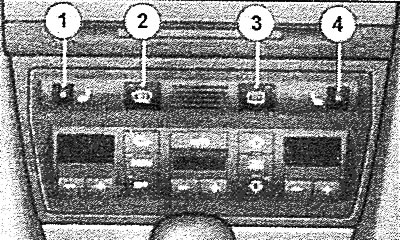
7 - Driver's seat heating switch
 (when the driver's seat heating is turned on, the steering wheel heating is automatically turned on at the set temperature);
2 - Windshield heating switch
 ;
;
3 - rear window heating switch
 ;
;
4 - Front passenger seat heating switch
 .
.
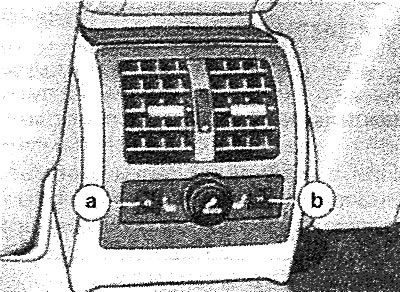
The rear seat heating is switched on and controlled independently using the controls a and b at the rear of the centre console.
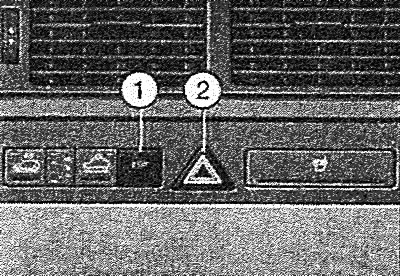
1 - Electronic Stability Program (ESP) switch;
2 - Hazard warning light switch
 .
.
The Electronic Stability Program (ESP) is automatically activated when the engine is started. However, it can be switched on or off if required by pressing button 1.
Ground clearance adjustment (4-level air suspension)
The ground clearance can be adjusted automatically (depending on the speed of movement) or manually.
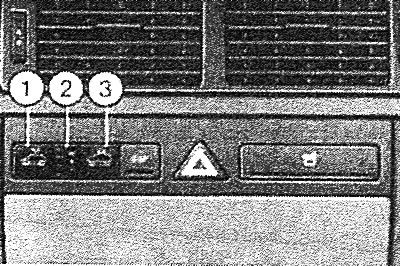
Automatic ground clearance control
Minimum ground clearance. In automatic mode, the minimum ground clearance is set at a speed of approximately 120 km/h. At the same time, the lowest green LED of the ground clearance indicator 2 lights up. When the speed is subsequently reduced to 70 km/h and driving for a long time at this speed, the normal ground clearance is set.
Normal ground clearance. Standard ground clearance. The two lower green LEDs of indicator 2 are lit.
High ground clearance. Increased ground clearance, which is also set automatically when parking and locking the doors from the outside. In this case, the three lower green LEDs of indicator 2 are lit.
Maximum ground clearance. In automatic mode, maximum ground clearance is set when driving in the most difficult road conditions. In this case, all four green LEDs of indicator 2 are lit.
Manual ground clearance adjustment
Switching from automatic to manual mode is done by pressing keys 1 or 3 (for at least 2 seconds). Return to automatic mode is carried out by pressing these keys again. When the manual ground clearance adjustment mode is on, the yellow LED of indicator 2 lights up. In manual mode, the function of setting a large ground clearance when parking, as well as a minimum ground clearance when driving at high speed, is disabled.
The increase of the vehicle's ground clearance is carried out by pressing key 3 only when the engine is running. During the setting of the required ground clearance, the corresponding LEDs of indicator 2 flash. After the required level of ground clearance is set, the LEDs light continuously.
The vehicle's ground clearance is reduced by pressing key 1. When the required ground clearance is set, the corresponding LEDs of indicator 2 flash. After the required ground clearance level is set, the LEDs light continuously.
Attention! Before jacking up the car or lifting it on a lift, it is necessary to simultaneously press keys 1 and 3 for approximately 5 seconds (at the same time, the LEDs of keys 1 and 3 and the yellow LED of indicator 2 are lit, as well as the signal lamp for adjusting the ground clearance on the instrument panel). Finally, turn off the ignition and lift the car. The car lifting mode is also disabled by simultaneously pressing keys 1 and 3 (within about 5 seconds). All LEDs and signal lights go out.
[The original article is located on the online resource: AUDIMANUAL]