



Table of contents: Dashboard ↓ 1 tachometer and digital clock with… ↓ 2 control lamps ↓ 3 clock setting button / control… ↓ 4 coolant temperature ↓ 5 fuel reserve ↓ 6 display ↓ 7 reset button ↓ 8 speedometer with trip meters ↓ Control lamps ↓ Driver Information System (FIS)* ↓ Control button ↓ Checking the system operation ↓ Malfunction indication ↓ Speed alarm1) ↓
Dashboard
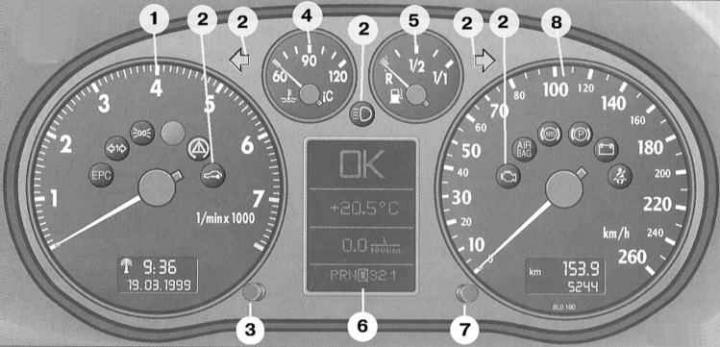
1 – tachometer and digital clock with date indication
2 – control lamps
3 – Clock setting button / control button
4 – coolant temperature
5 – fuel reserve indicator
6 – display
- indication of maintenance intervals
- signal symbols
- outside temperature
- selector lever positions*
- driver Information System*
7 – reset button for the mileage indicator of the maintenance interval
8 – speedometer with indicator panel of total mileage counter of mileage meter
1 tachometer and digital clock with date display
Tachometer
The red sector of the scale corresponds to the range of maximum revolutions that are permissible for a short-term running-in and warmed-up engine.
It is recommended, however, to shift into a higher gear or reduce the gas at the latest when the arrow reaches this sector of the scale.
Avoid high speed operation during the break-in period.
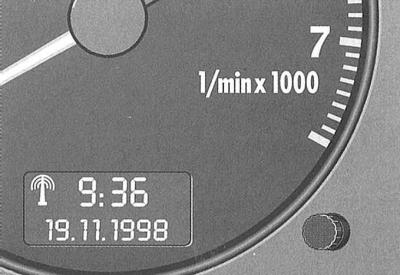
Digital watch with date indication
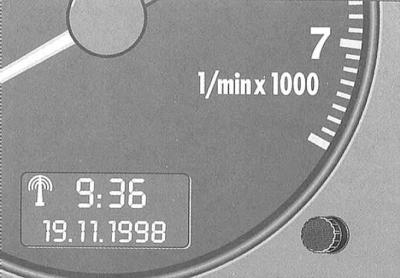
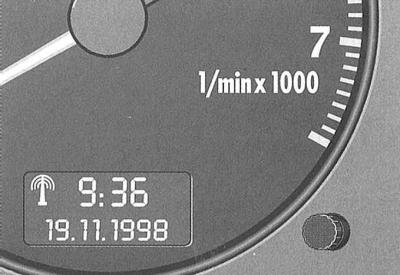
The clock indicator panel is located within the tachometer scale.
The upper indication shows the time, and the lower indication shows the date.
The setting button sets the time and date. The clock can work as a radio-controlled quartz* or as a regular quartz clock.
When receiving important radio information, the watch automatically enters the "radio-controlled quartz watch" mode with the appearance of the radio information reception symbol on the indicator panel (radio tower). If there is no important radio information for three days, the watch automatically switches to the "quartz watch" mode. In this case, the radio information reception symbol indication disappears.
Setting the clock time/date
The time and date can only be set manually in the "quartz watch" mode.
To set the current hour, pull the button until the hour indication starts flashing. The hour indication is changed by turning the button left / right.
To set the minutes, pull the button several times until the minute indication starts flashing. The minute indication is changed by turning the button left/right.
To set the calendar date, pull the button repeatedly until the day, month or year indication starts flashing. The day, month or year indication is changed by turning the button left / right.
When the indicator stops flashing after the button is released, the installation process is complete.
Setting the time zone
When moving by car to another time zone, change the clock display accordingly.
To set the time zone (in radio clock mode) pull the button until the hour indication starts flashing. Time zone indication (current hour) changes by turning the button left/right.
Output to display the calendar date
Pull the button several times until the calendar date indication starts flashing.
The calendar date is displayed by turning the button to the right and disappears when the button is turned to the left. When the display stops flashing after releasing the button, the installation process is complete.
2 control lamps
Please refer to the description below.
3 clock setting button / control button
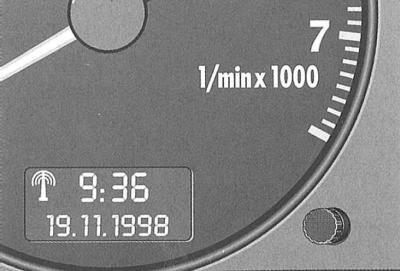
The control button has the following purpose:
Calling up the indication of the remaining number of kilometers before maintenance
By briefly pressing the button with the ignition on, the display shows the number of kilometers remaining before maintenance. The system operation can be checked with the engine off or running and at a speed of no more than 5 km/h.
For more details, please refer to the description below.
Control of symbol indication
By pressing the control button twice with the ignition on, all symbols are sequentially called up for display. The system operation can be checked with the engine off or running and at a speed of no more than 5 km/h.
If there is a 1st priority level fault (red symbol) indication control is not possible.
Output to the display of instructions to the driver1)
When any of the 1st priority symbols flashes, corresponding instructions can be displayed on the display to assist the driver.
For example: "MOTOR ABSTELLEN, OLSTAND PRUFEN" (turn off the engine, check the oil level).
1) Only vehicles with driver information system.
To display, press the control button. The indication goes out approximately 5 seconds after the button is released.
Lighting for odometers and clocks
With the ignition off, press the test button - the mileage counters and clock will light up for approximately 15 seconds.
In addition, the lighting turns on and remains on for 30 seconds after the driver's door is opened.
Clock setting button
Please refer to the description below.
4 coolant temperature
The indicator works when the ignition is on.
Cold Engine Temperature Range
While the needle is on the left side of the scale, avoid high engine speeds and loads!
Operating temperature range
During normal driving, the temperature gauge arrow should fluctuate within the middle part of the scale!
Under significant engine load and high outside temperatures, the needle may move further to the right on the scale. This should not be a cause for alarm as long as the cooling system warning light does not flash.
Signal lamp
Flashing coolant temperature/level indicator light while driving indicates low coolant level or overheating
Stop, turn off the engine and determine the cause of the problem.
5 fuel reserve
The indicator works when the ignition is on.
The fuel tank capacity of front-wheel drive vehicles is 55 liters, and all-wheel drive vehicles 62 liters.
If the arrow has reached the reserve field, there are about 7 liters of fuel left in reserve.
The lighting of the petrol pump symbol on the dashboard also reminds you of the need to refuel.
Never run the fuel tank completely dry.
Warning: To obtain a reliable indication of the presence of fuel, turn on the ignition while refueling.
6 display
- indication of maintenance intervals;
- signal symbols;
- outside temperature;
- selector lever positions refer to subsection Automatic transmission;
- driver Information System*
7 reset button
- mileage meter,
- indication of maintenance intervals
8 speedometer with trip meters
Speedometer
The speedometer is equipped with a digital total odometer and a mileage counter since reset.
During the break-in period and beyond, adhere to the guidelines given in the subsection Running in driving instructions.
Odometers
The lower counter records the total mileage, and the upper one (meter) – mileage since the start of measurement.
The odometer reading accuracy is 100 m.
Tripmeter reset button
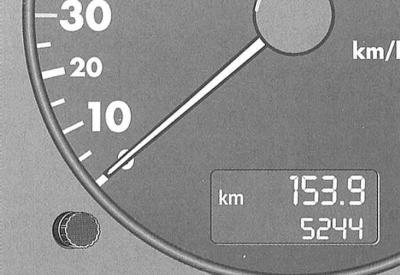
Press the button until the trip meter resets to zero.
Indication of maintenance intervals
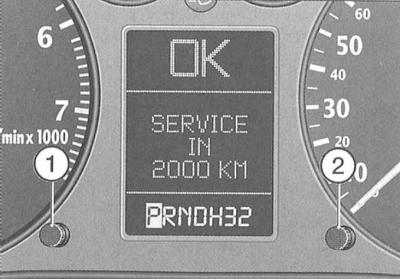
The illustration shows the instrument panel display indicating the mileage remaining before maintenance.
Indication of the mileage remaining before maintenance
By briefly pressing the control button (1) with the ignition on, the number of kilometers remaining before maintenance is displayed. The system operation can be checked with the engine off or running and at a speed of no more than 5 km/h.
The display of the number of kilometers remaining before maintenance is updated every 500 km.
The display of a new car, as well as after maintenance, always shows an indication during the first 500 km of mileage "SERVICE IN 15000 KM".
This also applies to vehicles with Longlife maintenance.
If there is a 1st priority level fault (red symbol) it is not possible to display the number of kilometers remaining before maintenance.
When the next maintenance is due / approaching, after the ignition is turned on, the display shows an indication "SERVICE IN 2000 KM" or "SERVICE!". After 5 seconds the display switches to normal indication mode.
Resetting the maintenance interval indicator
The indication is reset at the Audi service station that carries out the maintenance.
You can reset the indication yourself as follows:
Turn off the ignition.
With button (2) pressed, turn on the ignition. The display will show "SERVICE!"
Warning: Reset the display to its original position only according to the maintenance intervals. Otherwise, it will not correspond to reality.
Warning: When the battery is disconnected, the maintenance indicator data is retained.
Malfunction indication
If there is a fault, the "dEF" indicator appears in place of the instrument panel odometer readings. Have the fault repaired immediately at an Audi service station.
Control lamps
Electronic engine power control*1) EPC
(Electronic Power Control)
The indicator lamp lights up when the ignition is turned on. If there is no malfunction, it should go out after the engine starts.
1) Diesel Engine Pre-Glow System Warning Light
The indicator lamp lights up if a fault occurs in the engine management system while driving. The engine power management system automatically switches to the emergency program. This reduces engine power slightly. Contact an Audi service center immediately.
Preheat system (diesel engines only)

When the ignition of a cold engine is turned on, the control lamp lights up. The lamp lights up to indicate that the engine preheater is on.
The lamp goes out after reaching the ignition temperature. Start the engine as soon as the lamp goes out - refer to the subsection Ignition switch and engine start.
When starting a warm engine, as well as at an outside temperature above +8°C, the pre-glow system indicator lamp lights up for about one second – the engine can be started immediately.
If the indicator lamp does not light when the engine is cold, the cause may be a malfunction in the preheating system. In this case, seek qualified assistance.
If a fault occurs in the engine management system while driving, the control lamp starts to flash. The engine management switches automatically to the emergency program. At the same time, its power is slightly reduced.
Contact an Audi service station immediately.
Trailer Direction Indicators*

When driving with a trailer, the indicator lamp* flashes in sync with the direction indicators.
If the turn signal light on the vehicle itself or on the trailer is faulty, the indicator light does not flash.
Parking light / headlights

The indicator lamp lights up when the parking lights and headlights are on.
Anti-Slip Regulation (ASR)*1)

The indicator lamp comes on when the ignition is turned on and should go out after about two seconds.
The lamp flashes while driving when ASR is operating.
When the device is switched off or if there is a malfunction, the indicator lamp lights up continuously.
Since the ASR system works together with ABS, if the ABS fails, the ASR indicator lamp also lights up.
For more detailed information, please refer to the subsection Switches and switches.
1) ESP indicator light on vehicles with electronic stability program.
Electronic Stability Program (ESP)

The indicator lamp comes on when the ignition is turned on and should go out after approximately 2 seconds.
The lamp flashes while driving when the ESP is operating.
When the device is switched off or if there is a malfunction, the indicator lamp lights up continuously.
Since ESP works together with ABS, if ABS fails, the ESP warning light also comes on.
Warning: If the indicator lamp lights up immediately after starting the engine, the ESP may be switched off by the system.
Warning: In this case, you can turn on the ESP by turning off and then on the ignition. The indicator lamp goes out and the device is fully operational.
Warning: For more information, please refer to the subsection Switches and switches.
Electronic anti-theft lock

When the ignition is switched on, a request for vehicle key data is made. A positive result of data exchange is confirmed by a brief illumination of the control lamp.
When using an unencrypted key (for example, a duplicate) the indicator lamp starts to flash for a long time. In this case, starting the car engine is not possible. See also subsection Keys, body locks with single control and security alarm.
High beam

The indicator lamp lights up when the high beam is switched on or when using the light signal – refer to the subsection Switches and switches.
Direction indicators

The indicator lamp flashes synchronously with the direction indicators. If one of the direction indicators fails, the indicator lamp flashes twice as fast. This does not apply to driving with a trailer.
For more detailed information, please refer to the subsection Switches and switches.
When the hazard warning lights are switched on, both direction indicator lamps flash synchronously.
Engine electronics*

The warning light indicates a malfunction in the engine electronics. Contact your Audi service station immediately and have the cause of the malfunction eliminated.
Airbag system AIRBAG
The indicator lamp for the airbag system and pyrotechnic seat belt tensioners should light up after the ignition is turned on and go out after a few seconds.
When the front passenger airbag is deactivated, the indicator lamp lights up continuously for 4 seconds, then flashes for 15 seconds, and then goes out. This signals that the front passenger airbag is deactivated, also refer to the subsection Security systems. Transportation of children.
The system is faulty if the indicator lamp:
- does not light up when the ignition is turned on,
- does not go out after turning on the ignition or
- lights up while driving.
A malfunction is indicated by the constant lighting of the control lamp.
Warning: If the system is faulty, have it checked at an Audi service station as soon as possible. Otherwise, there is a risk that the airbags or pyrotechnic belt tensioners will not operate as intended in an accident.
Anti-lock brake system (ABS)

The control lamp monitors the operation of the ABS.
ABS
The operational readiness of the main electrical components of the ABS is checked before and during driving by the electronic control system.
The indicator lamp comes on when the ignition is turned on and should go out after approximately 2 seconds.
If the ABS warning light does not go out or lights up while driving, the device is faulty. In this case, the car can only be braked using the regular braking system.
If the brake system warning light also comes on when the ABS is faulty, please note the following:
Warning: If the ABS control function fails, the rear wheels may lock relatively quickly when braking. Under certain conditions, this may cause the vehicle to skid.
Warning: In this case, carefully drive to the nearest Audi service station and have the fault repaired.
If the ABS of vehicles with traction control system / electronic stability program fails, the ASR / ESP indicator lamp also lights up. For more detailed information, refer to the subsections Switches and switches and Driving Features and Assistance Systems (ABS, EDS, ASR, ESP).
Electronic Differential Lock (EDS)*
EDS works in conjunction with ABS.
If ABS fails, EDS also does not work.
Handbrake

The indicator lamp lights up when the handbrake is applied and the ignition is on. It should go out when the handbrake is released.
Battery discharge

The indicator lamp lights up when the ignition is turned on and should go out after the engine starts.
If the lamp does not go out or lights up while the car is moving, then as a rule you can still get to the nearest Audi service station. However, since this continuously discharges the battery, you should turn off all current consumers except the most necessary ones.
On vehicles with a driver information system, there is also an additional battery voltage monitoring lamp.
Fasten seat belt reminder*

The indicator light comes on for a few seconds after the ignition is turned on, reminding you to fasten your seat belts.
Signal symbols (standard version)
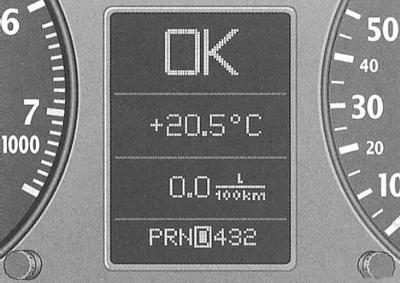
When the ignition is switched on and while driving vehicles without a driver information system (FIS), the following functions and the technical condition of the vehicle systems are continuously monitored.
The system notifies of any malfunctions or the need for urgent repair and maintenance work with an audible signal, accompanied by red and yellow light symbols on the dashboard, depending on the level of priority.
If the controlled functions are in order, the letters "OK" are displayed for a few seconds.
Symbols in red (priority 1)
 - Brake system malfunction
 - The level of liquid in the cooling system drops below normal or it overheats
 - Oil pressure drops below normal
When a flashing red symbol appears, three consecutive warning sounds are heard. The symbols indicate danger. Stop, turn off the engine, check the failed system and eliminate the malfunction. This may require qualified assistance.
If several first-priority failures occur at once, the symbols appear sequentially, with each display lasting 2 seconds. The symbols continue to flash until the fault is eliminated.
Yellow symbols (priority 2)
 - Reserve fuel supply
 - Wear of brake pads
 - Check engine oil level*
 - Engine oil level sensor malfunction
When a yellow symbol appears, one warning signal sounds. The symbol display is a warning signal. Check the corresponding functional display as soon as possible. When several warnings are displayed simultaneously, the symbols appear in succession, each for approximately 2 seconds.
Door/trunk open warning

When the ignition is switched on, the digital display symbol indicates the open doors and the boot. Regardless of the open door, the pictogram always shows the open driver's door. The boot shown on the pictogram flashes when its door is open.
After all doors and the trunk are closed correctly, this symbol goes out.
Brake system

The symbol flashes when the brake fluid level is too low or when the ABS is faulty.
In this case, stop and check the brake fluid level.
If the brake fluid level in the filler tank drops below the "Min" mark, carefully drive to the nearest Audi service station, top up the brake fluid and determine the cause of the drop in its level. If ABS fails, the rear axle braking force is not regulated. Therefore, the rear wheels are more likely to lock.
Warning: The reason for the brake fluid level dropping below the norm and the increase in the free travel of the brake pedal may be a failure of one of the circuits of the dual-circuit hydraulic brake drive.
Warning: In this case, although you can drive carefully to the nearest Audi service station, remember that the braking distance and pedal force will increase along the way.
Warning: If the brake fluid level is normal, the cause may be a malfunction of the ABS. If the ABS control function fails, the rear wheels may lock relatively quickly when braking. Under certain circumstances, this may cause the rear axle to skid.
Warning: Drive carefully to the nearest Audi service station and have the fault repaired.
Coolant temperature/level

Flashing of the symbol while driving indicates that the coolant is overheating or its level has dropped below normal.
Stop, turn off the engine and check the fluid level. Add fluid if necessary.
Warning: Be careful when opening the expansion tank cap of the cooling system! The cooling system of a warm engine is under pressure - risk of burns when liquid is ejected! Therefore, before unscrewing the cap, let the engine cool down.
Warning: Do not place your hands under the fan!
Warning: If the coolant level is normal, then the cause of overheating may be a failure of the cooling system fan.
Do not continue driving if the light does not go out – seek qualified assistance.
Engine oil pressure

When this warning symbol flashes, turn off the engine, check the oil level and top up if necessary
When the symbol is flashing and the oil level is normal, you must not continue driving. Do not allow the engine to idle – seek qualified assistance.
Warning: The oil pressure signal symbol is not an indicator of the oil level in the lubrication system!
Therefore, check the oil level regularly, preferably when refuelling.
Reserve fuel supply

Refuel your vehicle immediately.
Front brake pads worn out
 -
-
Contact your Audi service station to check the brake pads of the front and, additionally, the rear wheels.
Check engine oil level*

When this symbol appears, check the oil level and top up as soon as possible.
Engine Oil Sensor Malfunction*

Contact an Audi service station to check the oil level sensor.
Outdoor temperature indication (standard version)
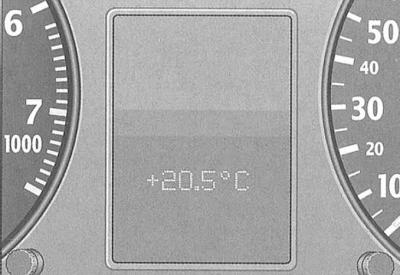
The outside temperature indicator appears when the ignition is on.
At temperatures from +5°C to –5°C, a snowflake appears to the left of the temperature display.
The appearance of the snowflake symbol warns the driver of the need for special care due to the danger of icy conditions.
When the vehicle is stationary or driving at very low speeds, the indication may be slightly higher than the actual temperature due to the heat radiated by the engine.
On vehicles with air conditioning, when the display switches to Fahrenheit (F), the outside temperature display automatically changes accordingly
Driver Information System (FIS)*
Display
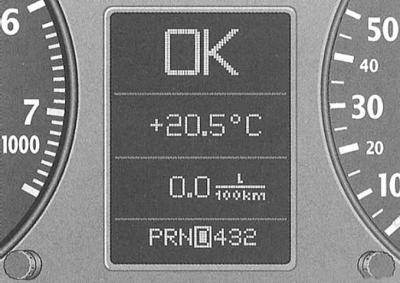
The following information may be displayed on the driver information system (FIS) display:
- Door/trunk open warning
- Radio frequency indication
- Outdoor temperature indication
- Malfunction monitoring system
- Speed alarm
- Trip computer
- Selector lever positions (automatic transmission)*
- Navigation system data* (the use of the navigation system is discussed in the attached operating manual).
Warning: On vehicles with automatic transmission, the display is only shown after the drive mode is engaged.
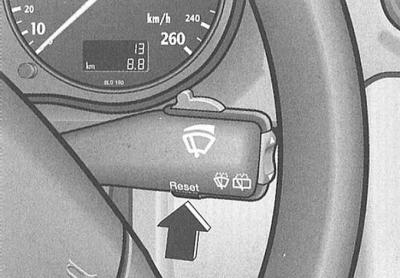
When the "Reset" key is pressed sequentially, the following modes are activated:
- Outside temperature / trip computer / fault monitoring systems or
- Navigation system indication*
- Turn off the display
The malfunction indicator of the malfunction monitoring system is also displayed when the display is switched off.
The Audi navigation system can only be used when the display is switched on.
Door/trunk open warning1)
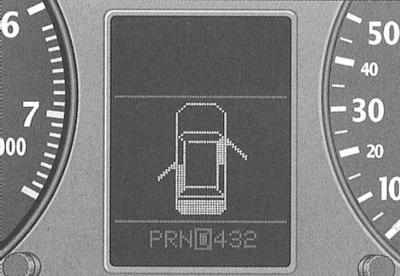
When the ignition is switched on, the digital display symbol indicates that the doors and the boot are not closed. As an example, the illustration shows the front passenger door, the rear left door and the boot not closed. The boot shown in the pictogram flashes when its door is not closed.
1) On vehicles with driver information system (FIS).
Once all doors and the trunk are completely closed, this warning goes out and the corresponding functions of the driver information system will be displayed.
Radio system indication1)
If there is no indication of 2nd priority faults and the radio is on (depending on the radio configuration) after the letters "OK" go out, the name of the radio station or radio frequency with additional information appears on the display.
This indication is additional information for the radio display.
Outdoor temperature indication1)
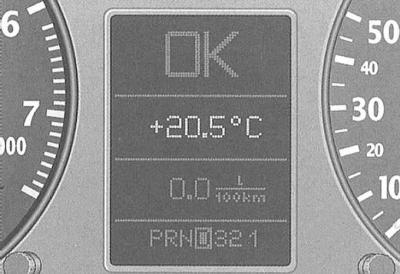
The outside temperature indicator appears when the ignition is on. On cars with automatic transmission, the indicator appears only after the driving mode is engaged.
At temperatures from +5°C to –5°C, a snowflake appears to the left of the temperature display.
1) On vehicles with driver information system (FIS).
The appearance of the snowflake symbol warns the driver of the need for special care due to the danger of icy conditions.
When the vehicle is stationary or driving at very low speeds, the indication may be slightly higher than the actual temperature due to the heat radiated by the engine.
On vehicles with air conditioning, when the display switches to Fahrenheit (°F) the outside temperature display automatically changes accordingly
Vehicle Malfunction Monitoring System1)
When the ignition is on and while driving, the automatic fault monitoring system continuously monitors certain functions and the technical condition of the vehicle systems.
The system notifies about any malfunctions or the need for urgent repair and maintenance work with a sound signal, accompanied by red and yellow light symbols on the instrument panel, depending on the priority. In addition, as an aid to the driver, along with some red symbols, the display may show an indication of instructions to the driver.
The following warnings and fault signals may be displayed:
1) On vehicles with driver information system (FIS).
Symbols in red (priority 1)
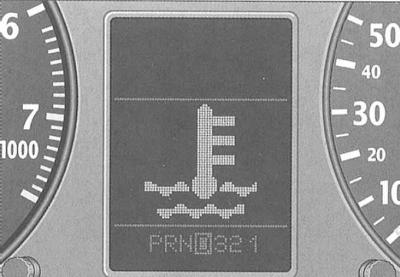
 - Brake system malfunction
 - The level of liquid in the cooling system drops below normal or it overheats
 - Oil pressure drops below normal
When a flashing red symbol appears, three consecutive warning sounds are emitted. The symbols indicate danger. Stop, turn off the engine, check the failed system and eliminate the malfunction. This may require qualified assistance.
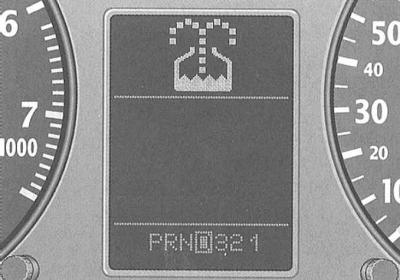
If several 1st priority level failures occur at once, the symbols appear sequentially, with each display lasting 2 seconds. The symbols continue to flash until the fault is eliminated.
Warning: If a fault occurs while the navigation system* is switched on, a 1st-priority warning symbol appears for a few seconds in place of the navigation system display. This symbol then moves up to the 2nd-priority display field and the navigation system display appears again in its place.
Warning: If a 1st priority fault occurs, the 2nd priority fault indication will not be displayed.
Yellow symbols (priority 2)
 - Brake light malfunction2)
 - Burnt out low beam or reverse light bulb
 - The washer fluid level has dropped below normal
 - Reserve fuel supply
 - Battery voltage deviation from normal
 - Check engine oil level*
 - Engine oil level sensor malfunction*
 - Speed alarm
 - Malfunction of dynamic headlight range control*
2) Depending on the country – a symbol or an inscription.
When a yellow symbol appears, one warning signal sounds. The symbol display is a warning signal. Check the corresponding functional display as soon as possible. When several warnings are displayed simultaneously, the symbols appear in succession, each for approximately 2 seconds.
Control button
The control button has the following purpose:
Control of symbol indication.
By briefly pressing the control button, with the ignition on, a sequential call is made to the indication of all symbols. The system operation can be checked both with the engine off and running and at a speed of no more than 5 km/h.
If there is a 1st priority level fault (red symbol) indication control is not possible.
Output to the display of instructions to the driver
When any of the 1st priority symbols flashes, corresponding instructions can be displayed on the display to assist the driver.
For example: "MOTOR ABSTELLEN, OLSTAND PRUFEN" (turn off the engine, check the oil level).
To display, press the control button. The indication goes out approximately 5 seconds after the button is released.
Trip meter illumination
With the ignition off, press the control button - the trip meter indicator will appear for approximately 15 seconds.
Checking the system operation
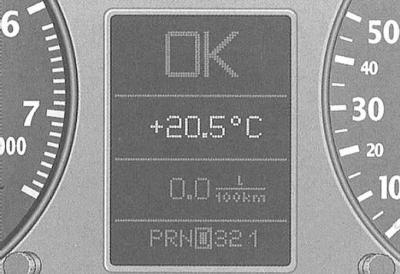
After the ignition is turned on, the vehicle's fault monitoring system automatically monitors functions.
Cars with manual transmission - RCPP
If the functions checked by the fault monitoring system are in order, the "OK" indicator lights up for a few seconds.
If there are any faults, after the ignition is turned on, their indication appears (instead of the "OK" indication). At the same time, an acoustic warning signal is emitted (if faults of 1st and 2nd priority levels occur simultaneously, three warning signals).
If there is no indication of a malfunction or the letters "OK" on the display, the system must be checked.
Cars with automatic transmission
After turning on the ignition (selector lever in position "P" and "N") the driver's instructions appear on the display: "BEIM EINLEGEN EINER FAHRSTUFE IM STAND FUSSBREMSE BETATIGEN" (when the stationary vehicle driving mode is engaged, press the brake pedal).
When selecting a driving mode ("R", "D", etc., the driver's instructions go out, and after pressing the brake pedal, automatic control of the functions is carried out.
If the controlled functions are in order, the letters "OK" are displayed for a few seconds.
If one or more faults are present, approximately 15 seconds after the engine has started, the driver's instructions are replaced by an indication of the corresponding fault symbols.
Malfunction indication
If the functions controlled by the fault monitoring system are violated, an acoustic warning signal is emitted. The following symbols may appear simultaneously:
Brake system

The indicator lamp flashes when the brake fluid level drops below the normal level or when the ABS is faulty.
Stop and check the brake fluid level.
If the brake fluid level drops below the "Min" mark, you can carefully drive to the nearest Audi service station to top up the fluid and find out the reasons for its leak. If ABS fails, the rear axle braking force is not regulated. Therefore, the rear wheels are more likely to lock.
Warning: The reason for the fluid level in the reservoir falling below the norm and the simultaneous increase in the free travel of the brake pedal may be the failure of one of the circuits of the dual-circuit hydraulic brake drive.
Warning: In this case, although you can drive carefully to the nearest Audi service station, remember that the braking distance and pedal force will increase along the way.
Warning: If the brake fluid level is normal, the cause may be a malfunction of the ABS. If the ABS control function fails, the rear wheels may lock relatively quickly when braking. Under certain circumstances, this may cause the rear axle to skid.
Drive carefully to the nearest Audi service station and have the problem fixed.
Coolant temperature/level

The reason for the lamp flashing while driving may be overheating or a drop in the coolant level.
Stop, turn off the engine, check the coolant level and top up if necessary.
Warning: Be careful when opening the expansion tank cap of the cooling system! The cooling system of a warm engine is under pressure - there is a risk of burns when liquid is ejected! Therefore, before unscrewing the cap, let the engine cool down.
Do not place your hands under the fan!
If the coolant level is normal, then the cause of overheating may be a failure of the cooling system fan.
If the warning light does not go out, you must not continue driving. Seek qualified assistance.
Engine oil pressure

When this symbol flashes, stop, turn off the engine, check the oil level and top up if necessary
Do not continue driving if the symbol is flashing when the oil level is normal. Do not allow the engine to idle - seek qualified assistance.
Warning: The oil pressure warning light is not an indicator of the oil level in the lubrication system!
Warning: Therefore, check the oil level regularly, preferably at every fill-up.
BREMSLICHT or

When an inscription or symbol lights up, the following are subject to inspection and, if necessary, replacement or repair at an Audi service station:
- brake light bulbs,
- fuses,
- connections in electrical wiring,
- brake light switch (only in case of complaints during the function control).
Burnt out low beam or reversing light bulb

The malfunction may be caused by the following reasons:
- the bulbs burned out
- fuses and
- the connections in the electrical wiring are broken.
Replace faulty bulbs/fuses yourself or at an Audi service station.
The "low beam or reversing light burnout" function is checked only when the light is on.
Washer fluid

Add windshield and headlight washer fluid to the reservoir*
Fuel reserve

Refuel your vehicle immediately.
Battery voltage deviation from normal

Contact an Audi service station and check the V-belt tension, regulator/battery condition.
Check engine oil level*

When this symbol appears, check the oil level and top up as soon as possible.
Engine oil level sensor malfunction*

Contact an Audi service station to check the oil level sensor.
Dynamic headlight range control malfunction*

Contact your Audi service center to repair the headlight range adjuster.
Speed alarm1)
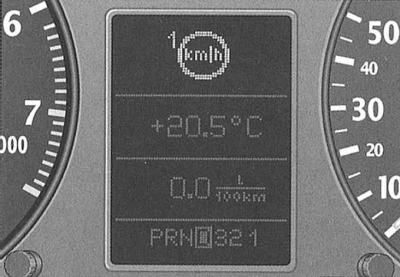
The speed alarm allows you to set a speed limit, which, when exceeded by approximately 10 km/h, a warning signal is emitted. At the same time, the signal symbol "km/h" appears on the display.
Warning: Regardless of the presence of a speed alarm device, monitor the maximum speed permitted by traffic rules using the speedometer.
1) On vehicles with driver information system (FIS).
The process for programming the speed of warning levels 1 and 2 and canceling them is described below.
Warning Level 1

The warning symbol goes out when the speed drops below the programmed threshold. The symbol also goes out when the speed increases by approximately 40 km/h above the programmed threshold for at least 10 seconds. However, this does not reset the memory of the programmed speed limit.
Speed programming
When the speedometer displays the desired speed, press and release the fault monitoring system control button. Memory entry is confirmed by the speed limit signal symbol flashing when the button is released.
The programmed speed value remains in memory until the next button press at a different speed or until the memory data is reset.
Cancellation of the imposed speed limit
At a speed of over 5 km/h, press the control button for more than one second. The cancellation of the restriction is confirmed by a crossed-out signal symbol.
When the ignition is turned off, the memory data of the storage device is automatically reset.
Warning level 2

With the ignition off, the driver can program a continuous warning threshold.
The warning indication is shown on the display. The signal symbol, unlike the warning level, only goes out when the speed drops below the programmed value.
Programming this warning is recommended when there is a need to remind the driver to maintain a certain speed as an addition to warning level 1. (For example, when driving in a country with a speed limit, maximum speed when driving with winter tires, etc.).
Speed programming
With the ignition off, press and release the control button. The trip meter indicator lights up.
Press the control button again for at least 2 seconds. The display shows the current speed limit threshold.
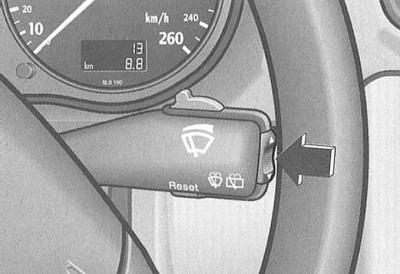
To change the speed, press the upper or lower side of the function switch (arrow) of the trip computer. This will cause a step-by-step (one stage 10 km/h) increase or decrease values.
A few seconds after programming is completed, the display lighting turns off again.
The programmed speed value is stored in memory until the next button press at a different speed or until the memory data is reset.
Cancellation of the imposed speed limit
With the ignition off, press and release the control button. The display lighting comes on. Press the control button again for about 2 seconds – the set speed indication appears. Finally, press and hold the "Reset" button of the trip computer until the crossed-out signal symbol appears.
(The original article is available on the website «AudiManual»)