



Table of contents: Removal the diagnostic connector of… ↓ Installation ↓ Connector in the diagnostic… ↓
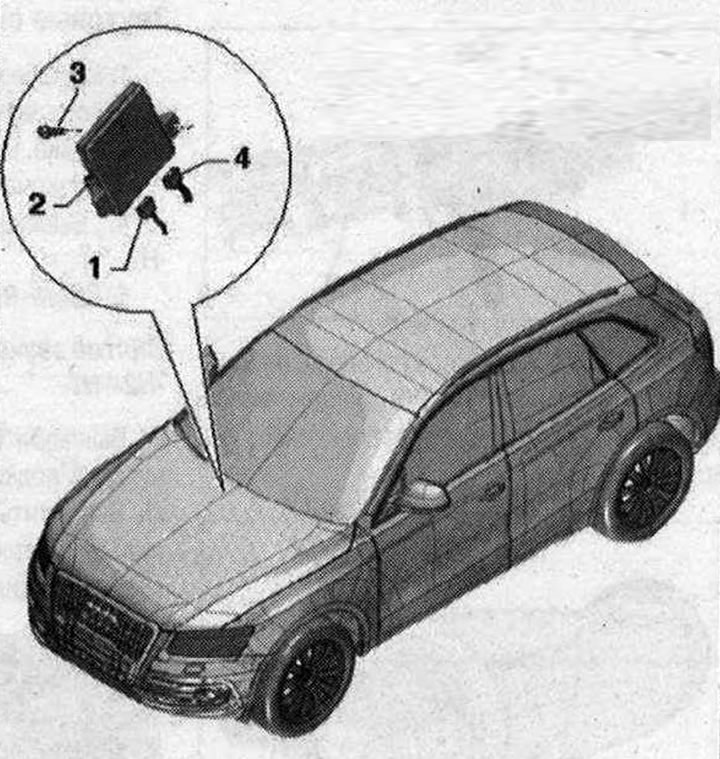
Data bus diagnostic interface 1. Electrical plug connection diagnostic interface data bus "J533"; 2. Diagnostic interface of the data bus "J533"; 3. Bolt 3 Nm; 4. Plug connection for optical cable. Close with protective cap for VAS cable connectors
Removal the diagnostic connector of the data bus "J533"
When replacing a used item, select the "Replace" function of the corresponding used item in the "Guided troubleshooting" or "Guided functions" mode.
Select function or path: Car brand -Engine code -19 Data bus diagnostic interface J533 - 19 Used replacement (rem. gr. 90).
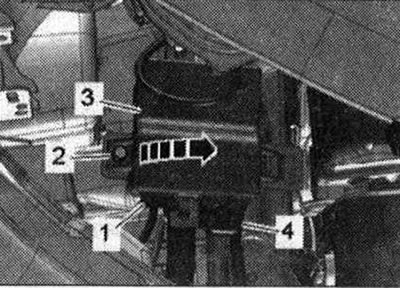
Follow further instructions on the display of the diagnostic tester. Switch off the ignition. Remove the glove box. Unscrew bolt "2". Remove the diagnostic data bus interface "533" "pos. 3" from the holder "arrow". Disconnect the electrical plug connection "4". Disconnect connector "1" of the fiber optic line.
Cover the open connector of the wiring harness "2" of the optical cable with a protective cap "VAS 6223/9" "pos. 1".
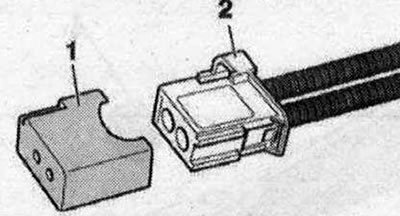
The protective cap prevents contamination or mechanical damage to the end surface of the optical cable, which would otherwise impair optical transmission.
Installation
Installation in reverse order: Install the glove compartment. Follow the further instructions on the tester display with the new data bus diagnostic interface "J533".
Connector in the diagnostic interface of the data bus "J533"
Connecting the MOST optical bus (optical cable) "pos. A"
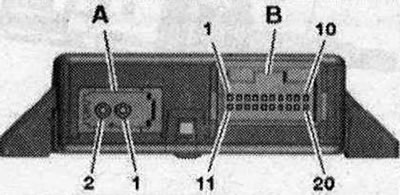
- 1. Login
- 2. Exit
Multi-pin plug connection, 20-pin "pos. B"
- 1. Battery + (terminal 30)
- 2. LIN 1
- 3. ACC-Rel.
- 4. ELV
- 5. CAN bus Low (comfort)
- 6. CAN-bus Low (drive)
- 7. CAN-bus Low (extended)
- 8. CAN bus Low (combi)
- 9. CAN-bus Low (diagnostics)
- 10. Screen (mOST bus diagnostics)
- 11. Mass - (terminal 31)
- 12. LIN₂
- 13. Wake-up signal of the instrument cluster
- 14. Terminal 15
- 15. CAN bus High (comfort)
- 16. CAN-bus High (drive)
- 17. CAN High bus (Extended)
- 18. CAN bus High (combi)
- 19. CAN-bus High (diagnostics)
- 20. Screen
This article was previously published on the resource AudiManual