



Table of contents: Instrument panel lighting ↓ Service position ↓ Removal the wiper blade ↓ Windscreen wiper blade mount ↓
Instrument panel lighting
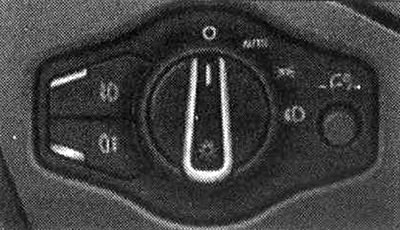
The brightness of the instrument panel, central console and displays can be adjusted. Press the button to unlock it. To decrease/increase the brightness, turn the button in the direction of "-" or "+". Press the button to lock it again.
Note: When the outside lights are off and the ignition is on, the arrows and scales on the instrument panel are illuminated. As the outside lights become less bright, the backlight intensity is automatically reduced and, under certain circumstances, it is completely switched off. This function is provided to remind the driver to turn on the low beam in a timely manner.
Windscreen wiper control handle
Activating the rear window wiper
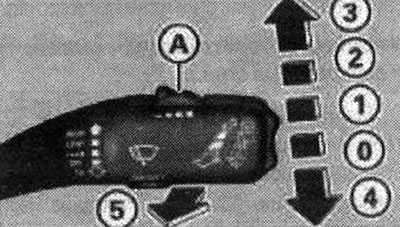
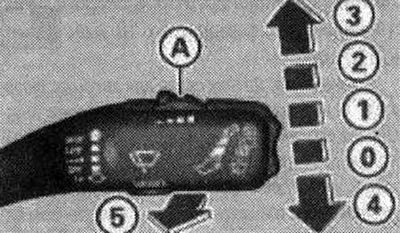
Move the windshield wiper handle to the appropriate position.
- 0. Windscreen wiper is off
- 1. Intermittent mode. To set longer/shorter cleaning pauses, move switch "A" to the left/right. In cars with a rain sensor, the windshield wipers are activated automatically, starting from a speed of 4 km/h. The higher the sensitivity of the rain sensor is adjusted (switch "A" to the right), the faster the windshield wipers operate when moisture appears on the windshield
- 2. Slow cleaning
- 3. Quick cleaning
- 4. Single wiper activation;
- 5. Windscreen cleaning. After a few seconds, the windscreen wiper switches on once to remove residual drops on the glass while driving. To deactivate this function, within 10 seconds after switching the windscreen washer on again, move the handle back to position 5. The next time the ignition is switched on, the windscreen washer re-activation function is reactivated. Clean the headlights. The headlight cleaning system only works when the lights are on. The first and every fifth time the handle is moved to position "5", the headlights are automatically cleaned. Additionally, the headlights are cleaned if the handle is operated in position 5 for longer than 2 seconds
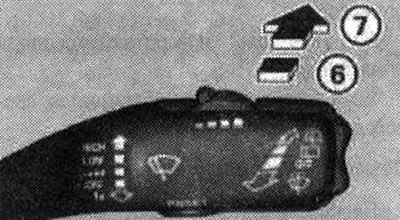
- 6. Rear window wiper on, Rear window wiper on approx. every 4 seconds
- 7. Cleaning the rear window. The number of wiper cycles depends on how long the handle is held in position 7
Note: Windscreen wipers are switched off when the ignition is switched off. Windscreen wipers are activated after the ignition is switched on and the windscreen wiper control handle is moved to any position. Wear or contamination of the windscreen wiper blades leads to the formation of swirls. This may adversely affect the operation of the rain sensor. Regularly check the windscreen wiper blades of the car. The windscreen washer jets are heated when the ignition is on and at low temperatures. During temporary stops, for example, at traffic lights, the speed of the windscreen wiper blades is automatically reduced by one step.
Display: service position
Display: service position
Windscreen wiper control handle
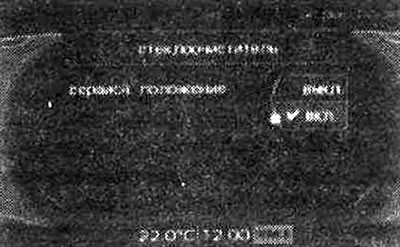
The service position is set in the radio or MMI.
Service position
Switch off the windscreen wiper (position "0"). Select: function key CAR → Windscreen wipers (wiper) → Service position (service, position) → ON (on). The windshield wipers will move to the service position.
Removal the wiper blade
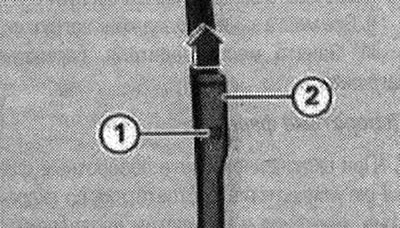
Move the windshield wiper arm away from the glass. Press the lock button "1" located on the windshield wiper blade. While doing this, hold the windshield wiper blade firmly. Remove the blade in the direction of the arrow.
Windscreen wiper blade mount
Insert the new blade into the wiper arm socket "2" until it locks into place with an audible click. Position the wiper arm so that it rests against the glass again. To return the wipers to their original position, operate the wiper control handle or Select: vehicle function key CAR → Windscreen wipers (wiper) → Service position (service, position) → off.
Note: The service position function can also be switched on, for example, if the windscreen needs to be protected from ice in winter by covering it.
(The original version is on the portal «AudiManual»)