



Table of contents: Removal ↓ Installation ↓
Removal
Remove the instrument cluster cover.
Release the instrument panel side cover clamps and remove it.
Unscrew five bolts 2 (fig. 12.72).
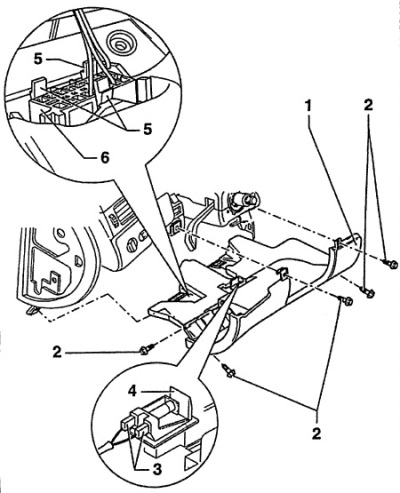
Fig. 12.72. Shelf for small items on the driver's side
1 - shelf for small items on the driver's side,
2 - bolts,
3 - electrical connector,
4 - footwell lighting,
5 - locking hooks,
6 - diagnostic connector
Remove the storage shelf by moving it downwards.
Disconnect electrical connectors 3 and 4 (fig. 12.72) to illuminate the foot area.
Remove the diagnostic connector 6 (fig. 12.72). To do this, squeeze the three locking hooks 5.
Installation
Installation is carried out in the reverse order of removal.