



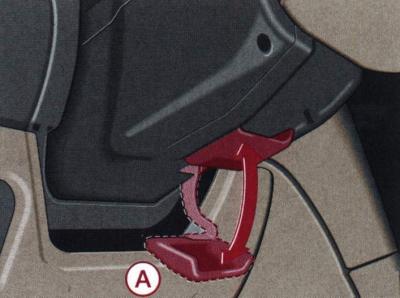
Fig. 1–26. Directions of movement of the locking handle (A) during mechanical adjustment of the steering column position
Mechanical adjustment
The steering column can be infinitely adjusted for tilt and height by pressing down the locking handle A (Fig. 1–26), located under the steering column, and set the steering column to the desired position. After this, the locking handle should be pressed upward with force.
Warnings: Adjust the steering column position only when the vehicle is stationary.
For safety reasons, the locking handle must always be firmly pressed upwards so that its position cannot suddenly change during movement.
Electrical adjustment
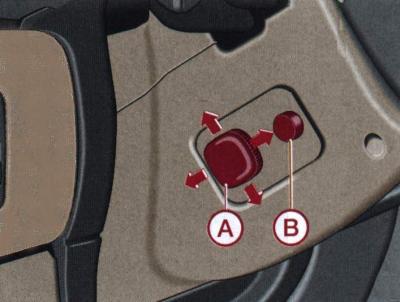
Fig. 1–27. Location of the steering column position switch (A) and the steering column forward and up button (B)
Switch A (Fig. 1–27) is used for stepless adjustment of the steering column in tilt and height when the ignition is off.
To move the steering column up/down or forward/backward, press and hold the switch in the appropriate direction until the steering column is in the desired position.
On vehicles with driver's seat position memory, the steering column position is also stored in memory.
Making landing easier
To facilitate boarding by moving the steering column to the entry/exit position, a button is used IN.
When you press the button IN steering column will move forward and up. After the ignition is turned on steering column returns to its original position.
[This article was previously published on the resource: Audimanual.ru]