



Table of contents: Sun visors ↓ Ashtrays ↓ Installation ↓ Cigarette lighter/electric socket ↓ Glove box ↓ Niches ↓ Niche for cups with drinks* ↓ Niche for storing cassettes* ↓ Glass holder ↓ Niche for storing a folder with car… ↓ Door niches ↓ Multifunction steering wheel with… ↓ Multifunctional steering wheel with… ↓ Changing the language option ↓ Telephone* ↓ Mobile phones, radios and devices… ↓
Sun visors
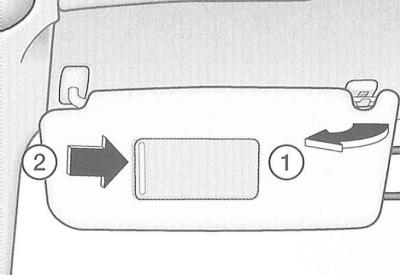
The sun visors can be released from their clips (arrow 1 in the illustration) and turned towards the doors.
A cosmetic mirror is built into the sun visors.
The mirror illumination is switched on automatically when the cover is moved (arrow 2) and switched off when it is returned to its original position. In addition, the lighting is switched off when the sun visor is closed.
Between the sun visors there is a small folding shield that can be used to cover the space above the interior mirror.
Ashtrays
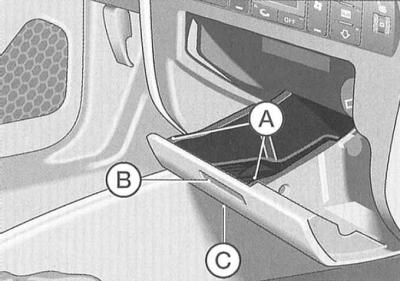
Front ashtray
Opening
Press the front wall (B) of the ashtray (refer to illustration).
Extraction
Take the element by the outer strips (A) and pull it upwards.
Installation
Press the ashtray down into the socket.
Closing
The ashtray can only be closed by pressing on its lower side (C).
Rear ashtray
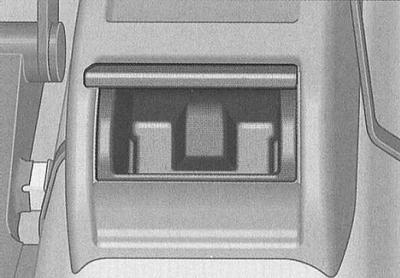
Opening
Open the lid.
Extraction
Grasp the open housing cover and pull the housing upward.
Installation
Insert the ashtray and press it down.
Cigarette lighter/electric socket
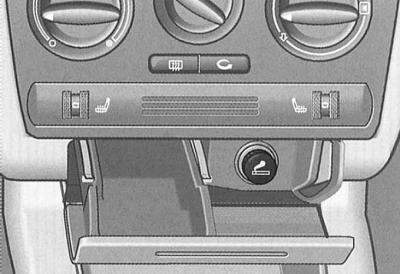
The cigarette lighter is turned on by pressing the socket.
When the heating coil is hot, the cigarette lighter socket will be ejected - immediately remove it from the socket for use.
The 12-volt socket located in the cigarette lighter socket can be used to connect additional electrical devices with a power consumption of up to 100 W. Remember that when the engine is not running, the battery is discharged. To avoid damaging the socket, use only suitable plugs.
Warning: Be careful when using the cigarette lighter!
Warning: Inattentive or uncontrolled use of the cigarette lighter may result in burns.
Warning: The cigarette lighter and electrical socket work even when the ignition is off, i.e. even after the ignition key has been removed from the lock.
Warning: Therefore, never leave children unattended in a vehicle.
Glove box
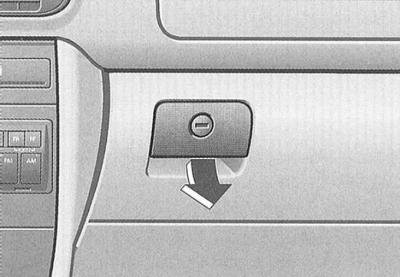
Only the main emergency key fits into the drawer lock – refer to the subsection Keys, body locks with single control and security alarm.
To open the drawer, pull the flat handle in the direction of the arrow.
The box is equipped with lighting. The lighting turns on when the box is opened and the headlights/parking lights are on.
Warning: For safety reasons, the box must remain closed while driving.
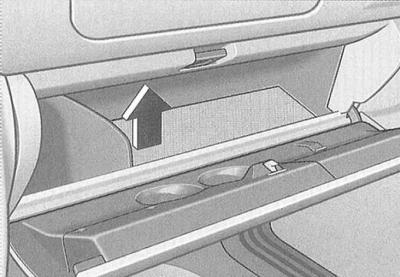
The bottom of the storage box lifts up to accommodate various items in the space underneath.
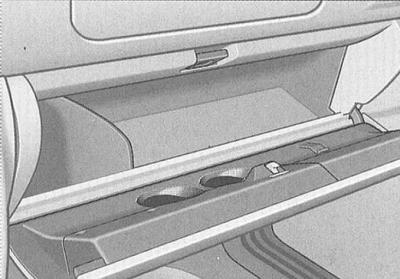
The lid of the box has recesses for cups with drinks, as well as fasteners for attaching writing instruments and a notepad.
Niches
In the front dividing armrest
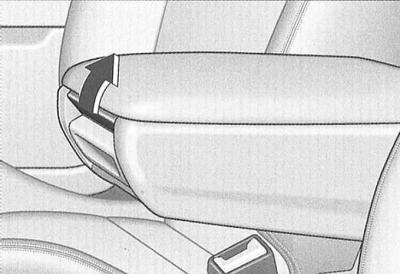
To open the lid, press the button up in the direction of the arrow.
Niche for cups with drinks*
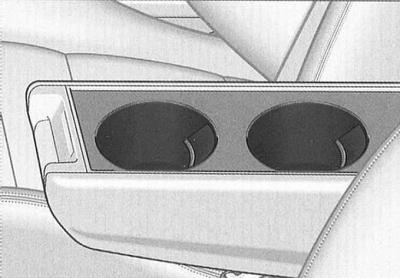
The niche is designed to accommodate two cups of drinks.
Warning: Do not place hot drinks, such as hot coffee or tea, in the holders while the vehicle is moving.
Warning: In the event of an accident or emergency braking, a hot drink may spill and cause burns.
Warning: Do not use hard drinking cups (for example, made of glass, porcelain), in case of an accident they may injure you.
Niche for storing cassettes*
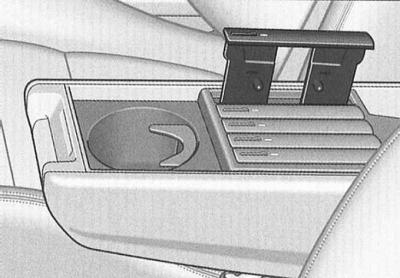
Audio cassettes can be stored (without cases with hinged lids) in pull-out compartments that can be tucked away into a niche designed for them. Locking the reels prevents the tape from unwinding spontaneously and thus deforming it.
To open the compartment, slide the B button back.
The cassette is placed in the compartment with the open side facing up. The red mark should be visible on the left side of the compartment.
Glass holder
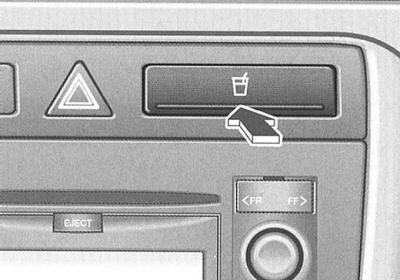
On the right side of the center console, next to the row of switches, is a glass holder.
To unlock, press the key (arrow).
Warning: When folding the front passenger seatback on a 2-door vehicle, be careful not to spill any drink in the cup holder.
Niche for storing a folder with car documents
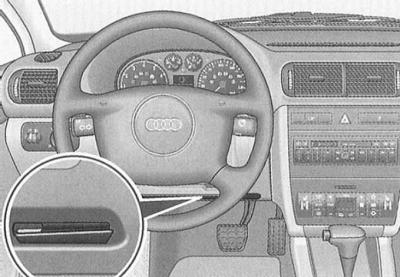
A folder with documents can be stored in the dashboard recess on the driver's side, as shown in the illustration.
Door niches
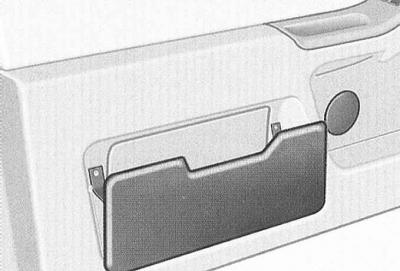
There are niches in the door trim.
To load the niche, open the lid (refer to illustration).
Multifunction steering wheel with radio controls*
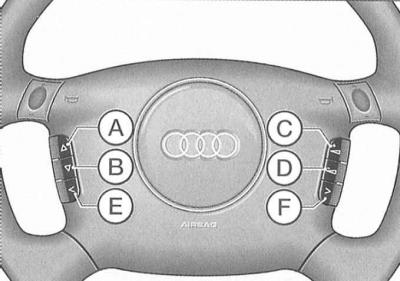
The steering wheel panel of vehicles with a factory-fitted radio system contains controls for basic functions. This allows the driver to be distracted as little as possible from driving while driving. Of course, it is also possible to control the radio, tape recorder/CD player and the corresponding buttons for these instruments directly.
You will find a detailed description of the radio in the operating manual.
By pressing the steering wheel buttons the following modes are activated:
And search / fast forward
- Radio - search radio frequency in ascending order
- Cassette - Fast Forward
- CD - search for audio track in forward direction
Search / rewind
- Radio - search radio frequency in descending order
- Cassette - Fast Rewind
- CD - search for audio track in backward direction
With increasing volume
- radio
- cassettes
- CD
depending on the mode currently enabled.
D decrease volume
- radio
- cassettes
- CD
depending on the mode currently enabled.
E station selection keys (pre-installation) in descending order
Depending on the radio configuration, you can call up to twelve stations in descending order.
If the keys are not programmed or the radio station is not received, then under certain circumstances only noise will be heard.
F station selection keys (pre-installation) ascending
Depending on the radio configuration, you can call up to twelve stations in ascending order.
If the keys are not programmed or the radio station is not received, then under certain circumstances only noise will be heard.
Multifunctional steering wheel with radio and telephone controls*
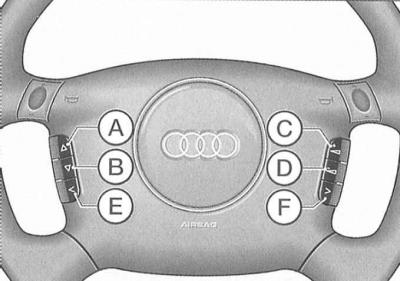
The steering wheel panel of vehicles with a factory-fitted radio/telephone system contains controls for basic functions. This allows the driver to be distracted as little as possible from driving while driving. Of course, it is also possible to operate the radio, tape/CD player or telephone directly using the corresponding buttons on these instruments.
By pressing the keys the following modes are activated:
And search / fast forward
- Radio - search radio frequency in ascending order
- Cassette - Fast Forward
- CD - search for audio track in forward direction
- Subscriber numbers (register) - search in ascending order (names in alphabetical order ZA), if you press and hold the button for a longer time, you can quickly scroll through the subscriber numbers stored in memory.
Search / rewind
By pressing this key the following modes are enabled:
- Radio - search radio frequency in descending order
- Cassette - Fast Rewind
- CD - search for audio track in backward direction
- Subscriber numbers (register) - search in descending order (names in alphabetical order A-Z), if you press and hold the button for a longer time, you can quickly scroll through the subscriber numbers stored in memory.
With radio/phone switch key
The driver information system (FIS) display shows information about the relevant phone parameters (for example, the dialed subscriber number), and not radio systems.
D increase volume
- radio
- cassettes
- CD
- speaking device (telephone)
depending on the mode currently enabled.
E decrease volume
- radio
- cassettes
- CD
- speaking device (telephone)
depending on the mode currently enabled.
F phone
Press this key to conduct telephone conversations through the talker or to end the current conversation.
Notes on using the phone
Use your Audi phone according to the operating instructions. Also note the following:
After turning on the ignition / telephone and entering the PIN code, the SIM card memory data is automatically read.
Please note that if the SIM card is replaced or after changing/adding/deleting data from the memory, logging into the system is only possible after the ignition is switched off and on again. The reading process takes up to 90 seconds, depending on the amount of data stored in the memory. During this time, the message appears on the driver information system (FIS) display "BITTE WARTEN..." (Wait).
If you need to make an urgent call, this process can be interrupted by briefly pressing any control key of the handset-adapter. This interrupts the process of reading the SIM card memory data. In addition, this process is also interrupted when a call is received.
Along with the already mentioned indication "BITTE WARTEN..." (Please wait), the following messages may appear on the FIS display:
- KARTE BITTE – (install the map) there is no SIM card in the phone
- PIN BITTE – (enter PIN code) PIN code not entered
- KEIN SERVICE – (lack of communication) no connection to the telephone network
- ANRUF – (call) incoming call
In case (depending on the network) additional transmission of the subscriber number of the calling participant, this number is displayed alternately with "ANRUF".
- BESETZT - (busy) the dialed number is busy
- TELEFON AUS - the phone is switched off
- WAHL - (set) establishing connection
- HANDY EINLEGEN - (hang up)
Place the telephone into the adapter handset.
Changing the language option
In accordance with the standard, the display of operating modes is carried out in German. If you need to set another language, do the following:
Changing the language option is only possible in the "Radio" mode. To enter this mode (if the "Phone" mode is enabled), press the C key.
Press the C and F buttons simultaneously for at least five seconds. The driver information system (FIS) display shows the set language (for example, DEUTSCH).
You can select the desired language using the A and B keys.
Confirm your selection with the F key.
Telephone*
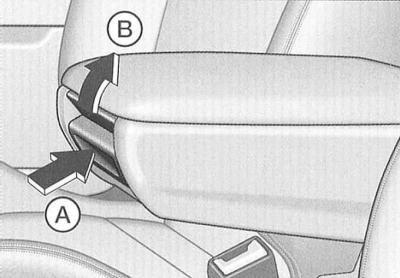
The car radio telephone can be located in the center console or the dividing armrest (refer to illustration).
Installing the armrest
For comfort reasons, as well as to allow front and rear seat passengers to use the phone, the armrest can be set to one of several fixed positions.
Press the button (A) at the end of the armrest and move it down. Then lift the armrest up, successively passing through the fixed positions, until you reach the desired one.
Telephone case
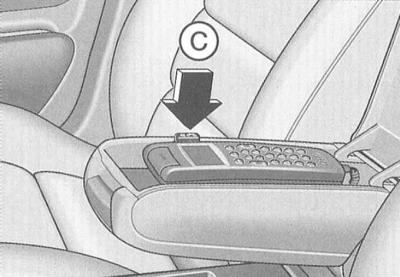
The key (B) opens the armrest cover, under which the telephone is located.
Removal the phone
By pressing the button (C) the phone is released from the holder.
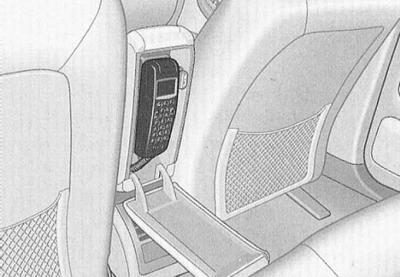
To make telephone calls from the rear seats, fold back the dividing armrest.
To set the armrest to one of the fixed positions, move it back. Refer to the illustration.
To return the armrest to its original position, press the button located at its end (arrow A in the left illustration) and move the armrest forward as far as it will go.
Possibility of mobile phone connection*
Factory preparation allows you to connect and use your mobile phone in the car.
This allows you to take full advantage of the benefits of a conventional car radio telephone (for example, as a conversational device, optimal range thanks to external antenna, etc.). In addition, the mobile phone battery is constantly charging.
An adapter for a mobile phone can be obtained from an Audi service station.
Warning: For instructions on how to use the Audi telephone / Audi "Telematik", please refer to the corresponding operating instructions.
Car radio telephone antenna
Before each car wash in an automatic car wash, unscrew the telephone antenna. The antenna key is in the car.
Mobile phones, radios and devices for business purposes
Stationary installation
When using commercially available mobile phones and radios, please keep the following in mind:
Subsequent installation of electrical/electronic devices requires permission to operate in a vehicle of this model and, under certain circumstances, may result in the loss of the right to operate them.
Installation of household and business appliances is permitted (except radio transmitters) provided that they do not affect the driver's direct control over the vehicle and that they bear the identification letters "CE".
Additional installed devices, the operation of which may affect the driver's control over the vehicle, must have permission to operate in this vehicle, as well as an identification mark - the letter "e".
A permit is required to install radio transmitters in a vehicle.
The Audi Group permits installation subject to the following conditions:
- technically correct installation of the antenna,
- outdoor antenna installation (using shielded cable and antenna matching without reflection),
- the effective power of the transmitter at the base of the antenna is no more than 10 W.
Information on the possibility of installing and operating radio transmitters with higher power can be obtained from an Audi service center.
Mobile radio transmitters
Using mobile phones or radios under the following conditions may result in malfunction of the vehicle electronics:
- lack of external antenna
- incorrectly installed outdoor antenna
- radiation power more than 10 watts.
Therefore, it is prohibited to use portable radio telephones or walkie-talkies in the passenger compartment without or with an incorrectly installed external antenna.
Warning: Using mobile phones and radios in the car without or with an incorrectly installed external antenna is hazardous to health due to the generation of high-frequency electromagnetic fields!
Warning: In addition, only an external antenna provides optimal range for the devices.
Warning: Be sure to follow the operating instructions for mobile phones and radios
(The original material is located on the website: «audimanual.ru»)