
Repair Chevrolet Repair Toyota Repair Honda Repair AvtoVAZ Repair Mercedes-Benz Repair BMW Repair Opel
Home  |  Contacts  |  Sitemap  |    
English Русский
Български
Беларускі
Український
Српски
Hrvatski
Română
Polski
Slovenský
Magyar
AudiManual.ru


  • AUDI 80
  • AUDI 100
  • AUDI A3
  • AUDI A4
  • AUDI A6
  • AUDI A8
  • AUDI Q
  • OTHER
  • ARTICLES
A2 (1999-2005)

Setting the clock (Audi A2)

  • Home
  • Audi
  • A2 (1999-2005)
  • General information
  • Introduction to the guide
  • Setting the clock
            0
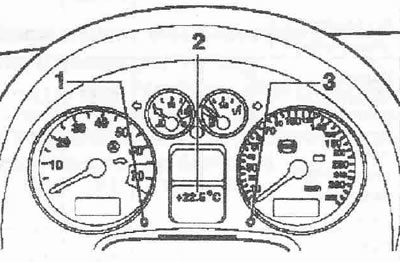
The clock is in the tachometer display area. Set the time using the setting button "1".

Setting the clock: Pull the button. The clock indication flashes. The clock indication can be…


Setting the clock: Pull the button. The clock indication flashes. The clock indication can be changed by turning the button to the left or to the right, respectively.

Setting the minutes: Pull the button several times until the minutes display starts flashing. The minutes display can be changed by turning the button to the left or right, respectively.

Setting the date: Pull the button several times until the day, month or year indication starts to flash. By turning the button to the left or, respectively, to the right, the day, month and year indication can be changed.

Displaying or deleting the date: Pull the button several times until the date display starts to flash. Turn the button left or right to delete or display the date display, about 15 seconds after pressing the setting button, the adjustment process is completed.
The article was checked by auto expert Daniil Ushakov
This article is available at russian, bulgarian, belarusian, ukrainian, serbian, croatian, romanian, polish, slovak, hungarian

Share information:
Previous articles
Audi A2: Introduction to the guide
Next articles

Radio or Navigation System Plus — Activating Security Coding
Brief description of engines
Instrument cluster — select language
Nameplate, Vehicle Identification Number (VIN)
Lifting a car with a lift or jack


Similar articles on other Audi car models:
Setting the piston to the top dead center position of cylinder… Audi 80 B4 (1991-1996)
Self-checking system, additional instruments in the instrument… Audi 100 C4 (1990-1994, petrol)
Setting the piston of the first cylinder to TDC (petrol) Audi A3 Type 8L (1996-2003)
Setting the front panel to the maintenance position Audi A4 B6 (2000-2006)
Wiring diagram of the instrument cluster display, combined… Audi A6 C5 (1997-2004)
Instrument cluster control unit, radio clock receiver module Audi Q5 Type 8R (2008-2017)
Link to this page in different formats


Visitor comments

No comments yet


How much will 10 + 18 =


Audi A2(1999-2005) 
  • General information
  • Introduction to the guide
  • Maintenance
  • Engine 1.4 l (gasoline)
  • Engine repair
  • Lubrication system
  • Cooling system
  • Exhaust system
  • Engine 1.6 l (gasoline)
  • Engine repair
  • Lubrication system
  • Cooling system
  • Exhaust system
  • Engine 1.2 l (diesel)
  • Engine repair
  • Lubrication system
  • Cooling system
  • Injection and turbocharging
  • Engine 1.4 l (diesel)
  • Engine repair
  • Lubrication system
  • Cooling system
  • Turbocharging system
  • Supply system
  • Fuel injection system
  • Exhaust system
  • Transmission
  • Mechanical gearbox 02J
  • Mechanical gearbox 02T
  • Mechanical gearbox 085 DS
  • Chassis
  • Car suspension
  • Steering
  • Brake system
  • Body
  • Exterior
  • Interior
  • Seats
  • Doors, locks and windows
  • Safety system
  • Heating and air conditioning
  • Electrical equipment
  • Power devices
  • Equipment and devices
  • Wipers and washers
  • Lighting and lamps
  • Breakers and switches
  • Electrical circuits
 
AudiManual.ru © 2017-2026 · Mobile version · Feedback · Sitemap: EN BG BY UA RS HR RO PL SK HU · Site search · News and articles
80 B2 · 80 B3 petrol · 80 B3 · 80 B4 · 100 C3 diesel · 100 C3 petrol · 100 C3 · 100 C4 petrol · 100 C4 · A3 Type 8L · A4 B5 petrol · A4 B5 · A4 B6 petrol · A4 B6 · A4 B7 · A4 B8 · A6 C4 · A6 C5 · A6 C5 Allroad · A8 D2 · Q5 Type 8R · Q7 Typ 4L · Audi A2 ·
This site uses cookies 🍪. Click the button to accept this fact.